

In the world of project management, Azure DevOps and Jira stand as industry giants—each offering powerful features, yet taking distinct approaches to helping teams plan, track, and deliver work. Azure DevOps, Microsoft’s all-in-one DevOps suite, powers end-to-end software development, while Jira, Atlassian’s Agile ace, dominates issue tracking and sprint planning. Whether you’re coding a masterpiece or managing cross-functional chaos, this comparison breaks down their features, pricing, and vibes to help you pick the right tool for your team.

Azure DevOps, a Microsoft product, is a comprehensive platform for software development. It includes Azure Boards for planning, Azure Repos for version control, Azure Pipelines for CI/CD, Azure Test Plans, and Azure Artifacts. With a 24% cloud computing market share, it’s a one-stop shop for teams needing a full DevOps lifecycle, from code to deployment.
Azure DevOps Pros And Cons
Pros:
- Full DevOps Lifecycle: Covers planning, coding, testing, and deployment
- Seamless Microsoft Integration: Works with Azure, GitHub, and Teams
- Robust CI/CD Pipelines: Automates builds and releases with Azure Pipelines
- Scalable For Enterprises: Handles complex, large-scale projects
Cons:
- Complex For Beginners: Steep learning curve for non-technical users
- Limited Non-Dev Use: Less flexible for non-software projects
- Pricing Complexity: Costs can stack with additional services

Jira, crafted by Atlassian in 2002, is a powerhouse for Agile project management, trusted by over 300,000 organizations. Originally a bug tracker, it now excels in issue management, Scrum/Kanban boards, and sprint planning. With 3,000+ integrations via the Atlassian Marketplace, it’s a favorite for software teams and beyond.
Jira Pros And Cons
Pros:
- Agile Superstar: Scrum and Kanban support for sprints
- Top-Notch Issue Tracking: Perfect for bugs, tasks, and user stories
- Huge Integration Library: Connects with Bitbucket, Confluence, and more
- Free For Small Teams: Up to 10 users with core features
- Granular Customization: Workflows tailored to any process
Cons:
- Learning curve: Intimidating for Agile or tech novices
- No Native CI/CD: Relies on integrations for build pipelines
- Documentation add-on: Needs Confluence for robust docs, adding cost
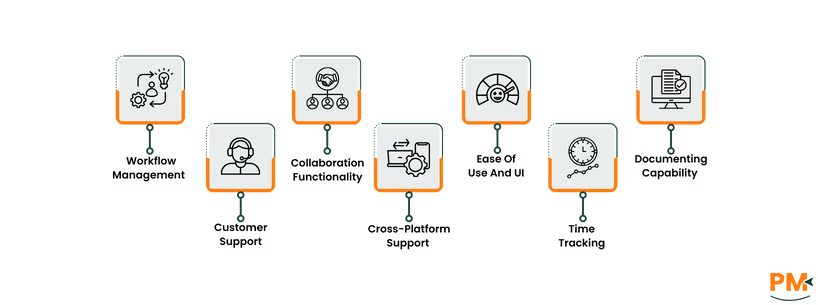
Azure DevOps
Azure DevOps’ Azure Boards handle task management with Kanban, Scrum, and custom workflows. Tasks (work items) support dependencies, priorities, and progress tracking, with deep integration into repos and pipelines. It’s ideal for end-to-end dev projects but less flexible for non-technical workflows.
Jira
Jira’s issue-based system organizes tasks as epics, stories, or bugs, with customizable workflows for statuses and transitions. Its Scrum and Kanban boards, backlogs, and roadmaps are built for Agile, making it a go-to for sprint-driven software teams. Setup can be complex for new users.
Azure DevOps
Azure DevOps offers a help center, community forums, and Microsoft’s support portal. Basic users get community support, while paid plans (Basic, Enterprise) include 24/7 support and dedicated account managers for Enterprise. Response times are reliable but can vary for complex issues.
Jira
Jira provides a help center, forums, and a support portal. Free plan users rely on community help, while Standard, Premium, and Enterprise plans offer 24/7 support, with Premier Support including dedicated engineers. Support is robust but slower for intricate queries.
Azure DevOps
Azure DevOps fosters collaboration via Azure Boards’ work item comments, file sharing, and integration with Microsoft Teams. Dashboards and wikis support team alignment, while GitHub integration enhances code collaboration. It’s dev-focused, so non-technical collaboration may feel limited.
Jira
Jira’s collaboration thrives on issue comments, mentions, and Confluence integration for documentation. Slack and Microsoft Teams connections streamline communication. It’s great for dev teams but lacks native real-time chat or robust doc editing without add-ons.
Azure DevOps
Azure DevOps is accessible via web browsers, desktop apps (Windows, macOS). The mobile app supports task tracking and notifications but is less robust for pipeline management. The web version is best for full functionality.
Jira
Jira offers web access, desktop apps (Windows, macOS), and mobile apps (iOS, Android). The mobile app handles issues, boards, and notifications but is less suited for complex admin tasks. The web platform remains the core experience.
Azure DevOps
Azure DevOps’ interface is functional but dense, with a focus on technical workflows. Dashboards are customizable, but the learning curve is steep for non-dev users. Tutorials help, but it’s best for teams familiar with Microsoft’s ecosystem.
Jira
Jira’s UI is powerful but complex, with Agile-focused boards and filters. It’s intuitive for dev teams but overwhelming for beginners or non-technical users. Guided setups and tutorials ease the process, but mastery takes time.
Azure DevOps
Azure DevOps lacks native time tracking but supports logging hours on work items. For advanced features, integrations add timesheets and analytics. Setup is less seamless than Jira’s native options.
Jira
Jira’s built-in time tracking logs hours on issues with estimates and reports. App add-ons enhance functionality with AI insights. It’s more integrated than Azure DevOps but may require add-ons for advanced needs.
Azure DevOps
Azure DevOps offers wikis in Azure Boards for documentation, with markdown support and version control. Integration with OneNote or SharePoint adds depth, but it’s less robust than Confluence for non-dev teams.
Jira
Jira leans on Confluence for wikis, knowledge bases, and collaborative docs. Within Jira, comments and attachments handle basic needs, but standalone documentation requires Confluence, adding cost and setup.

Feature | Azure DevOps | Jira |
Free Plan | Up to 5 users; basic features | Up to 10 users; 2GB storage |
Entry-Level Paid Plan | $6/user/month (Basic) | $7.53/user/month (Standard) |
Mid-Tier Plan | $52/user/month (Basic + Test Plans) | $13.53/user/month (Premium) |
Enterprise Plan | Custom pricing | Custom pricing |
Storage | Varies by plan | 2GB to Unlimited (varies by plan) |
Support | Community (Free) to 24/7 (Paid) | Community (Free) to 24/7 Premier (Enterprise) |
Disclaimer: The pricing is subject to change.
Azure DevOps’ free plan is slightly more restrictive, but its entry-level pricing is lower. Jira’s free plan supports more users, but add-ons can inflate costs for advanced features.
Azure DevOps excels for:
- Devops-driven Teams: Full lifecycle support for coding, testing, and deployment
- Microsoft Ecosystem Users: Seamless with Azure, GitHub, and Teams
- Enterprise-scale Projects: Handles complex, technical workflows
- CI/CD Enthusiasts: Robust pipelines for automated builds
Jira is perfect for:
- Agile Software Teams: Unmatched Scrum and Kanban tools
- Issue-tracking Pros: Ideal for bugs, tasks, and user stories
- Integration Lovers: 3,000+ apps for dev-focused workflows
- Cross-functional Teams: Expanding use beyond software dev
Azure DevOps or Jira? If you’re all-in on a DevOps lifecycle with CI/CD pipelines and Microsoft tools, Azure DevOps is your powerhouse. For Agile teams craving sprint planning, issue tracking, and dev integrations, Jira’s the king. Many teams pair them—Jira for planning, Azure DevOps for deployment. Try their free plans to find your flow.