
Choosing the right project management tool can make or break a team’s productivity. With countless options available, it’s crucial to understand how each platform aligns with your workflow and team needs.
Asana and Linear are two popular solutions, but they cater to different audiences and project styles. Asana offers versatile task management and broad integrations, ideal for cross-functional teams, while Linear focuses on speed, Agile cycles, and developer-centric workflows.
This detailed comparison examines both platforms across features, collaboration, pricing, and usability. In this guide, we provide an at-a-glance comparison, pros and cons, and insights to help you choose the best fit for your team.
Feature | Asana | Linear Project Management |
Task And Workflow Management | Structured tasks, subtasks, dependencies, multiple views, Workflow Builder and automation | Issues, cycles, triage, boards/swimlanes, AI-assisted summaries |
Customer Support | Digital channels, Help Center chat, Asana Academy, community forums | In-app form, email, Slack channel, regional hotline, real-time system status |
Collaboration | File sharing, comments, tagging, automated workflows, external collaborators | Real-time sync, issue comments, notifications, integrations like Fellow, Range, Slab |
Cross-Platform Support | Web, desktop (Mac/Windows), mobile apps (iOS/Android), synced across devices | Desktop, web, mobile via PWA, offline support, OS-native notifications |
Ease Of Use/UI | Clean, structured, feature-rich, initially steep learning curve | Minimalist, keyboard-first, fast interactions, intuitive for developers |
Agile Support | Kanban boards, timelines, custom fields, sprint templates, integrates with Jira/GitHub | Cycles, sprint planning, Parabol andTeam O’clock integrations, Agile-focused |
Reporting And Analytics | Dashboards, charts, Universal Reporting, real-time insights | Insights panel, dashboards, integrations with Screenful/Polymer, customizable metrics |
Time Tracking | Native tracking (Advanced+), third-party integrations: Everhour, TMetric, Clockify | Third-party integrations: TrackingTime, Harvest, TMetric |
Documenting Capability | Attach files, technical templates, version tracking, collaboration | Project documents, Markdown support, collaborative editing, version revert, inline comments |
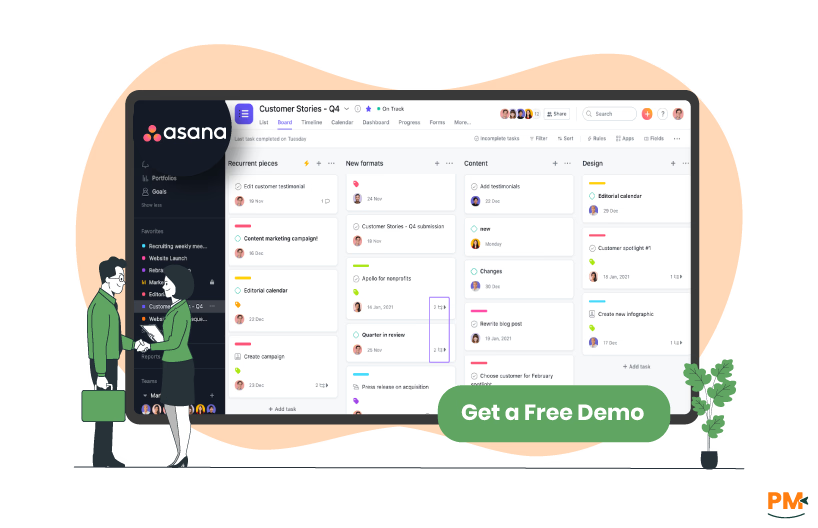
Asana is a work management platform designed to help teams plan, track, and execute projects efficiently. It offers customizable project views—including list, board, calendar, and timeline formats—to suit various workflows. Teams can set strategic goals and align tasks accordingly, ensuring clarity and accountability across all levels.
Asana's Work Graph® data model connects tasks, projects, and goals, providing real-time insights and facilitating seamless collaboration. The platform also integrates with numerous tools, enhancing its versatility for cross-functional teams.
Asana Pros and Cons
Pros | Cons |
|
|

Linear is a project management tool designed for modern software development teams. It streamlines the development cycle from roadmap to release, emphasizing speed and simplicity. Additionally, Linear offers structured workflows, including projects, issues, and cycles, which help teams stay organized and focused.
The platform also provides visual planning tools, such as timelines and milestones, to track progress and align goals. Moreover, with native integrations for tools like GitHub, GitLab, and Slack, Linear enhances collaboration and efficiency. Finally, its clean, keyboard-first interface is optimized for developers seeking a fast and intuitive experience.
Linear Project Management Pros and Cons
Pros | Cons |
|
|

Asana
Asana focuses on structured task creation and tracking, allowing teams to break work into tasks, subtasks, and dependencies for clear ownership. Tasks can live in multiple projects at once, keeping cross-functional teams aligned.
Teams can organize work into sections and switch between lists, boards, calendars, and timeline views to visualize progress. The Workflow Builder and automation rules reduce manual updates by auto-assigning tasks, adjusting due dates, and triggering actions.
In practice, Asana helps teams move work through a defined process, offering visibility and control over every step of a project.
Linear Project Management
Linear emphasizes speed and developer-friendly workflows, focusing on issues, cycles, and triage over traditional task lists. Issues can be organized into cycles to create short, focused sprints, helping teams deliver faster.
Teams can customize issue flows and use views like boards or swimlanes to track work visually. The triage feature helps prioritize incoming bugs and requests, keeping backlogs manageable. AI agents assist with summaries, code generation, and repetitive updates.
In practice, Linear handles task management by streamlining the entire development cycle, enabling faster execution and fewer process bottlenecks.

Asana
Asana relies on digital channels without offering live phone support. Users can submit support tickets via the Help Center chat widget, which initiates a support request and offers follow-up over email. Asana also provides extensive self-help options, including instructor-led training, the Asana Academy, knowledge base articles, and community forums.
Linear Project Management
Linear offers multiple ways to reach support: via an in-app contact form, email to support@linear. app, or its customer Slack channel. Requests are routed through Intercom and prioritized by urgency, with reproducible bugs entered directly into their triage system.
Additionally, Linear provides a public support hotline in certain regions, accessible on weekdays by phone or callback if lines are busy. They also maintain real-time system status tracking and invite user feedback for unresolved incidents through email.

Asana
Asana brings teams together by centralizing work in one hub. Users can share files and discuss tasks directly within projects, keeping all context in place. Teams can align work through shared goals, milestones, and dependencies. Project members see real-time updates and can comment or tag teammates to coordinate efforts.
External collaborators can also be invited, breaking down cross-functional silos. With Asana Flow and Workflow Builder, teams automate cross-team coordination without losing visibility. All of this happens in a unified interface that reduces manual work and keeps everyone informed throughout a project’s lifecycle.
Linear Project Management
Linear supports team collaboration through real-time sync, commenting, and notifications directly within issues and projects. Teams stay aligned as updates propagate instantly across devices. Shared projects and contextual discussions ensure that all work remains transparent.
Integrations enhance team workflows: meeting notes become issues via Fellow; async check-ins sync Linear activity through Range; and external tools like Slab, SteelSync, and Lindie extend visibility to stakeholders and docs. These integrations help teams stay connected across different channels and keep collaboration seamless.
Asana
Asana works across the web, desktop, and mobile platforms. Its desktop app for macOS and Windows removes browser clutter while syncing in real time with the web and mobile apps. The mobile apps for iOS and Android let users capture voice notes, images, and create tasks on the go. All platforms stay in sync, enabling task updates, inbox access, and collaboration from any device. However, Asana no longer supports mobile web browsers—users must rely on its native mobile applications.
Linear Project Management
Linear supports access through major platforms: desktop (macOS Intel andApple Silicon, Windows), web browser, and mobile via Progressive Web App (PWA). Desktop clients offer tailored benefits like OS-native notifications, keyboard shortcuts, and offline mode. The web app delivers nearly full functionality across evergreen browsers. Mobile and tablet access is enabled through its PWA, providing a consistent experience across devices without requiring native apps.

Asana
Asana features a clean, structured layout segmented into a sidebar, top bar, header, main pane, and right pane for clear navigation. Users benefit from intuitive access to tasks, inboxes, projects, and progress metrics.
While rich in features, this comprehensive interface can initially feel overwhelming to new users. The learning curve softens as users familiarize themselves with key components like custom fields, workflows, and multiple project views.
Linear Project Management
Linear focuses on speed and minimalism. Its user interface (UI) is keyboard-first, delivering sub-100 ms interactions and real-time sync for fluid navigation. The interface supports both list and board views, and it works offline while offering light and dark themes. Users praise its clarity and intuitive nature, noting that it simplifies onboarding and task management.
Asana
Asana supports Agile teams with Kanban-style boards, timeline views, custom fields, and task dependencies to plan and manage sprints intuitively. You can visualize workflows in a way that suits your process and iterate quickly. Agile-specific templates—such as sprint planning, backlog, stand-up, and retrospective—help teams establish consistent processes across projects.
These templates help teams structure every Agile phase, from sprint planning to release and feedback gathering. Asana also integrates with over 200 tools, including engineering platforms like GitHub and Jira, to bridge collaboration between business and development workflows.
Linear Project Management
Linear embraces Agile development through Cycles—its version of sprints—allowing teams to time-box work from one to eight weeks. Each cycle auto-generates, keeping teams focused and aligned. Linear also integrates with Agile meeting tools: Parabol enables teams to push meeting items directly into Linear issues, facilitating sprint planning and retrospectives.
Additionally, Team O’clock integration supports planning poker estimates and syncing retrospective action items back to Linear issues. These features help teams maintain Agile rituals without disrupting their workflow.
Asana
Asana includes built-in Reporting Dashboards, enabling users to create charts—such as bar, donut, burn-up, lollipop, and numeric roll-ups—to visualize task status, team workload, or budget at the project level without writing code. Each chart updates in real time and lets users click through to underlying tasks.
Available on Premium, Business, and Enterprise plans, it helps uncover bottlenecks instantly. Asana also provides Universal Reporting to aggregate insights across multiple teams, projects, goals, workloads, and budgets, all shareable via dashboards for executive visibility.
Linear Project Management
Linear offers built-in Insights, delivering real-time analytics across issues, cycles, and projects with flexible dashboards. The Insights panel is accessible via shortcuts and customizable filters, enabling users to drill down on the issue of velocity, trends, and performance.
Enterprise workspaces can create durable Dashboards that combine charts, metric blocks, and tables across teams and projects. In addition, Linear integrates with analytics tools like Screenful and Polymer to produce custom charts, scheduled reports, and consolidated views combining data from GitHub, GitLab, and more.
Time Tracking

Asana
Asana offers native time tracking—available on Advanced, Business, Enterprise, and legacy tiers—using custom fields like estimated time and actual time, plus an embedded timer that logs tracked time and rolls subtotals into parent tasks.
Dashboards can compare estimated vs. actual time and surface utilization insights. For fuller functionality, users often rely on third-party tools such as Everhour, TMetric, Clockify, or Timeneye, which embed timers directly into the Asana interface.
Linear Project Management
Linear doesn’t include native time tracking. Instead, teams use third-party integrations like TrackingTime, Harvest, or TMetric. These tools add timer buttons directly within Linear issue pages through browser extensions, allowing one-click tracking and generating detailed time reports and timesheets.
Documenting Capability

Asana
Asana enables teams to attach files directly to tasks from services like Google Drive, Dropbox, Box, or OneDrive using the attachments icon in the task pane. This centralizes documentation within context, ensuring ease of access and version accuracy. Shared updates—like added attachments—appear in activity feeds and in users’ inbox notifications, keeping collaborators in the loop.
Advanced features like the Attachment Manager let teams tag, organize, and bulk-download attached files for efficient review and archival. Asana also offers a structured technical documentation template, turning documentation into organized tasks and subtasks with embedded visuals, version tracking, and feedback loops.
Linear Project Management
Linear supports rich documentation directly within the project's scope. Teams can create project documents—using Markdown—right inside a project's overview and link to issues or projects as needed. These documents support collaborative editing, inline comments, version reverting, and slash-commands for formatting.
Reactive features like comment subscriptions ensure updates reach relevant stakeholders instantly. This creates a living, structured knowledge base within each project context—ideal specs, status updates, and planning artifacts.
Asana Vs Linear Project Management Pricing Comparison
Asana
Asana offers the following pricing plans:
- Personal (Free) – $0
- Starter - $13.49/user/month
- Advanced – $30.49/user/month
- Enterprise – Custom pricing
- Enterprise+ – Custom pricing
Disclaimer: The pricing is subject to change.
Linear Project Management
Linear offers the following pricing plans:
- Free – $0
- Basic – $10/user/month
- Business – $16/user/month
- Enterprise – Custom pricing
Disclaimer: The pricing is subject to change.
Who Is Asana Best For?
Asana is best suited for teams seeking structured project and task management across industries. It works well for small to mid-sized teams, as well as large enterprises, offering scalable solutions that meet organizational needs. Marketing, IT, product development, and operations teams benefit most from their visual workflows, timelines, and dependency tracking.
The platform accommodates teams of 5 to thousands of users, with flexible plans to match team size and complexity. Organizations that require collaboration, cross-functional project tracking, and integration with tools like Slack, Jira, or Google Workspace find Asana particularly effective.
Who Is Linear Project Management Best For?
Linear is best suited for software development teams, particularly those in tech startups, product engineering, and AI-focused companies. Its streamlined interface and developer-friendly features make it ideal for small to mid-sized teams that value speed and efficiency. Linear's focus on structured workflows, such as n-week cycles, supports Agile methodologies, facilitating rapid iteration and collaboration.
The platform's integrations with tools like GitHub, GitLab, and Slack enhance its appeal to development teams seeking a cohesive and efficient project management solution. While it can accommodate larger enterprises, Linear's design and functionality are tailored to meet the needs of fast-paced, technology-driven teams.
Which One May Suit Your Needs Better?
When choosing between Asana and Linear, the decision depends on team size, workflow style, and industry focus. Asana excels for teams needing versatile task management, visual project tracking, and broad integrations, making it ideal for marketing, operations, and cross-functional teams of any size.
Linear, in contrast, is optimized for software development teams that prioritize speed, Agile workflows, and developer-centric integrations like GitHub and Slack. For large, cross-department projects, Asana may suit better, while tech-focused, Agile-driven teams may find Linear more efficient. The choice aligns with workflow complexity and team specialization.
What Are The Alternatives?
Asana Alternatives
If Asana doesn’t fully meet your team’s needs, several alternatives offer robust project and task management features, including:
- Trello – It provides visual Kanban boards, checklists, and automation, suitable for small to mid-sized teams
- Monday. com - The tool delivers flexible workflows, dashboards, and automation for cross-functional project tracking
- ClickUp – It combines tasks, docs, goals, and time tracking in a single platform, catering to teams of all sizes
- Wrike – The platform offers advanced reporting, resource management, and integrations for enterprise-scale teams
Linear Project Management Alternatives
If Linear doesn’t meet your development workflow needs, consider these alternatives:
- Jira – It provides comprehensive Agile project management, issue tracking, and sprint planning for development teams
- Shortcut – The tool focuses on lightweight Agile project management with fast issue tracking and team collaboration
- ClickUp – The platform supports Agile workflows, cycles, and integrations with GitHub/GitLab for developer teams
- LinearB – It delivers workflow optimization, metrics, and analytics tailored for software engineering teams