


Choosing the right productivity tool can often be the difference between organized success and chaotic stress. In the vast market of project and task management software, two names often stand out for their powerful features: Asana and OmniFocus. However, they are designed to solve fundamentally different problems.
Asana is a collaborative work management platform built to help teams orchestrate their projects, from daily tasks to strategic initiatives. It focuses on team transparency, communication, and workflow visualization. On the other hand, OmniFocus is a powerful personal task manager built to keep track of actions. It’s designed to help individuals capture, organize, and execute their tasks with precision and focus, acting as a trusted system for personal productivity.
This article will dissect both platforms, comparing their features, strengths, and ideal use cases to help you decide which tool is the right fit for your needs.

Asana is a work management platform that helps teams organize, track, and manage their work. Co-founded by Facebook co-founder Dustin Moskovitz, Asana aims to eliminate the ‘work about work’ by providing a central source of truth for teams. It allows users to create projects, assign tasks, set deadlines, and communicate directly within the platform. Its flexibility is a key asset, offering multiple ways to visualize work, including lists, Kanban boards, timelines, and calendars to suit different project types and team preferences.
Asana Pros and Cons
Pros | Cons |
|
|

OmniFocus is a premium personal task management application developed by The Omni Group. Its functionality aligns with David Allen's "Getting Things Done" (GTD) methodology, a popular framework for managing tasks and projects. OmniFocus provides a structured environment to capture thoughts, clarify them into actionable steps, and organize them into projects and contexts.
Its power lies in its deep organizational features, such as sequential and parallel projects, quick entry, and a dedicated repeat schedules feature, making it a trusted system for individuals who need to manage a high volume of complex tasks
Omnifocus Pros and Cons
Pros | Cons |
|
|
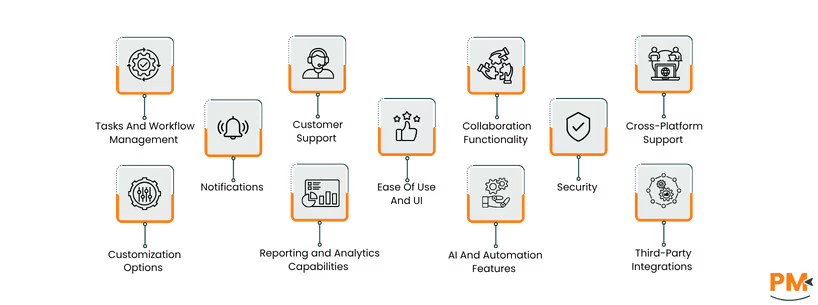
Tasks And Workflow Management
Asana
Asana provides a detailed framework for managing team-based workflows. Tasks can be broken down into subtasks, each with its own assignee and due date. Users can create task dependencies to ensure work is completed in the right order. Its workflow automation feature, ‘Rules,’ allows you to automate routine processes like assigning tasks, updating statuses, or moving tasks between project sections based on triggers. With multiple project views, from Kanban boards for agile workflows to time tracking for mapping out project schedules, Asana adapts to various methodologies.
Omnifocus
OmniFocus excels at individual tasks and workflow management. Its structure is built on GTD principles. You can create different types of projects: Sequential (tasks must be completed in order), Parallel (tasks can be done in any order), and Single Action Lists (for unrelated tasks). The "Contexts" feature (now called Tags) lets you tag tasks with the tool, person, or location needed to complete them. Another powerful feature at Omnifocus, Custom Perspectives, allows you to create custom, savable views of your tasks filtered by specific criteria, giving you laser focus on what you can do right now.
Customer Support
Asana
Asana offers a multi-layered support system, where all users have access to the comprehensive online help center, community forum, and webinars. The Asana Academy provides free courses to help users master the platform. Paid subscribers receive priority support via email and chat. The dedicated Asana help center offers customer success managers and support options via a strong community, ensuring large organizations have the resources they need.
Omnifocus
The Omni Group is known for its excellent customer support. They offer free and responsive support via email and phone to all users. Their website features extensive documentation, user manuals, and video tutorials that cover every aspect of the application, accessible through their support portal. The user community is also very active, with forums and blogs offering tips and best practices from long-time users.
Collaboration Functionality
Asana
Collaboration is the heart of Asana and its user philosophy. Every task, project, and portfolio is a collaborative space. Team members can be assigned tasks, leave comments, attach files, and mention colleagues to ask direct questions. Project conversations provide a central place for high-level discussions, and the team inbox consolidates all relevant notifications. Workload management features help managers see who is overworked and rebalance tasks accordingly, ensuring team-wide visibility and coordination.
Omnifocus
While OmniFocus is fundamentally a single-user application and it does offer team collaboration features, though they can be comparatively limiting. There is no concept of shared projects, task assignments to others, or real-time commenting within the app. Users can, however, send tasks to others via email or use the Mail Drop feature to forward emails into your inbox, it is not designed for a collaborative workflow.
Crossplatform Support
Asana
Asana is a fully cross-platform solution, allowing dedicated integration with apps like MS Teams, Google Chat, and Canva, to ensure smooth project functioning and support. Its powerful web application is the primary interface, and it offers feature-rich desktop applications for both Windows and macOS. Its mobile apps for iOS and Android are robust, allowing users to manage projects and tasks on the go with nearly full functionality.
Omnifocus
While it does offer powerful cross-platform support, OmniFocus is exclusive, and limited, to the Apple ecosystem. It has native, high-quality applications for macOS, iOS, iPadOS, and watchOS. The apps are designed to work seamlessly together with fast and reliable syncing. In recent years, they have added a Web version, allowing users to access their tasks from any browser, which provides some flexibility for users who may occasionally be on a non-Apple device. However, there are no native apps for Windows or Android
Ease Of Use And UI
Asana
Asana features a modern, colorful, and visually engaging user interface, that can be seen as simpler and easier to manage, in comparison to its contenders. For simple projects, it's quite intuitive and directive. However, its vast feature set and high degree of flexibility can be overwhelming for new users, leading to a steeper learning curve for advanced functionality and management. The ability to switch between features like List, Board, and Timeline views makes the UI adaptable to user preference.
Omnifocus
OmniFocus has a clean, professional, but data-saturated UI that is consistent with Apple's design philosophy and practical output. It prioritizes function over form, presenting information in a structured, text-heavy manner that simplifies tasks and directions for new users. This, combined with its unique GTD-centric terminology like custom perspectives and defer, contributes to a significantly simpler learning curve. Once mastered, however, the UI is praised for its efficiency and power.
Customization Options
Asana
Asana is a highly customizable platform that is designed to fit a wide range of teams, by offers 17 base custom fields. Users can build on these custom fields to track specific information on tasks, like priority, cost, status. You can build custom project templates to standardize processes across your organization. The Rules engine allows for custom workflow automation. On higher-tier plans, you can build custom, real-time dashboards to report on the exact metrics that matter to your team.
Omnifocus
Omnifocus's primary customization feature is its custom perspectives, but it comes with customizable views that allow users to display information according to their preferences. Users can create highly specific and saved views of their task database. For example, Omnifocus allows for the creation of perspectives that show only available tasks tagged "Phone" for a project in your "Work" folder that are not due today. This level of granular filtering is what makes OmniFocus so powerful for individual users who want to tailor their views precisely.
Security
Asana
Asana takes security seriously, especially for its enterprise clients. It comes with data loss prevention capabilities and is compliant with regulations like GDPR. Security features include permission controls, guest access management, and data privacy controls. For enterprise customers, Asana offers advanced security features like Security Information Event Management (SIEM) for single sign-on, data export controls, and service level agreements.
Omnifocus
OmniFocus prioritizes the security of your personal data with end-to-end encryption and data privacy. It offers local-first storage for your tasks when using the Omni Sync Server, that stores information on your devices. This means that only you can read your data. Users also have the option to sync using their own private WebDAV server, giving them complete control over where their data is stored.
Notifications
Asana
Asana provides a highly customizable notification system to keep teams informed. You receive updates in a dedicated inbox within the app, via email, and through push notifications on mobile. You can fine-tune your notification settings to control what updates you receive and for which projects, helping to reduce noise and focus on what's important.
Omnifocus
OmniFocus uses the standard notification systems on macOS and iOS. You can set up alerts for tasks that are due or becoming available (after a defer date). Notifications are customizable on a per-task basis, and you can set up global defaults. The system is effective for personal reminders but lacks the team-based notification context of Asana.
Reporting And Analytics Capabilities
Asana
Asana offers powerful reporting and analytics features on its paid plans. Users can create real-time reporting dashboards to visualize project progress, team performance, and potential bottlenecks. Portfolio management provides a high-level overview of the status of all projects within an initiative. Universal Reporting allows you to track data across your entire organization to measure efficiency and business outcomes.
Omnifocus
As a personal task manager, OmniFocus does not focus on powerful built-in reporting or analytics capabilities. Its purpose is to manage upcoming work, not to analyze past performance. The closest equivalent is using the "Completed" perspective to view finished tasks, but this is simply a historical list, not an analytical tool.
AI and Automation Features
Asana
Asana comes with heavily loaded AI collaboration features. This includes AI-powered smart summaries for tasks and projects with workflows that can be customized with AI. Smart editor tools to improve writing, and smart goals to align work with company objectives. This is in addition to its long-standing "Rules" feature, which allows you to automate workflows by setting triggers and actions (e. g. , "If a task is moved to 'In Progress', assign it to me".)
Omnifocus
OmniFocus does not have built-in AI features. Its automation capabilities come from its deep integration with Apple's ecosystem. On the Mac, it can be automated using AppleScript, and on iOS/iPadOS, it has extensive support for the Shortcuts app. This allows advanced users to create complex, personalized workflows that connect OmniFocus with other apps and services
Third-Party Integrations
Asana
Asana boasts a massive library of over 200 integrations with popular business tools. This includes seamless connections with Slack, Microsoft Teams, Google Workspace, Dropbox, Adobe Creative Cloud, Jira, and more. Through its Zapier integration, it can connect to thousands of other applications, making it a central hub for work.
Omnifocus
OmniFocus has a much more limited set of integrations, reflecting its focus as a personal tool. It integrates with Apple systems like calendar applications, Siri for voice input, and email via the Mail Drop feature. Its primary "integration" is through automation platforms like Zapier, Make, and Apple Shortcuts, which allow users to build bridges to other applications
Asana
Asana offers the following pricing plans:
- Personal at $0
- Starter at $10.99/user/month
- Advanced at $24.99/user/month
- Enterprise at customized pricing
Omnifocus
Onmifocus offers the following pricing plans:
- V4 Standard License at $74.99
- V4 Pro License at $149.99
- Omnifocus For Web at $4.99/month
- Omnifocus Annual Subscription at $99.99/year
Asana is best for teams and organizations that require a central platform to manage collaborative work. It excels in environments where transparency, cross-functional communication, and project visibility are critical. This includes marketing teams running campaigns, engineering teams managing sprints, creative agencies handling client projects, and large enterprises coordinating strategic initiatives. Whether you are a small startup of 5 people or a global organization with thousands of employees, Asana scales to meet the demands of team-based project management.
OmniFocus is best for individuals who need a powerful, structured system to manage a high volume of personal and professional tasks. It is the go-to choice for practitioners of the GTD methodology. Its ideal users are executives, freelancers, consultants, academics, and any professional deeply embedded in the Apple ecosystem who is committed to building a disciplined personal productivity system. It is not suitable for teams or for users who need to collaborate on shared projects in real time.
The verdict is straightforward and depends entirely on your context: are you managing a team's work or your own?
For any scenario involving team collaboration, Asana is the definitive winner. Its entire design is centered around making team projects visible, trackable, and efficient. The ability to assign tasks, have conversations, manage workloads, and report on progress in a shared environment is something OmniFocus does not offer.
For the individual professional seeking to master their personal productivity, especially one who follows GTD principles and uses Apple hardware, Omnifocus is in a class of its own. Its granular control, powerful filtering with Perspectives, and dedicated Review process provide a robust framework for managing personal responsibilities that Asana's team-oriented design cannot match.
Ultimately, the choice isn't about which tool is better overall, but which tool is built for the job you need to do.
Asana
- Monday. com : A highly visual and flexible Work OS that is great for a wide variety of use cases and team workflows.
- ClickUp Software : Aims to be the "one app to replace them all," offering a massive feature set that includes docs, goals, and whiteboards in addition to task management.
- Trello Software : A simple, visual, and intuitive Kanban-based tool that is excellent for smaller teams and straightforward projects.
- Jira Software : While known for software development, Jira is a powerful project management tool for business teams that need structured workflows and deep integration with development processes.
Omnifocus
- Things 3: A beautifully designed and highly praised task manager for Apple devices that offers a simpler, more elegant approach to task management than OmniFocus.
- Todoist: A cross-platform task manager that is flexible, easy to use, and has great natural language processing. It offers good collaboration features, making it a hybrid between Asana and OmniFocus.
- TickTick Software: Another excellent cross-platform option with a robust free tier, featuring calendars, habit tracking, and a built-in Pomodoro timer.
- Microsoft To Do : A free and simple to-do list app from Microsoft that is available on all platforms and integrates well with the Microsoft 365 ecosystem.
