

Azure DevOps is an integrated platform designed to support the complete software development lifecycle. It brings together key tools like Azure Boards for project tracking, Repos for source control, Pipelines for CI/CD automation, Test Plans for quality assurance, and Artifacts for package management. This cohesive environment enables teams to plan, build, test, and deliver software efficiently—making Azure DevOps a powerful solution for managing end-to-end projects with speed and precision.
To get started with Azure DevOps project management, follow these initial setup steps:
- Create an Azure DevOps account by signing up at dev. azure. com
- Set up a new project within your organization, giving it a relevant name and description
- Configure project settings, including visibility (public or private) and your preferred version control system (Git or Team Foundation Version Control)
This Azure DevOps tutorial ensures your team is aligned and ready to manage work efficiently from the beginning.
Azure Boards provide powerful tools for tracking and organizing work using Agile principles.
Creating And Customizing Work Items
Start by creating and customizing work items such as Epics, Features, User Stories, and Tasks. These help you structure your project hierarchy and break down complex initiatives into manageable pieces.
Managing Backlogs And Sprints
Next, set up and manage backlogs and sprints to plan your iterations effectively. This process helps prioritize work, maintain focus, and ensure steady progress toward your goals.
Visualizing Workflows And Tracking Progress
Use Kanban boards to visualize your workflows, monitor task statuses, and identify bottlenecks early. Assign tasks to team members, update their statuses regularly, and review completion timelines to keep everyone aligned.
Azure Boards empowers teams to stay organized, agile, and focused throughout the entire project lifecycle.
Azure Repos offers robust Git-based version control to help teams collaborate on code securely and efficiently.
Initializing A Git Repository
Start by initializing a Git repository within your Azure DevOps project to track your codebase from the very beginning.
Cloning Repositories And Managing Branches
Clone repositories locally and manage branches to support parallel development and isolate new features safely.
Using Pull Requests And Conducting Code Reviews
Use pull requests to propose changes and conduct code reviews that maintain code quality, encourage collaboration, and uphold coding standards.
With Azure Repos, development teams can confidently manage code changes and streamline collaboration throughout the project lifecycle.
Azure Pipelines supports continuous integration and continuous deployment to streamline workflow delivery.
Creating Build And Release Pipelines
Begin by creating build and release pipelines to automate compiling, packaging, and deploying your code seamlessly.
Integrating With External Repositories
Integrate Azure Pipelines with external repositories like GitHub or Bitbucket to automatically trigger builds on every push or pull request.
Automating Testing And Deployment
Automate testing and deployment to staging or production environments, enabling rapid feedback and reliable releases.
With Azure Pipelines, teams can deliver quality updates faster and more consistently.
Azure Test Plans help teams validate software quality throughout the development lifecycle.
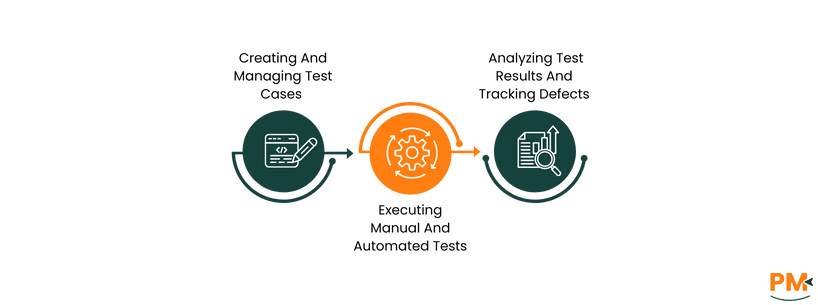
Creating And Managing Test Cases
Begin by creating and managing test cases that define scenarios reflecting real user interactions. This ensures thorough coverage of functionality.
Executing Manual And Automated Tests
Next, execute both manual and automated tests to verify that features work as expected and to catch bugs early in the development cycle.
Analyzing Test Results And Tracking Defects
Finally, analyze test results and track defects to gain visibility into quality metrics and streamline the resolution process.
By integrating testing into your workflow, Azure Test Plans ensures quality assurance is continuous and collaborative.

Azure Dashboards provide real-time visibility into your project's health, helping teams stay informed and aligned.
Adding Widgets To Track Key Metrics
Begin by selecting and adding widgets that display essential project metrics. These include work item status to monitor task completion, sprint burndown charts to track progress against goals, and build results to ensure code stability. These visuals offer at-a-glance updates for faster decision-making.
Customizing Dashboards For Team Roles
Tailor each dashboard to reflect the responsibilities of different team members. For instance, developers might focus on build pipelines and code reviews, while project managers may prioritize sprint progress and bug tracking. This role-specific setup helps teams focus on the data that matters most to them.
Generating Reports For Stakeholders
Use dashboard data to create structured reports that summarize key achievements, roadblocks, and current progress. These reports help keep stakeholders in the loop with minimal effort and provide the clarity needed for timely decisions.
By leveraging Azure Dashboards, teams gain the transparency and insight required to drive projects forward with confidence and alignment.
Enhance Azure DevOps functionality and boost team efficiency through seamless integrations.
Connect With Collaboration Tools
Integrate with platforms like Slack, Jira, and Microsoft Teams to streamline communication and keep your team updated in real time.
Utilize Extensions From The Marketplace
Leverage extensions available in the Azure DevOps Marketplace to add customized features that fit your unique workflow needs.
Automate Workflows With Third-Party Services
Automate repetitive tasks by connecting Azure DevOps with third-party services, reducing manual effort and increasing productivity.
These integrations create a more connected, automated, and efficient development environment.
Maximize your team’s productivity and project success with these practical tips:
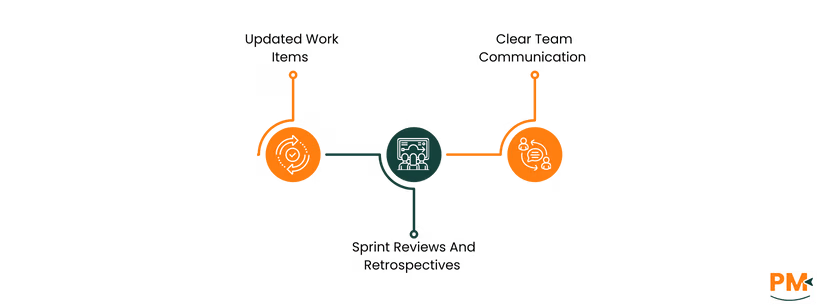
- Keep work items updated to reflect real-time progress and ensure alignment across the team
- Conduct sprint reviews and retrospectives to evaluate performance, identify improvements, and reinforce Agile principles
- Maintain clear team communication through built-in collaboration tools or integrations like Microsoft Teams
- Following this Azure DevOps pipeline tutorial ensures smoother workflows, better visibility, and stronger collaboration throughout the development cycle.
What are the prerequisites for using Azure DevOps?
You need a Microsoft account and internet access to start with Azure DevOps for beginners. Familiarity with version control and Agile concepts is helpful but not required.
Can Azure DevOps be used for non-software projects?
Yes, Azure Boards and Dashboards can manage non-software projects by organizing tasks, tracking progress, and facilitating team collaboration.
How does Azure DevOps support Agile methodologies?
Azure DevOps for project management includes tools like Boards, backlogs, sprints, and Kanban boards that align with Agile workflows and practices.
Is there a cost associated with Azure DevOps services?
Azure DevOps offers a free tier for the first five users, which includes Boards, Repos, Pipelines, and 2 GiB of free artifact storage. Beyond that, additional users cost $6 per user/month, and advanced features like Test Plans are $52 per user/month.
How secure is data within Azure DevOps?
Azure DevOps adheres to Microsoft's enterprise-grade security, including data encryption in transit, and compliance with standards such as ISO/IEC 27001, SOC 1/2/3, and GDPR.