
Construction projects in 2025 are more demanding than ever; complex timelines and remote collaboration have become the norm. Therefore, construction project management software has become a critical tool for staying competitive.
Construction professionals now rely on digital solutions to coordinate tasks, manage costs, streamline field operations, and maintain clear communication throughout the entire project lifecycle, from design to delivery.
Whether you're managing small residential buildings or large commercial developments, the right tool can improve coordination, reduce delays, and simplify compliance.
This article examines the top 10 construction management software solutions for 2025, each offering distinct strengths to help firms navigate contemporary challenges and drive project success.
Choosing the best construction software starts with identifying tools that support field coordination, document control, budget tracking, and real-time collaboration.
Here are some of the best construction management software:
1.Procore
Procore is a cloud-based construction project management platform built to support large-scale and enterprise projects across every phase of the construction lifecycle. It offers centralized tools for pre-construction, project management, financials, and field operations, allowing teams to collaborate in real-time.
Procore is ideal for large teams handling data-intensive workflows, offering integration with over 500+ third-party apps. It is best suited for general contractors, owners, and large construction firms that manage multi-phase projects and require powerful integrations and analytics.
2.Buildertrend
Buildertrend is tailored for residential builders and remodelers, offering an intuitive, clean interface and powerful client communication tools that streamline every phase of a project. Its native Client Portal provides homeowners with real-time access to schedules, daily logs, photos, selections, change orders, invoices, and payments, keeping communication clear and centralized.
3.Autodesk Construction Cloud
Autodesk Construction Cloud is particularly beneficial for firms that already rely on Autodesk tools, as it seamlessly bridges the design and construction phases with integrated document management, model coordination, and project workflows. The platform is ideal for firms that require robust documentation, mobile capabilities, and version control managed within a consistent cloud environment.
4.Fieldwire
Fieldwire is a practical construction project management tool designed for architects, contractors, and designers. It enables teams to assign tasks efficiently, stay updated through real-time push notifications, and maintain seamless communication on-site. The platform also supports the creation of custom forms, as well as detailed markups and annotations, helping professionals manage every aspect of their construction projects with greater precision and collaboration.
5.CoConstruct
CoConstruct is purpose-built for custom home builders and remodelers, offering an all‑in‑one solution that seamlessly combines budgeting, client selections, scheduling, and financial management within a unified platform. It effortlessly manages every aspect of the project, including clients and contractors, from a single, centralized app designed to streamline communication and coordination. It's among the best construction software options for small businesses seeking to track costs, manage clients, and simplify communications without requiring multiple tools.
6.Smartsheet
Smartsheet is a flexible, cloud-based work management tool that appeals to teams transitioning from spreadsheets. The platform has become a standout solution for construction project management, offering a range of templates and features specifically tailored to meet the unique needs of the construction industry.
7.monday. com
monday. com combines a no-code, highly visual platform with customizable workflows that adapt seamlessly across construction phases. Its spreadsheet-style boards support Gantt, Kanban, timeline, and calendar views, making it easy to build tailored task flows, automate reminders, and track budgets and invoices in real-time.
8.Wrike
Wrike offers robust task management, including time tracking, resource allocation, and custom workflows, making it ideal for growing construction firms. It tracks contractor hours, monitors budgets, and provides real-time workload visibility, helping avoid overruns.
9.RedTeam
RedTeam is purpose-built commercial construction management software tailored for small to mid-sized general contractors. It offers a powerful and integrated suite of tools, offering customizable workflows. Designed to support contractors of all sizes, RedTeam streamlines field and construction management, helping teams stay organized and efficient throughout every stage of the project.
10.Zoho Projects
Zoho Projects is a cloud-based project management software tailored for small and midsize construction companies. As part of the larger Zoho ecosystem, it provides a centralized platform for managing project tasks, timelines, and team collaboration. Designed to support every phase of a project—from planning and execution to final delivery, Zoho Projects streamlines workflows and enhances team productivity within the construction industry.
The construction sector in 2025 faces a complex set of challenges, including regulatory requirements, tighter budget margins, and increasingly distributed teams. Remote collaboration has become a standard expectation, yet many firms still struggle with fragmented communication and outdated scheduling methods.
Regulatory compliance now requires accurate documentation, traceability, and real-time reporting, while fluctuating material costs and labor shortages add pressure to budget control and resource allocation.
Modern construction project management software helps firms meet these demands by centralizing project data, streamlining communication across office and field teams, and automating key workflows.
Features such as real-time scheduling, mobile access, integrated cost tracking, and customizable reporting help maintain alignment, prevent rework, and improve overall project outcomes.
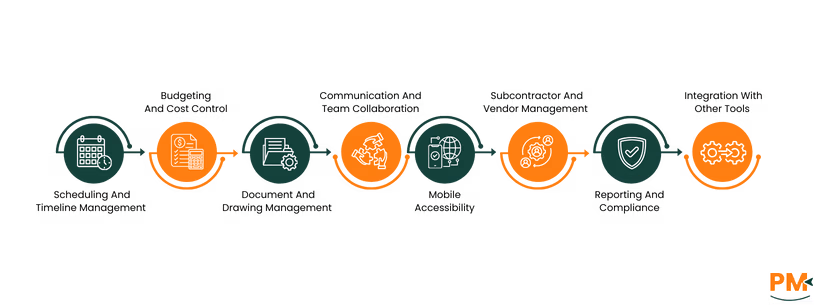
Selecting the right construction project management software means looking beyond surface-level capabilities. The best platforms go beyond simple task tracking, offering integrated features that align with how construction firms plan, execute, and deliver work. Here are the essential features to evaluate when making your decision:
Scheduling And Timeline Management
Effective scheduling tools are non-negotiable in the construction industry. Look for features like Gantt charts, calendar views, and critical path tracking to visualize project phases and dependencies. These tools help avoid delays, keep stakeholders aligned, and manage multiple timelines across teams and job sites.
Budgeting And Cost Control
A strong platform should support detailed expense tracking, cost-to-complete projections, and job costing, enabling real-time comparison of budgeted versus actual figures. Built-in estimating tools and change order management are also essential for maintaining financial accuracy.
Document And Drawing Management
Construction workflows depend on up-to-date documentation. Your software should offer centralized storage for blueprints, permits, inspection reports, and submittals. Features like version control and markup tools help ensure teams are working from the latest plans, reducing errors and rework.
Communication And Team Collaboration
Clear communication prevents misalignment and costly mistakes. Look for platforms that support real-time chat, task commenting, activity logs, and centralized dashboards. Collaboration tools that connect office and field staff help keep everyone on the same page, even across locations.
Mobile Accessibility
Mobile apps enable access to schedules, blueprints, task lists, and photo uploads, even in offline mode. GPS-tagged updates and push notifications help on-site teams work more efficiently with office support.
Subcontractor And Vendor Management
Managing external partners is a critical part of project delivery. Software should allow tracking subcontractor tasks, deadlines, and contract terms, with options to assign responsibilities and monitor progress. Portals for vendors and trades can reduce email clutter and miscommunication.
Reporting And Compliance
Construction firms must meet both internal reporting needs and external regulatory requirements. Look for platforms with customizable reporting, automated audit trails, and compliance checklists. These tools simplify documentation for inspections, safety audits, and client handovers.
Integration With Other Tools
Your project management platform should integrate with essential tools, such as accounting software (e. g. , QuickBooks), ERP systems, BIM platforms (e. g. , Revit), and cloud storage services. For firms using the Zoho ecosystem, seamless integration with Zoho Projects, Zoho Books, and Zoho CRM makes it a compelling choice for small to mid-sized businesses.
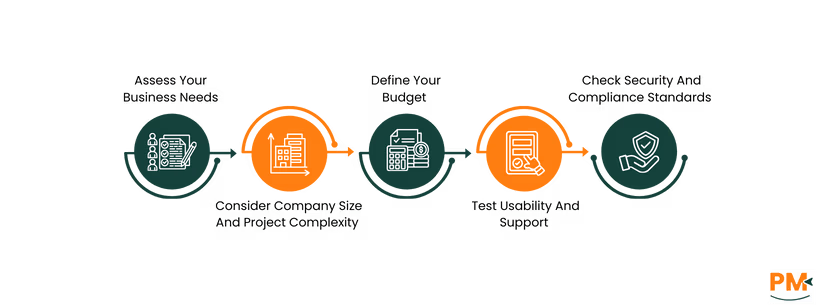
Selecting the right construction project management software requires more than comparing feature lists. It involves aligning the platform with your team's workflows, business size, and long-term growth plans. Here’s a practical step-by-step guide to help you make a well-informed choice:
- Assess Your Business Needs: Start by evaluating your day-to-day challenges. Are delays caused by poor scheduling, miscommunication, or budget overruns? Do field teams need better mobile access? Make a list of key pain points to determine the features that matter most, like RFIs, scheduling, or document control
- Consider Company Size And Project Complexity: Smaller residential builders may benefit from simple, user-friendly tools like CoConstruct or Buildertrend, while larger firms managing multi-phase commercial projects may require enterprise-grade platforms like Procore or Autodesk Construction Cloud. Choose software that can scale with your operations
- Define Your Budget: Compare pricing models—some tools offer all-inclusive pricing with unlimited users, while others use tiered plans based on the number of seats or specific features. Weigh the upfront and ongoing costs against time savings, reduced rework, and better financial control to evaluate return on investment
- Test Usability And Support: Ease of use is essential, especially for field staff. Sign up for a free trial or demo to test the interface, mobile responsiveness, and setup time. Also, review the level of customer support, onboarding resources, and community forums available
- Check Security And Compliance Standards : Ensure the platform adheres to industry data standards and offers role-based permissions, data backups, and audit trails. This is especially important for firms dealing with sensitive client documents and regulatory requirements
What is the best construction project management software for small businesses?
For small construction firms, Buildertrend, CoConstruct, and Zoho Projects are often recommended due to their affordability, ease of use, and features tailored to residential builders and remodelers. These platforms typically include scheduling, budgeting, and client communication tools that help smaller teams stay organized without overwhelming complexity.
Can construction project management software integrate with accounting tools?
Yes, many construction project management platforms offer native integrations with popular accounting tools, such as QuickBooks, Xero, and Sage. These integrations help sync budgets, track expenses, automate invoices, and maintain financial accuracy across departments, eliminating double entry and reducing the risk of errors.
Is cloud-based construction software secure?
Cloud-based construction software typically includes strong security measures such as encryption, role-based access controls, regular backups, and compliance. Providers like Procore, Autodesk, and RedTeam invest heavily in security infrastructure to protect sensitive projects and financial data.
How much does construction project management software typically cost?
Pricing varies widely depending on the platform’s features, user count, and deployment model. Entry-level tools can start as low as $10 per user per month, while more advanced platforms, such as Procore or Autodesk Construction Cloud, may require custom quotes and can cost several thousand dollars per year for mid-sized to large firms.
Are there free construction project management software options available?
Yes, some platforms offer free plans with limited features, such as Zoho Projects (free for up to 5 users) or Monday. com’s basic tier. These are suitable for small teams or short-term projects, but larger firms often require paid plans to access advanced tools, integrations, and support.