
Jira vs Miro

Project teams frequently initiate work with a high level of momentum; however, this momentum often diminishes as the volume of ideas, tasks, and responsibilities increases, resulting in reduced operational clarity. Managers encounter difficulties when attempting to determine task ownership, while design and product groups experience alignment issues as initial brainstorming sessions devolve into unstructured documentation. Development personnel may remain idle when shifting priorities delay guidance or decision-making. Collectively, these conditions produce a consistent outcome across many organizations: conceptual progress continues, yet execution becomes impeded.

Jira and Miro function as two distinct yet complementary systems designed to mitigate these coordination deficiencies. Jira provides a formalized framework that enables teams to structure work items, monitor progress, and maintain accountability across all phases of a project lifecycle. Miro supplies a visual collaboration environment that facilitates the capture of conceptual inputs, the construction of workflow diagrams, and the maintenance of alignment during planning and discovery activities. When applied together, these platforms address the complete sequence of operational challenges, beginning with ideation and extending through delivery, thereby supporting teams that require stability, clarity, and sustained progress in complex project environments.
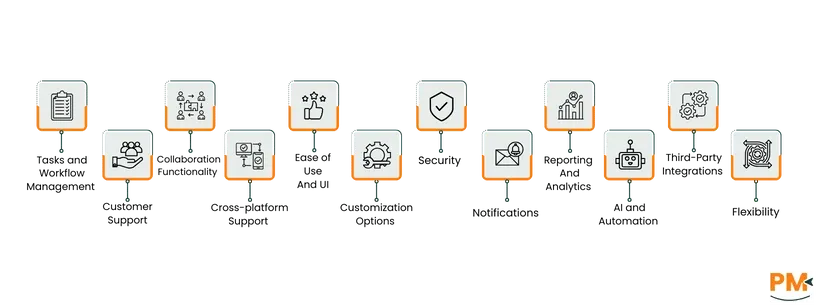
Jira Vs Miro: At A Glance

Jira vs Miro features

Feature

Jira

Miro

Tasks and Workflow Management

Customizable boards, sprint tracking, workload visualization, task assignment, automation, drag-and-drop interface, workflow modification

Kanban-style boards, task cards with details, checklists, ownership, due dates, Asana integration, Flows for multi-step workflow automation

Customer Support

Documentation, user community, tiered paid assistance, 24/7 enterprise support, dedicated account managers

Help Center, community forums, webinars, ticketing system, knowledge base, FAQs

Collaboration Functionality

Comments, mentions, attachments, shared dashboards, Slack/Microsoft Teams/Confluence integration

Real-time infinite canvas, simultaneous editing, commenting, live workshops, embedded video chat, voting, timers, recorded “Talktrack” presentations

Crossplatform Support

Web, desktop, mobile, cloud sync, self-hosted options

Web, desktop (Windows/macOS), mobile (iOS/Android), consistent user experience

Ease of Use and UI

Intuitive dashboards, drag-and-drop boards, progress monitoring, multiple project views

Clean, minimal interface, drag-and-drop, infinite canvas, intuitive navigation, supports complex workflows

Customization Options

Workflow configuration, issue types, field editors, marketplace plugins, no-code tools

Templates library, custom templates, layout/color adjustments, Custom Blueprints, reusable Spaces

Security

Enterprise-grade encryption, SSO, SOC 2/ISO 27001 compliance, permission and identity controls

Zero Trust Architecture, AES-256/TLS 1.3 encryption, SOC 2/ISO 27001/ISO 42001, GDPR compliance, data residency options, Enterprise Guard, EKM

Notifications

Configurable via email, in-app, mobile push, issue/project subscriptions

Configurable via email, mobile push, Slack, Teams, in-product Feed, event-specific alerts

Reporting and Analytics

Real-time dashboards, agile metrics, customizable reports, BI tool integration

Collaborative dashboards, trend analysis, live data sharing, report creation, Miro Insights for actionable feedback

AI and Automation

Rule-based automation, AI recommendations for priorities, automatic assignments, summaries, low-code rules

Canvas-embedded AI, Sidekicks AI teammates, multi-step workflow automation, roadmap generation, image editing, board summarization, meeting transcription

Third-Party Integrations

Atlassian Marketplace integrations, GitHub, Slack, Jenkins, API access for custom integrations

250+ tools including Microsoft 365, Google Workspace, Atlassian, Slack, Jira, Confluence, GitHub, Asana, ServiceNow, APIs, SDKs, developer ecosystem

Flexibility

Dynamic workflow modification, tailored views, real-time project adjustments, supports agile methodology shifts

Infinite canvas, scalable ideation, Spaces for boards/documents/tasks, reusable Blueprints, customizable layouts and content

Jira Overview

Jira

Jira is a project-tracking platform that helps software teams manage tasks, monitor progress, and resolve issues in an organized system. Engineering managers use it to structure development cycles, assign work, and maintain visibility across multiple projects. Product owners rely on it to prioritize backlogs, track feature delivery, and review team capacity. QA teams document bugs and manage testing workflows. Jira solves coordination and visibility problems by giving every stakeholder a single source of truth for tasks, dependencies, timelines, and performance data. This structure helps technical teams stay aligned as projects scale in size and complexity.

Jira Pros and Cons

Pros 

  • Flexible views for boards, lists, and timelines enable multi-angle project tracking 
  • Custom workflows and automation adapt to varied processes efficiently 
  • Linked tasks, epics, and dependencies provide clear multi-team progress visibility 

Cons

  • Deep report customization often needs extra plugins
  • Updates and notifications may appear with delay 

Miro Overview

Miro

Miro is a visual collaboration platform built for teams that convert ideas into structured plans. Project managers use it to outline roadmaps, lead workshops, and coordinate planning cycles. UX designers sketch interfaces, compare concepts, and document user flows. Research teams cluster insights and create analysis boards. Miro solves alignment and documentation issues by merging visuals, sticky notes, text, and discussions into one interactive board. This format allows teams to keep work centralized and understandable during complex planning sessions.

Miro Pros and Cons

Pros 

  • Real-time collaborative boards visualize ideas instantly across multiple team perspectives 
  • Premade templates accelerate idea generation and visually structure planning 
  • Shapes, notes, and arrows enhance research visualization and brainstorming clarity 

Cons

  • Export limited to PDF; no XML or native text output 
  • Copy-paste may omit elements or misalign lines 

 

Tasks And Workflow Management

Jira provides a robust platform for agile task and workflow management by offering customizable boards and comprehensive sprint tracking, enabling users to visualize workloads, assign responsibilities, and automate routine task transitions. Its drag-and-drop interface facilitates iterative planning and continuous progress monitoring, while allowing teams to modify workflows without the need for coding, thereby supporting dynamic projects that demand rapid updates and adaptable priorities.

Miro facilitates task and workflow management through its Kanban-style boards, where columns represent stages such as “To-do,”, “In progress,”, and “Done,”, and task cards move through these stages as work progresses. Cards support detailed information including titles, checklists, ownership, and due dates, allowing for clear task assignment and scheduling. Integration with Asana provides bi-directional synchronization, enabling teams to import, edit, and update tasks directly from the board. The platform’s Flows feature further allows teams to automate multi-step workflows, linking canvas elements and AI-driven actions to streamline repetitive processes.

Winner: Jira and Miro both offer powerful workflow management; Jira excels with agile sprint tracking and workflow customization, while Miro stands out with visual Kanban boards and AI-driven Flows for task automation.

Customer Support

Jira’s support framework integrates Atlassian’s comprehensive documentation, an active user community, and tiered paid assistance, enabling users to access self-help resources or submit tickets for advanced troubleshooting. Enterprise-level plans provide dedicated account managers and continuous 24/7 support, establishing a multi-tiered model that accommodates both smaller teams requiring autonomous problem-solving and large organizations necessitating responsive, around-the-clock service coverage.

Miro offers a varied support system including access to a Help Center, community forums, webinars, and a ticketing system. Users can submit support requests through an in-product form, addressing issues such as product functionality, billing, login, security, and legal inquiries. The help center includes a comprehensive knowledge base containing articles, step-by-step guides, and FAQs.

Winner: Jira provides multi-tiered support including 24/7 enterprise assistance and dedicated account managers, offering stronger coverage than Miro’s Help Center and community-driven support.

Collaboration Functionality

Jira facilitates interactive collaboration by incorporating comments, mentions, attachments, and shared dashboards, allowing team members to communicate directly within task contexts and maintain all discussions alongside relevant work items. Integration with platforms such as Slack, Microsoft Teams, and Confluence further enhances transparency, establishing a live, interconnected environment that promotes coordinated teamwork across agile and distributed teams.

Miro enables real-time collaboration through an infinite, shared canvas that supports simultaneous editing, commenting, and content contribution by multiple team members. Features such as live workshops, embedded video chat, voting mechanisms, and timers facilitate structured interaction for distributed teams. The platform also offers recorded “Talktrack” presentations for asynchronous engagement through video walkthroughs of your board.

Winner: Miro delivers superior collaboration with a real-time infinite canvas, live workshops, voting, and asynchronous board presentations, exceeding Jira’s task-centered collaboration features.

Crossplatform Support

Jira provides extensive accessibility through web, desktop, and mobile applications, enabling users to monitor and manage projects from browsers or mobile devices and maintain productivity across diverse locations. The cloud-based version ensures automatic updates and seamless cross-device synchronization, whereas self-hosted deployments address organizational requirements for specific compliance standards or network configurations.

Miro is accessible across desktop, mobile, and web environments, providing a consistent user experience. The desktop applications support Windows (64-bit) and macOS, including Intel and Apple Silicon architectures. Mobile access is available on iOS devices running version 16 or higher and Android devices running version 7 or later, enabling users to contribute remotely.

Winner: Jira and Miro both ensure seamless access via web, desktop, and mobile applications, providing consistent usability across platforms.

Ease Of Use And UI

Jira’s contemporary user interface delivers an intuitive experience through well-organized dashboards and drag-and-drop boards, enabling users to efficiently monitor progress, identify dependencies, and navigate between multiple project views. This design minimizes onboarding time and facilitates rapid task updates, making the platform particularly suitable for teams that prioritize usability and comprehensive workflow visibility.

Miro’s interface combines a clean, minimal design with functional elements that facilitate intuitive interaction. The platform employs drag-and-drop mechanics and an infinite canvas to accommodate diverse use cases, reducing the learning curve for new users while maintaining advanced capabilities for complex workflows. The arrangement of tools and interaction patterns supports efficient navigation, enabling teams to execute design, planning, and research activities without unnecessary friction.

Winner: Jira and Miro both combine intuitive interfaces with drag-and-drop functionality, enabling users to quickly adapt and efficiently manage complex workflows.

Customization Options

Jira’s customization framework enables users to configure workflows, issue types, and fields through graphical editors, allowing teams to tailor boards or incorporate marketplace plugins to enhance functionality. These no-code tools provide the flexibility to rapidly adjust the platform to evolving project requirements, minimizing administrative overhead and facilitating efficient adaptation to dynamic work environments.

Miro provides extensive customization through a large library of templates spanning agile, design thinking, and decision-making use cases. Users can create custom templates from any board or object group, adjusting structure, layout, and color schemes for personal, team, or organizational use. The Custom Blueprints feature allows full Spaces, including boards and formats, to be saved as reusable frameworks, supporting standardized workflows.

Winner: Jira and Miro both offer extensive customization; Jira supports workflow tailoring and plugin integration, whereas Miro provides templates, Blueprints, and reusable Spaces to standardize workflows.

Security

Jira incorporates enterprise-grade security measures, including data encryption, single sign-on (SSO), and compliance with standards such as SOC 2 and ISO 27001, while enabling administrators to manage permissions and identity controls across projects. Cloud hosting ensures continuous system patching, collectively providing robust protection suitable for both small and medium-sized businesses as well as large enterprises.

Miro uses a Zero Trust Architecture, continuously validating users, devices, and requests to protect data. Information is secured with AES-256 encryption at rest and TLS 1.3 in transit on AWS infrastructure. The platform holds SOC 2 Type II, ISO 27001, and ISO 42001 certifications, supports GDPR compliance, and offers data residency options. Enterprise Guard automatically classifies sensitive content, applies Intelligent Guardrails, manages content lifecycle policies, and, with enterprise key management (EKM), lets organizations control encryption keys and audit access events.

Winner: Jira and Miro both provide enterprise-grade protections, including encryption, compliance certifications, and access controls, ensuring strong security across organizational use cases.

Notifications

Jira offers configurable notifications via email, in-app alerts, and mobile push messages, allowing users to subscribe to specific issues or projects to receive pertinent updates while minimizing information overload. This system delivers immediate alerts, facilitating prompt responses and enhancing transparency in task tracking and project management.

Miro offers a configurable notification system that delivers alerts via email, mobile push, Slack, or Microsoft Teams. Users may define preferences for events such as board sharing, access requests, mentions, comments, and weekly summaries. The platform’s in-product Feed consolidates updates, mentions, access requests, and comment threads, allowing users to respond or interact directly within the feed without changing context.

Winner: Jira and Miro both provide configurable alerts via email, in-app, mobile push, and third-party apps, keeping teams informed while avoiding information overload.

Reporting and Analytics Capabilities

Jira provides real-time dashboards, agile metrics, and customizable reports for sprints and workload management, enabling teams to monitor velocity, issue resolution times, and overall project health through visual analytics. Integration with platforms such as Power BI and Tableau further enhances analytical capabilities, supporting comprehensive, data-driven decision-making across projects.

Miro provides collaborative dashboards for tracking performance, analyzing trends, and visualizing multiple data points in one space. Teams can discuss metrics, generate insights, and share live data updates without static screenshots. Dashboards support project management, report creation, customization of metrics, and onboarding, enabling faster, insight-driven decision-making across the organization. Further, Miro Insights turns customer feedback into actionable signals, helping teams prioritize features, surface critical insights, and integrate feedback directly into workflows for smarter product decisions.

Winner: Jira and Miro both support robust analytics; Jira offers real-time dashboards and integrations with BI tools, while Miro provides collaborative dashboards and actionable insights via Miro Insights.

AI and Automation Features

Jira integrates rule-based automation alongside emerging AI functionalities that recommend task priorities, automatically assign issues, and generate summaries, while low-code automation rules streamline repetitive processes. This integration of AI and automation optimizes operational efficiency and accelerates workflow execution, enhancing overall productivity within agile project environments.

Miro leverages AI and automation to enhance collaboration by embedding intelligent capabilities directly into the canvas, turning existing team work into actionable insights. Its Sidekicks function acts as AI teammates, supporting multi-step visual workflows and enabling entire processes rather than just individual tasks to be automated. Teams can generate roadmaps, edit images, summarize boards, and transcribe meetings instantly, saving hours of manual work each week.

Winner: Jira and Miro both enhance productivity through AI; Jira automates tasks and offers smart recommendations, whereas Miro enables multi-step visual workflows and instant content generation.

Third-Party Integrations

Jira offers an extensive integration ecosystem through the Atlassian Marketplace, providing seamless connectivity with platforms such as GitHub, Slack, Jenkins, and numerous other SaaS applications, while API access allows developers to construct custom integrations. This comprehensive compatibility facilitates streamlined collaboration across contemporary DevOps workflows and broader organizational environments.

Miro connects with over 250 enterprise tools, including Microsoft 365, Google Workspace, Atlassian, Slack, Jira, Confluence, GitHub, Azure DevOps, Asana, ServiceNow, and AWS, enabling seamless workflows and real-time collaboration. Its interoperability supports project management, communication, data visualization, and AI tools, while admins can manage, deploy, and provision Miro at scale. The platform also offers APIs, SDKs, and a developer ecosystem to build custom applications and extend functionality across organizational workflows.

Winner: Jira and Miro both feature extensive integration ecosystems and APIs, connecting with a wide array of productivity, development, and communication tools.

Flexibility

Jira’s adaptable architecture permits the dynamic modification of workflows, the creation of tailored views, and the real-time adjustment of project structures, allowing agile teams to shift seamlessly between methodologies and implement iterative process enhancements. This versatility positions the platform as an effective solution for organizations navigating ongoing operational or strategic transformations.

Miro offers significant flexibility through its infinite canvas, which allows unrestricted scaling for ideation, planning, and collaborative activities. Spaces consolidate boards, documents, and tasks into centralized hubs, supporting structured workflows across projects. Blueprints provide reusable, fully customizable templates for Spaces, enabling teams to standardize recurring workflows while adapting layouts, objects, and content for specific organizational needs.

Winner: Jira and Miro both support dynamic workflows and scalable project planning, with Jira enabling flexible adjustments across methodologies and Miro offering Spaces and reusable Blueprints for structured ideation.

Jira vs Miro Pricing Comparison

Jira vs Miro pricing

Jira 

Jira employs a tiered pricing structure in which the per-user cost decreases as the total number of users rises, and free trials are available for both the Standard and Premium plans.  

Name 

Cost (/user/month) 

Key Features 

Free 

$0 

Unlimited goals, projects, tasks, and forms, Backlog, list, board, timeline, calendar, and summary views, Reports and dashboards, 100 automation rule runs/month- 2 GB of storage- Support from Atlassian Community, Up to 10 users 

Standard 

$9.05 

Everything in Free plus:- Rovo Search, Chat, and Agents, integrated AI-powered work features- User roles and permissions, External collaboration- Multi-region data residency, 1,700 automation rule runs/month, 250 GB of storage- 9/5 regional support, Up to 100,000 users/site 

Premium 

$18.30 

Everything in Standard plus:- Cross-team planning and dependency management- Customizable approval processes/user automation limits (1,000 rule runs/month), Unlimited storage- 24/7 support for critical issues- 99.9% uptime SLA 

Enterprise 

Contact sales 

Everything in Premium plus:- Cross-product insights, Advanced analytics, scale, and security for enterprises 

Miro  

Name 

Cost (/user/month) 

Key Features 

Free 

$0 

3 editable boards, 5,000+ templates, 160+ app integrations, layers, 10 AI credits/month, 5 Talktracks 

Starter 

$8 

Unlimited boards, public sharing, exports, version history, custom templates, project folders, 25 AI credits/month, interactive meetings, private boards 

Business 

$16 

Multiple private workspaces, unlimited guests, 50 AI credits/month, diagramming shapes, Jira/Azure sync, SSO, synced copies 

Enterprise 

Custom (from 30 members) 

Flexible licenses, centralized admin, org-wide controls, enterprise security, data residency, 100 AI credits/month, optional add-ons for prototypes, insights, portfolios, and premium support 

Starting from $20/month/team, Miro Prototypes offers a 7-day free trial with 350 AI credits, while other add-ons include Miro Insights, Miro Portfolios, and Enterprise Guard.  

Who Is Jira Best For?

Jira is designed for software development teams, product managers, and cross-functional groups needing structured task management, progress tracking, and iterative workflow support. It is widely used across IT, software development, manufacturing, retail, e-commerce, and government. Its structured task and issue tracking supports both agile and traditional methodologies, ensuring alignment and predictability.  

Teams benefit from Jira’s customizable boards, automation, reporting dashboards, and integrations, making it ideal for maintaining transparency, accountability, and continuous improvement across complex projects.

Who Is Miro Best For?

Miro is tailored for creative, product, and cross-functional teams relying on visual collaboration for brainstorming, planning, design, and strategy. Common users include product managers, UX/UI designers, researchers, educators, and distributed teams across technology, education, consulting, marketing, and enterprise services.

Teams benefit from Miro’s infinite canvas, visual templates, real-time collaboration, and integrations with productivity tools. It is effective for interactive workshops, centralized ideation, and flexible visualization of concepts, enabling alignment and planning across remote or hybrid teams 

Which One May Suit Your Needs Better?

Choosing between Jira and Miro depends on workflow needs and team priorities. If structured project management, task tracking, automation, and visibility for development or operational projects are critical, Jira is preferable, supporting agile, waterfall, and hybrid methodologies.  

If the focus is on visual collaboration, ideation, and flexible planning for creative or strategy teams, Miro excels. Its interactive boards, templates, and facilitation tools help teams brainstorm, document, and organize concepts while maintaining alignment across distributed or cross-functional groups.  

What Are The Alternatives?

Jira Alternatives 

Alternative 

Description 

Asana 

A flexible work‑management platform offering list, board, timeline views, task dependencies, and rich integrations—ideal for teams seeking a more intuitive Jira replacement.  

ClickUp 

An all-in-one productivity tool consolidating tasks, docs, time tracking, goals, and Gantt views, with automation and strong customization.  

YouTrack 

JetBrains’ issue-tracking system supports Scrum and Kanban, customizable workflows, and integrated time tracking, tailored to development teams.  

Taiga 

An open-source Agile tool designed for Scrum and Kanban workflows, offering simplicity, backlogs, sprints, and issue tracking at low cost.  

Redmine 

A web‑based, open-source project management and bug tracking platform with flexible role-based permissions, time tracking, and modular structure.  

Miro Alternatives 

Alternative 

Description 

Lucidspark 

A virtual whiteboard with sticky notes, drawing tools, and AI-assisted brainstorming that integrates tightly with Lucidchart.  

Creately 

A diagramming and collaboration platform with real-time editing, templates (flowcharts, mind maps), and integrations like Slack and Google Workspace.  

Whimsical 

A fast, keyboard-friendly tool for flowcharts, wireframes, and boards, optimized for speed and simplicity in collaborative sketching.  

Mural 

A digital workspace for visual collaboration offering timers, voting, and facilitation tools, ideal for brainstorming and design-thinking workshops.  

Excalidraw 

An open-source sketchboard that mimics hand-drawn diagrams, supports real-time collaboration, and can be self-hosted for privacy-conscious teams.