

Kanban has emerged as a pivotal methodology in project management, offering a visual, flexible, and lean approach to streamline complex workflows and enhance collaboration. Originally rooted in manufacturing methodologies, Kanban enables project teams to visualize tasks through boards and cards, making work-in-progress transparent, trackable, and actionable.
Many project management professionals frequently grapple with challenges such as task overload, unclear priorities, communication breakdowns, and shifting deadlines. These issues can stall progress, decrease efficiency, and inflate costs. Kanban addresses these obstacles by offering real-time visibility into workloads, enabling bottleneck identification, applying WIP (work-in-progress) limits, and promoting a continuous flow aligned with team capacity.
In this guide, we’re going to explain the principles and practices behind Kanban project management, outline how it resolves common project challenges, and list some benefits as well as its drawbacks. By the end, you’ll have a good idea as to what is the kanban methodology, how it’s used in project management and how it can be utilized within different industries.
Kanban is a visual project management framework that helps teams manage work by representing tasks on a board and optimizing workflow in real time. Originating from Toyota’s lean manufacturing system, the term “Kanban” means “visual card” in Japanese. This highlights its core function: to make work visible and manageable from start to finish.
Unlike rigid, schedule-driven models, Kanban encourages a flexible approach to project execution. Tasks are typically displayed on a digital or physical board divided into columns that reflect stages of progress—such as “To Do,” “In Progress,” and “Done.” Each task is represented by a card that moves across the board as it advances, allowing teams to easily monitor workloads and identify bottlenecks
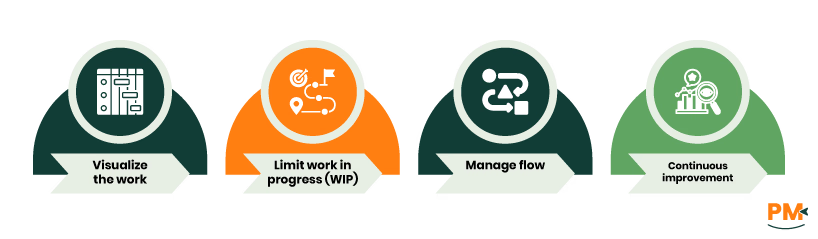
At the heart of Kanban are four core principles:
- Visualize the work: Kanban boards and cards make project tasks and statuses immediately visible, ensuring that everyone knows what’s being worked on and by whom
- Limit work in progress (WIP): By limiting the number of work items, teams can focus better and avoid overloading individuals, leading to reduced work-in-progress items
- Manage flow: Tracking how tasks move through each stage helps teams spot delays and improve the efficiency of their process, ensuring a consistent flow of work
- Continuous improvement: Kanban promotes incremental process changes, encouraging teams to regularly evaluate performance and adjust workflows for better outcomes
Together, these principles create a system that balances flexibility with structure, helping teams deliver higher-quality results with greater predictability.
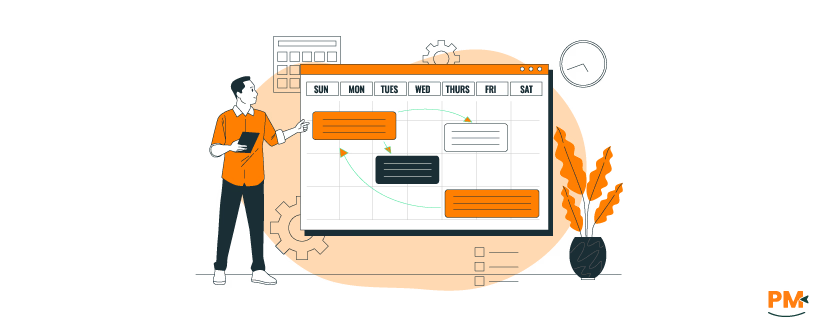
As mentioned before, Kanban uses a visual system to organize and manage tasks through each stage of a project. This system is built around a Kanban board, which displays the flow of work using distinct elements like columns, cards, and work-in-progress (WIP) limits. These tools help teams maintain clarity, reduce delays, and ensure steady progress from start to finish.
Usually, boards serve as the central space where all project tasks are tracked. Whether physical or digital, a Kanban board visually maps the workflow—typically divided into columns such as “To Do,” “In Progress,” and “Done.” These columns can be customized to match the unique stages of a team's process.
Each card on the board represents a single task or work item. Cards may include details like deadlines, assignees, attachments, and comments, allowing for clear communication and ownership. As tasks progress, cards are moved across columns, giving the team a visual sense of movement and task status.
To further organize tasks, swimlanes can also be introduced. These horizontal sections divide the board into categories—for example, by team member, project phase, or task type—offering an added layer of structure for tracking parallel workflows.
When done right, Kanban can be a great boon for many businesses. Below are some benefits that they can obtain from utilizing Kanban:
While Kanban offers flexibility and visibility, it may not be suitable for every project environment. Below are some common challenges and ways to mitigate them:
- Not ideal for rigid, sequential workflows: Kanban is less effective for waterfall-style projects that rely on fixed phases and strict timelines
- Limited guidance: Kanban doesn’t inherently provide guidance on how to complete specific processes, which may result in inconsistencies across the board
- Difficulty in planning: The emphasis on flow can make it hard to assess when a work item will be finished, making it difficult to plan ahead
- Requires self-regulation: Teams unfamiliar with self-managed workflows may struggle with accountability and flow control, ultimately becoming complacent and lagging behind
Kanban's adaptability makes it a practical choice across a wide range of industries and team structures. Its visual and flexible approach to task management supports both agile workflows and day-to-day operations. Below are some of the most common use cases:
Software Development
Developers can use Kanban boards to track bugs, feature requests, and sprint tasks, helping ensure steady code delivery and fewer bottlenecks. They can also use Kanban boards in crucial product phases such as prototyping where they have to iterate on a product over and over.
Marketing Teams
From campaign planning to content production, Kanban boards help marketing teams organize deliverables, track deadlines, and manage assets visually. This can help marketing teams set up campaigns, organizing events, etc.
IT Operations
Teams in IT often have to deal with a large number of tasks. To help with this, they use Kanban boards to manage tickets, service requests, and routine maintenance while maintaining visibility into task statuses and avoiding priority conflicts.
Product Management
Kanban boards enables product managers to visualize product development. It also allows teams to prioritize feature development, collaborate with stakeholders, and monitor roadmaps without overwhelming their boards.
What is Kanban in project management?
Kanban is a visual workflow management method that helps teams organize tasks using boards and cards. It allows teams to visualize work in progress, identify bottlenecks, and improve process efficiency without rigid planning structures.
How does Kanban differ from Scrum?
While both are agile methodologies, Kanban is flow-based and continuous, with no fixed iterations or roles. Scrum, on the other hand, follows time-boxed sprints and prescriptive ceremonies like sprint planning, reviews, and retrospectives.
Can Kanban be used for remote teams?
Yes, Kanban works well for remote teams. Most digital Kanban tools offer real-time collaboration features, allowing distributed teams to stay aligned, manage workloads, and communicate effectively across locations.
Is Kanban suitable for large-scale projects?
Kanban can scale with project complexity by using swimlanes, multiple boards, and integrated reporting. However, teams managing highly structured or regulatory-heavy projects may benefit from combining Kanban with timeline or milestone-based tools.
What are WIP limits in Kanban?
Work-in-progress (WIP) limits cap the number of tasks allowed in a specific workflow stage. This helps prevent overload, reduce multitasking, and ensure tasks move through the pipeline efficiently.
What types of teams benefit most from Kanban?
Software developers, marketing teams, operations staff, product managers, and support teams commonly use Kanban. It’s ideal for any team that values visibility, adaptability, and incremental improvement.
Does Kanban support deadlines and due dates?
Yes. While traditional Kanban focuses on flow over fixed timelines, most digital tools allow teams to add due dates and integrate calendars to track time-sensitive tasks.
What are some drawbacks of Kanban?
Kanban may not suit projects that require strict scheduling or phase-based execution. It can also become cluttered without proper board management and clear WIP limits.
Can Kanban integrate with other project management tools?
Many Kanban platforms integrate with tools like Slack, Jira, Google Workspace, and calendar apps—ensuring smooth collaboration across teams and systems.
How do I choose the best Kanban software?
Look for a solution that is user-friendly, customizable, and scalable, with automation, analytics, and integration capabilities that match your team’s workflow needs.