
Choosing the right software for your team can feel like a daunting task. With so many options, it's easy to get lost in feature lists and marketing jargon. If you've narrowed it down to Miro and Jira, you're already looking at two of the best, but they serve very different purposes.
In a nutshell, think of Miro as your team's digital whiteboard, an infinite canvas for brainstorming, strategy, and visual collaboration. Jira, on the other hand, is your project command center, a powerful engine for tracking tasks, managing agile sprints, and getting complex work across the finish line. They can work together, but understanding which one you need is the key. Let's break them down.
Feature | Miro | Jira |
Core Purpose | Visual Collaboration Platform | Project and Issue Tracking Software |
Tasks & Workflow | Visual task planning on a flexible canvas. Ideal for mapping out workflows. | Powerful, structured task tracking with customizable, automated workflows. |
Communication | Contextual comments & live chat on the canvas. Feels like a collaborative room. | Comment threads centered on specific tasks/issues. Functional and traceable. |
Customer Support | Good support on paid plans, extensive knowledge base, and community forum. | Extensive resources and 24/7 support on high-tier plans, but they can be complex. |
Collaboration | Real-time, multi-user co-creation. Perfect for brainstorming and workshops. | Asynchronous, task-focused coordination. Ideal for tracking progress and updates. |
Cross-Platform | Excellent web, desktop, and mobile apps for a seamless experience anywhere. | Strong web and mobile apps, though complex tasks are best on desktop. |
Ease of Use & UI | Intuitive and easy to learn. Minimal interface gets out of your way. | Powerful but complex. A steep learning curve, especially for new users. |
Security | Enterprise-grade security (SOC2, ISO 27001, GDPR), SSO, and granular sharing controls. | Top-tier enterprise security certifications and robust administrative controls. |
Integrations | 160+ key integrations, including Figma, Trello, Google Drive, Dropbox, Zoom, and many more. | 3,000+ app integrations, including GitHub, GitLab, Bitbucket, Figma, and Slack. |
(TL;DR) Jira wins for project management with its superior task tracking and automation. While Miro excels at visual collaboration, Jira's comprehensive execution capabilities make it the definitive choice for turning ideas into trackable, actionable results.
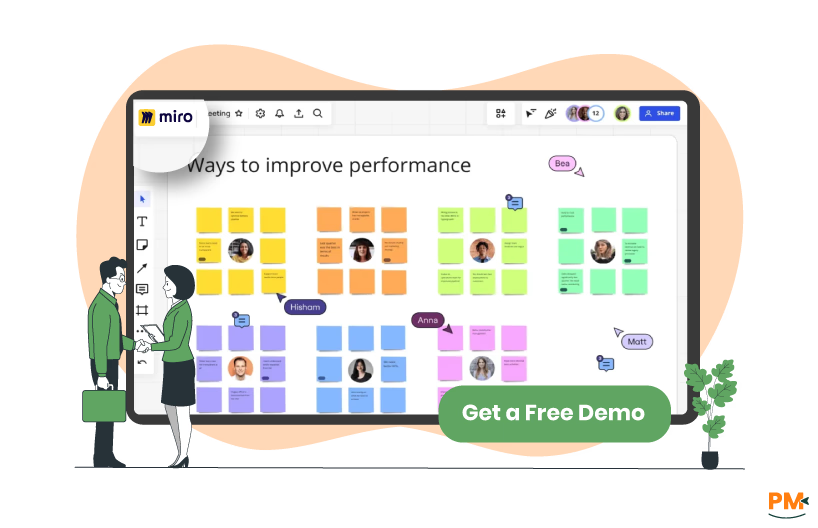
Miro is an online whiteboard platform that helps teams brainstorm, plan, and collaborate visually. It’s designed to bring teams together, no matter where they are, to brainstorm, diagram, map out customer journeys, and plan projects visually. It’s where the magic of ideation happens, with tools like digital sticky notes, freehand drawing, and a massive library of templates for every framework imaginable.
Miro Pros and Cons
Pros | Cons |
|
|
|
|
|
|

Jira, developed by Atlassian, is one of the most widely used tools for agile project management and issue tracking. It’s built for one thing: getting work done in an organized, traceable way. It allows teams to create tasks, bugs, and stories, assign them, prioritize them in backlogs, and move them through custom workflows on Scrum or Kanban boards. It’s less about the "what if" and more about the "what's next."
Jira Pros and Cons
Pros | Cons |
|
|
|
|
|
|

Miro
Miro handles tasks with a visual touch. You can create cards, add assignees and due dates, and organize them on frameworks like Kanban boards. It’s fantastic for planning your workflow and visualizing what needs to be done. It’s the perfect starting point for a sprint planning session, but you’ll likely want to push those tasks into a tool to actually track them.
Jira
Jira is built for task tracking with boards, sprints, timelines, and roadmaps. Teams can define workflows, assign issues, track dependencies, and measure progress through reports. The automation rules save countless hours by handling routine tasks, and the reporting features tell you exactly how your team is performing.

Miro
Communication in Miro is all about context, mentioning teammates on a sticky note, or even hopping on a video call right inside the canvas. The built-in chat and comment features keep the conversation tied directly to the work, reducing confusion. It feels natural and immediate, much like pointing at a whiteboard in person.
Jira
Jira focuses more on structured communication around tasks. You can leave comments on issues, tag teammates, and link related tickets. It doesn’t replace messaging apps but integrates well with Slack and Teams for smoother communication.

Miro
Miro offers support through help centers, documentation, and live chat for paid plans with varying response times (faster for higher tiers). In contrast, Enterprise plans get a dedicated success manager and 24/7 premium support.
Jira
Jira has a massive support ecosystem. There’s extensive documentation, a huge community forum, and tutorials for days. Standard paid plans get email support, while Premium and Enterprise plans unlock 24/7 support and a dedicated team, and receive priority SLAs.

Miro
Collaboration is Miro’s bread and butter. Real-time editing, sticky notes, diagramming, and facilitation tools make it ideal for distributed teams.
Jira
Collaboration in Jira is more asynchronous and task-focused. It’s about collaborating on the work, not necessarily on the ideas. You collaborate by commenting on issues, updating statuses, and reviewing each other's work.
Miro
It’s a fully web-based application that works seamlessly in any modern browser. It also offers robust desktop apps for macOS and Windows, and mobile apps for iOS and Android that are surprisingly functional for reviewing boards and light editing on the go.
Jira
Jira is also primarily cloud-based (with self-hosted options for large enterprises). It is accessible on web, desktop, and mobile apps, making it useful for checking statuses, receiving notifications, and adding quick comments.
Miro
Miro provides enterprise-grade security, including SOC 2 Type II, ISO 27001, and GDPR compliance. Features like SSO, SCIM, data encryption, and audit logs ensure secure collaboration. Enterprise plans offer data residency options for geographic control. Your visual ideas and communications are protected within a robust, continuously audited framework.
Jira
Jira delivers strong security via Atlassian Access, enforcing SSO, 2FA, and SCIM. It meets SOC 2, ISO 27001, and GDPR standards, with advanced audit logs and granular permissions. For ultimate control, self-hosted Data Center options are available, ideal for strict compliance needs.
Miro
Miro seamlessly integrates with 160+ essential tools, creating a fluid collaborative hub. Key connections include Slack, Teams, and Zoom for communication; Figma, Jira, and Trello for design and task management; and Google Drive and Dropbox for document embedding. This allows teams to centralize resources, turning the infinite canvas into a dynamic workspace without disruptive app-switching, supercharging workshops, and asynchronous collaboration.
Jira
Jira’s power is supercharged by the Atlassian Marketplace, offering 3,000+ integrations. It deeply connects with GitHub, GitLab, and Bitbucket for seamless development tracking, Figma for design, and Slack for communication. This vast ecosystem automates workflows, centralizes data, and transforms Jira into a command center for the entire development lifecycle, from initial code commit to final deployment.
Miro Pricing Plans
Plan | Cost (per user / per month) | Key Features Included |
Free | $0 | 3 editable boards, basic collaboration, 10 AI credits/team |
Starter | $8/user/month | Unlimited boards, 25 AI credits, core integrations |
Business | $16/user/month | Advanced collaboration, 50 AI credits, SSO, Jira/Azure sync |
Enterprise | Custom Pricing | Org-level controls, compliance, advanced integrations |
Jira Pricing Plans
Plans | Cost (per user / per month) | Key Features Included |
Free | $0 (up to 10 users) | 3 editable boards, basic collaboration, 10 AI credits/team |
Standard | $8.60/user/month (for teams with up to 100 members) | Unlimited boards, 25 AI credits, core integrations |
Premium | $17.00/user/month (for teams with up to 100 members) | Advanced collaboration, 50 AI credits, SSO, Jira/Azure sync |
Enterprise | Custom Pricing | Org-level controls, compliance, advanced integrations |
Disclaimer: The pricing is subject to change.
Who Is Miro Best For?
Miro is a reliable platform for any team that lives and breathes collaboration. It’s perfect for design thinkers, product managers, strategists, and creative agencies who need to map out ideas visually. If your work involves frequent brainstorming sessions, workshops, or client presentations, Miro will feel like a natural extension of your process. It's also for remote and hybrid teams that need to replicate the energy of an in-person whiteboard session. Small to mid-sized teams can make the most of Miro, but it also scales to enterprises that need global collaboration spaces.
Who Is Jira Best For?
Jira is built for software development teams, and that’s still its home turf. It’s the go-to for Scrum Masters, product owners, and developers following Agile methodologies. However, its use has expanded to any team that manages complex projects with many moving parts and dependencies. This includes IT operations, marketing teams running complex campaigns, and legal teams tracking cases. Jira is best for medium to large organizations that need structure, reporting, and a systematic way to track work from start to finish.
Verdict: Which Project Management Software is better?
Based on a comprehensive evaluation of features and capabilities, Jira emerges as the superior project management software. While Miro excels as a visual collaboration canvas, its functionality is limited to ideation and planning, lacking robust task tracking and execution features. Jira provides comprehensive ticket tracking, advanced workflow automation, detailed reporting, and seamless integration with development tools. Jira’s structured and powerful platform is the clear winner as it transforms ideas into actionable, trackable outcomes, ensuring nothing is overlooked.
What Are The Alternatives?

If neither Miro nor Jira is the perfect fit for your team, there are several excellent alternatives to consider. For teams seeking visual collaboration tools similar to Miro, options include Mural for its design thinking focus, Figma's FigJam for its seamless integration with design workflows, or Lucidspark for effective mind mapping. If you need a project management alternative to Jira, powerful options exist like ClickUp for its all-in-one approach, Asana for its user-friendly interface, Trello for simple Kanban-based task management, or Monday CRM for its highly visual and customizable Work OS.