
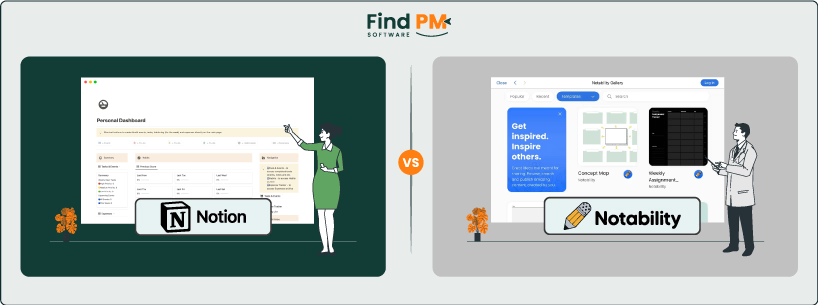
Choosing the right productivity and note-taking platform depends on your team’s needs. Notion is an all-in-one workspace that combines notes, documents, databases, and task management into one system. Notability (by Ginger Labs) is a digital note-taking app focused on freehand writing, PDF annotation, and audio recording. Notion shines at linking docs and tasks across a team, while Notability excels at rich media note-taking on iPads and Macs. In this comparison, we’ll break down both tools on features, usability, pricing, and more, so you can decide based on facts — not buzzwords.
Notion is a cloud-based workspace built around modular pages and databases. It lets teams take notes, write docs, and manage tasks in one place. Content in Notion is arranged into pages and “blocks” (text, tables, checklists, etc.) which you can link or embed. Notion is used as a wiki or knowledge base, project manager, and personal notebook all at once. Teams can create custom boards, calendars, and Kanban views to track work, and share pages with colleagues. It also supports rich embedding (videos, code, diagrams) and an AI assistant for drafting. Notion’s workspace is fully searchable and syncs across web, desktop (Mac/Windows) and mobile (iOS/Android) apps. The interface is modern but very flexible, catering to teams that want one integrated system for docs, tasks, and collaboration.
Notion Pros And Cons
Pros
Cons
Notability is a digital note-taking app designed primarily for Apple devices (iPad, iPhone, Mac). It provides a canvas for handwriting, drawing, and typing notes. You can record audio while taking notes, and the app syncs the audio to your writing for playback. Notability’s interface is clean and minimal, built around notebooks and pages. Users can import PDFs, annotate with a variety of pens/highlighters, and add typed text or images. Notability also offers a community gallery to share templates and notes. Unlike Notion, Notability does not include project or task management – it’s focused purely on capturing ideas and information.
Notability Pros And Cons
Pros
Cons

Notion: Notion treats tasks as items in pages and databases. You can create task lists, Kanban boards, or calendars directly in Notion and move tasks through custom workflow states (To Do → Doing → Done, etc.) . Its databases support dependencies and status fields, and you can assign tasks to teammates. Notion even has simple timeline/Gantt views via templates. These features let teams plan releases or projects within the same space they write docs and specs. Automations (via integrations) can move items or notify people based on triggers. Overall, Notion’s workflow management is flexible: you can adapt it to Scrum, Kanban, or simple to-do lists, but it relies on manual setup (there’s no baked-in sprint cadence unless you create it).
Notability: Notability has no concept of tasks or workflow. You organize content by notebooks and dividers, but there are no states or progress tracking. Each note is standalone – you might keep a to-do list in one note, but Notability won’t notify anyone or move that task through stages. In practice, Notability’s workflow is linear and personal: open a note, jot information, and save or share it when done. It’s great for individual productivity (taking a meeting’s notes and recording it, for example), but it does not have tools to manage team assignments or schedules.
In summary, Notion provides robust task tracking and boards alongside note-taking, whereas Notability remains purely a note/document-centric tool without built-in task workflows.

Notion: Notion offers an extensive help center and community. Anyone can browse documentation, tutorials, and community forums for answers. Paid plans include more direct support: Notion’s Business and Enterprise customers get faster SLAs and a customer success team. (For example, upgrading to a paid plan gives you “priority support” so you don’t wait in line.) Overall, support consists of email and chat (no phone) plus an active Slack/Discord community and certified consultants for complex deployments. Even free users can email [email protected] or use Notion’s community forums.
Notability: Support is provided by Ginger Labs through its help center and in-app request forms. Users can report issues or request features by selecting “Help → Contact Support” in the app. There’s also an online FAQ and guides. For business customers, Notability offers an enterprise plan with priority support: companies get a dedicated support team to handle deployment and troubleshooting. In practice, Notion’s support is more focused on self-service resources (with paid tiers getting faster responses), while Notability has a straightforward direct support request process and offers paid priority support for organizations.

Notion: Collaboration is at the heart of Notion. Team members can edit the same page in real time, leave comments, and mention each other on any page or task. Notifications let everyone follow updates. You can share specific pages or whole “teamspaces” with different access levels (viewer, editor, commenter). Notion also supports full-page embeds from other apps (Google Docs, Figma, etc.) and syncs comments across platforms. It can integrate with Slack or email to post alerts when tasks change. Shared dashboards and synced blocks mean multiple people can contribute to the same source of truth. These features make Notion effective for distributed teams to co-author documents and track changes.
Notability: Notability’s collaboration is much simpler. There’s no multi-user editing; each note is owned by one person at a time. You can share a note by exporting it (as PDF, image, or Notability file) or by publishing to the Notability Gallery. Your team can then download or view it, but edits are not synced. However, Notability lets users comment on “shared notes” in educational use (like teachers marking up student work). In a business sense, collaboration means emailing notes or using a sharing link, not built-in discussions. In short, Notability encourages sharing static notes, while Notion is built for active co-authoring and discussion.
In practice, Notion offers robust in-app collaboration (comments, mentions, live editing), whereas Notability relies on exporting or publishing notes. Teams that need ongoing document editing and threaded discussions will find Notion much stronger; Notability is limited to one-person note preparation and later distribution.
Notion: Notion is fully cloud-based and available on virtually every platform. You can use Notion in any modern web browser, or via dedicated apps for Windows, macOS, iOS, and Android. This means your team can access the same workspace on desktops, tablets, and phones. Notion also offers offline sync in its desktop and mobile apps (limited to recently opened pages). Notion’s flexibility extends to integrations: it can connect to many external apps and data sources via API or tools like Zapier.
Notability: Notability was historically limited to Apple devices. It fully supports iPad, iPhone, and Mac. There is no native Windows or Android app for end users. On desktops, you use the Mac app to open notes. On mobile, you use iOS. For offline use, Notability works on the device, but there’s no cross-platform editing – you’d need to export/import when switching between Mac and iPad. Notability for Business also integrates with MDM solutions so that companies can manage the app on employee iPads.
In summary, Notion runs on virtually any device (web and native apps), making it cross-platform by design. Notability is mainly for Apple’s ecosystem, so it’s best if your team standardizes on iPads/Macs.

Notion: The Notion UI is clean and visual, but highly customizable. It uses a drag-and-drop page builder with a left-hand workspace sidebar for navigation. Many users praise the aesthetic and modularity (you can embed Kanban boards, tables, images, etc. easily). Notion does provide templates and guided onboarding to help new users (getting-started wizards for common use cases). Overall, Notion’s interface is powerful for experienced knowledge workers, but it can be daunting until you learn the building-block approach.
Notability: Notability’s interface is very straightforward by comparison. It has a simple toolbar with pen, highlighter, and eraser icons, and notebooks are organized in a sidebar. The default blank page (or imported PDF) fills the screen, so there’s no clutter. Users can focus on writing and drawing. There are fewer hidden menus and nearly every tool is visible on-screen. This makes Notability easy to pick up: teachers, students, or professionals can start writing and annotating with almost no training. However, the simplicity also means fewer visual cues for things like version history or task assignments (features Notion has).
In essence, Notion’s UI is rich and modular (which suits power users but can overwhelm beginners), while Notability’s UI is streamlined for note-taking (which is very approachable but not feature-rich beyond its core tools). Both are polished, but they cater to different use cases.

Time tracking is not a core feature of either Notion or Notability. Neither app includes built-in timers or automatic work-hour logging like some project tools do. In Notion, you could manually record time in a database or embed a time-tracking widget from an integration, but it doesn’t natively calculate billable hours. Notability similarly has no time-tracking functionality (it focuses on note content and doesn’t track how long you spend on a note). Teams needing detailed time logs would typically use a dedicated time-tracking app and possibly link it with Notion or use other integrations.

Notion: Notion is itself a documentation platform. It excels at creating structured documents and wikis. You can write long-form docs, create knowledge bases, and publish pages as internal or external websites. For example, teams often build internal Wiki pages, meeting minutes, and process docs in Notion, with full search and version history. Every page in Notion can have rich media, tables, and interlinked references. Essentially, Notion is built to be an “internal Wikipedia” for your company.
Notability: Notability is focused on personal note documents rather than shared knowledge bases. You can create “notes” that contain text, handwriting, and media, but these live in notebooks on your device. There is no concept of a wiki or shared knowledge repository. The only way to distribute a Notability note is by exporting it (for example, as a PDF) or sharing it via the Notability Gallery. While Notability is great for capturing information, it does not manage or publish documentation for a team.
In short, Notion provides a full documentation environment (wikis, web pages, structured pages) out of the box, whereas Notability does not have built-in documentation or publishing features beyond sharing individual notes.
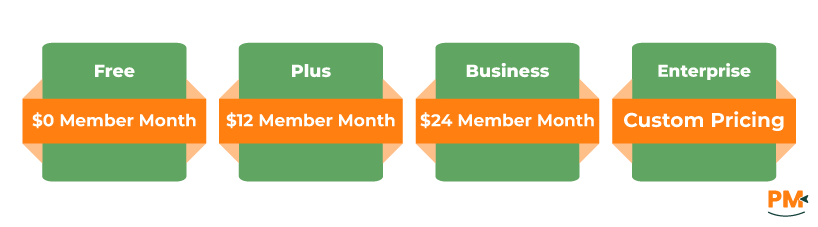
Notion (Cloud): The platform offers the following plans:
- Free: $0/member/month (Basic forms/sites, Notion Calendar, Gmail sync, databases, Notion AI trial)
- Plus: $12/member/month (Everything in Free + unlimited blocks/uploads/charts, custom forms/sites, basic integrations, Notion AI trial)
- Business: $24/member/month (Everything in Plus + SSO, private teamspaces, page verification, conditional logic, domain verification, premium integrations, full Notion AI, enterprise search, AI meeting notes, research mode)
- Enterprise: Custom pricing (Advanced controls, security, and scalability for large organizations)
The free plan is quite usable for personal or small-team use, but growing teams typically upgrade for more storage and security controls.
Disclaimer: The pricing is subject to change.
Notability: Notability is free to download with basic note-taking functionality. Many features (unlimited notes, handwriting recognition, audio transcription, premium templates) require a Notability Plus subscription. The subscription costs around $2.99/month or $14.99/year. Notability does not offer a separate enterprise tier price publicly, though they sell volume licensing via MDM for businesses.
Disclaimer: The pricing has been taken from third-party websites and is subject to change.
Notion’s per-user cost is higher than Notability’s. However, Notion bundles a broader set of features (task boards, databases, integrations, published sites) which might replace several tools. Notability’s pricing is simpler but requires an individual subscription for each user. When looking at total cost, remember that Notion is usually used by the whole team, so you’ll likely pay for each person using it. On the other hand, Notability might be paid for per device, especially in schools or businesses, which can make it cheaper if many people share devices..
Who Is Notion Best For?
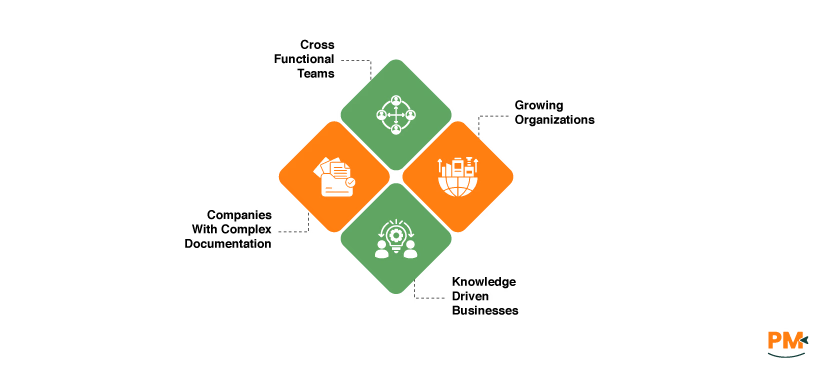
Notion is ideal for teams that need a shared workspace and knowledge base. It’s particularly suited to:
- Cross-Functional Teams (engineering, design, marketing): That want one place for docs, meeting notes, and project plans
- Growing Organizations that need customizable workflows: Notion can serve as an internal wiki, project tracker, and doc repository all at once
- Companies With Complex Documentation Needs: If your team writes detailed specifications, how-to guides, or product roadmaps, Notion’s interlinked pages and database features make it easy to keep information organized
- Knowledge-Driven Businesses: Startups or enterprises where capturing ideas, research, and feedback in a structured way is important. Notion’s templates for roadmaps, OKRs, and research can help align product and business goals
Who Is Notability Best For?
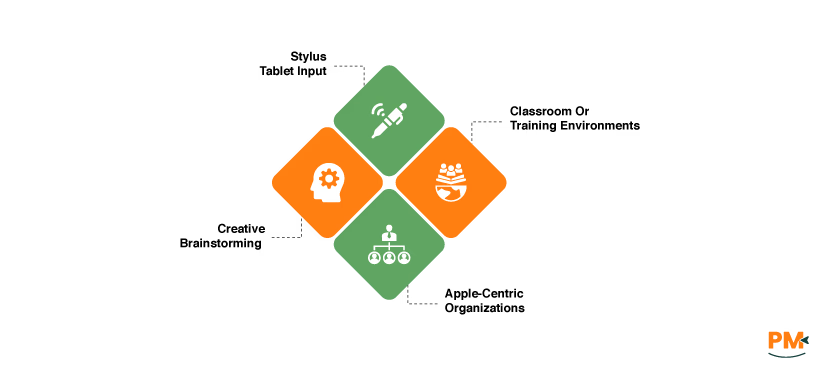
Notability is best for individuals and teams focused on freehand note-taking and teaching/training scenarios. It’s particularly a good fit if:
- You Rely On Stylus/Tablet Input: Teams that use iPads with Apple Pencil (designers, architects, field engineers, medical professionals taking handwritten notes) will love Notability’s pen tools
- Classroom Or Training Environments: Notability originated in education. Teachers and corporate trainers can distribute worksheets or slides to students, who can annotate them. The audio-record/replay feature is great for lectures or meeting minute capture
- Creative Brainstorming: Storyboard artists, designers, or researchers who sketch diagrams can use Notability as a quick digital whiteboard that stays neatly organized
- Apple-Centric Organizations: Companies whose mobile workforce is standardized on iPads and Macs (for example, retail, hospitals, or consultancies using iPads) might adopt Notability for note-taking. In fact, Notability for Business is explicitly aimed at managing notes on corporate iPads via MDM
Which One Should You Go For?
Use Notion if your team needs a strategic, collaborative workspace and can benefit from integrated docs and project management; choose Notability if you need a powerful yet simple note-taking tool optimized for Apple devices. Consider also platform (cross-device vs Apple-only), the style of work (team documentation vs personal note capture), and budget (Notion is higher-cost per seat but all-in-one, Notability is cheaper per user but narrower in scope). Make your decision on those criteria – not just on which app is more popular – to ensure it fits your team’s way of working.