


Imagine it’s Monday morning, and your inbox is overflowing with task updates, missed deadlines, and countless ‘urgent’ messages. Your team is scattered across locations, juggling multiple projects, and struggling to keep track of who’s doing what. Without the right project management platform, staying organized can feel like an uphill battle—wasting hours on coordination instead of meaningful work.
This is where tools like Podio and Asana come in. Both promise to streamline workflows, centralize collaboration, and automate repetitive tasks, but they approach these challenges differently. From task management and cross-platform support to AI-driven automation and robust reporting, this head-to-head comparison dives into the strengths, features, and unique capabilities of each platform, helping you decide which solution can transform your team’s productivity and efficiency.
Feature | Podio | Asana |
Tasks & Workflow | Integrated tasks with reminders, recurring tasks, and automation triggers | Tasks organized via lists, boards, timelines, with automation and templates |
Customer Support | Help Center and direct inquiries | Help Center, tickets, and AI chatbot |
Collaboration | Customizable workspaces with real-time updates and private projects | Shared workspaces, task dependencies, cross-functional collaboration, integrations |
Cross-Platform | Mobile, desktop, web, plus integrations | iOS, Android, desktop, 300+ integrations |
Ease of Use | Drag-and-drop customizable UI | Intuitive UI with templates, dependencies, dashboards |
Customization | Custom apps, layouts, Dynamic Forms | Custom fields, multiple views, automation rules, reusable templates |
Security | HTTPS, AES, ISO 27001, OAuth2, IP whitelisting | ISO 27001 & SOC2, SSO/2FA, enterprise controls, data residency options |
Notifications | Event-based, API-customizable, push updates | Email/browser/In-App notifications, consolidated Inbox |
Reporting & Analytics | Dashboards with 20+ chart types, integrations, scheduled reports | Dashboards with filters, task/project charts, BI integrations |
AI & Automation | Workflow Automation across apps and tasks | AI-powered workflows, AI Teammates, Smart Assists |
Integrations | Google Drive, Dropbox, Excel, Extensions Marketplace | 300+ tools including Slack, Salesforce, Tableau |

Podio is a flexible work platform that brings project data, conversations, and processes together in a single collaboration hub. It helps teams organize information, track progress, and move projects forward efficiently.
Advanced workflows reduce repetitive tasks, allowing team members to focus on value-driven activities. Customizable structures and clearly defined roles enhance collaboration, delivery times, and overall effectiveness. Integration with existing tools and seamless data migration ensure teams can work within a unified workspace without disruption.
With a secure and flexible foundation, Podio offers granular administrative controls, fast communication with internal and external stakeholders, and a platform tailored to each team’s unique workflow.
Podio Pros and Cons

Asana is a collaborative work management platform designed to connect goals, teams, and tasks in one place. It enables organizations to coordinate projects effectively while integrating AI to provide clarity, accountability, and faster execution.
With AI features that adapt to the context of each business, Asana reduces manual effort and helps teams focus on achieving outcomes. Flexible templates and over 300 integrations ensure seamless connection with existing enterprise tools and workflows.
Trusted by leading global companies, Asana offers a scalable foundation that supports organizations of any size, helping them stay aligned, efficient, and focused on measurable impact.
Asana Pros and Cons
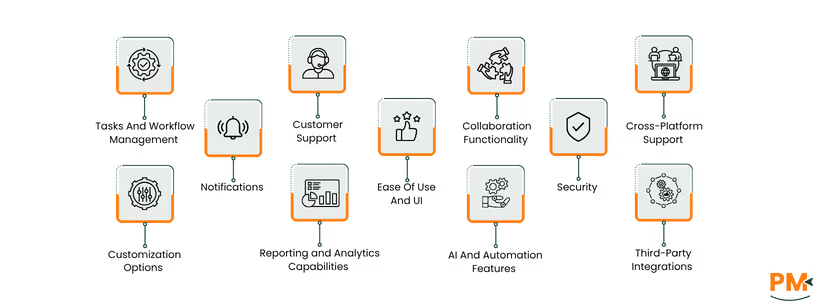
Tasks And Workflow Management
Podi
Podio integrates task management directly into team workflows, enabling tasks to be tied to conversations, files, and custom app content. Teams can set reminders, create recurring tasks, assign responsibilities, and add context with comments or attachments. Instead of relying solely on manual setup, tasks can also be triggered automatically when certain conditions are met, ensuring smoother progress tracking without requiring extra tools. A key strength lies in task-level flexibility, as teams can define how responsibilities, deadlines, and progress indicators are structured to fit their specific processes.
Asana
Asana treats tasks as the core unit of work, allowing them to be assigned, scheduled, and organized across views such as lists, calendars, Kanban boards, and timelines. Its workflow management is powered by an automation engine where rules can trigger actions like moving tasks, assigning owners, or sending reminders. Templates and forms help standardize processes, while integrations with other tools allow seamless coordination across different platforms. This combination supports both structured project management and flexible day-to-day task handling.
Customer Support
Podio
Podio offers a comprehensive support system to assist users. Their Help Center provides detailed documentation, tutorials, and FAQs to address common queries. For more personalized assistance, users can visit the "Contact Us" page to submit inquiries directly to the support team.
Asana
Asana provides robust customer support through its Help Center, where users can access a wealth of resources, including tutorials, troubleshooting guides, and best practices. For direct assistance, users can initiate a support ticket or access the AI chat bot from the bottom right corner.
Collaboration Functionality
This will be discussed in detail with each Project Management Software being discussed separately in its respective sub-heading.
Podio
Podio centralizes your team's work by integrating tasks, files, and conversations into customizable workspaces. This unified approach enhances transparency and streamlines communication, making it easier to stay aligned on projects. Features like status updates, comments, and activity streams keep everyone informed in real-time. Podio also supports private workspaces for confidential projects, ensuring sensitive information remains secure.
Asana
Asana fosters team collaboration through shared workspaces where tasks, comments, and deadlines are centralized. Teams can assign tasks, set dependencies, and track progress using boards, lists, and dashboards. The platform supports cross-functional collaboration by offering templates and integrations with tools like Slack and Microsoft Teams, ensuring seamless communication and coordination across locations
Cross-Platform Support
Podio
Podio offers seamless cross-platform support through its dedicated mobile, desktop, and web applications. Users can access their workspaces and manage tasks from virtually any device, ensuring continuous productivity regardless of location. The platform's versatility is further enhanced by its extensive integration capabilities, allowing users to connect with various third-party tools and services. This ensures that teams can maintain synchronization and efficiency across different platforms and devices.
Asana
Asana provides robust cross-platform support, enabling teams to manage their work from anywhere. With native applications available for iOS, Android, and desktop, users can stay connected and productive across devices. The platform also integrates with over 300 third-party tools, including Slack, Google Drive, and Microsoft Teams, facilitating seamless collaboration and data synchronization across various platforms.
Ease Of Use And UI
Podio
Podio's user interface is designed to be highly customizable, allowing teams to create tailored workspaces and apps that fit their specific workflows. The platform utilizes a drag-and-drop interface, making it intuitive for users to build and organize their work environment.
Asana
Asana provides an intuitive and user-friendly interface designed to enhance team collaboration and productivity. With features like customizable project templates, task dependencies, and real-time reporting dashboards, teams can efficiently manage their work.
Customization Options
Podio
Podio offers extensive customization capabilities, enabling users to tailor their workspaces to fit specific business needs. Through its App Builder, users can create custom apps with a drag-and-drop interface, incorporating various field types and layouts. These apps can be displayed in different formats, such as table or card views, to suit individual preferences.
Unlike its task management customization, which focuses on deadlines and assignments, this section of Podio emphasizes workspace and app-level personalization. For more advanced customization, Podio provides extensions like Dynamic Forms, which facilitate the creation of sophisticated web forms without the need for coding.
Asana
Asana provides a range of customization options to adapt to various project management needs. Users can create custom fields, including single-select and multi-select options, to track specific data points relevant to their projects. These fields can be color-coded for easy identification.
Additionally, Asana also offers multiple project views, such as List, Board, Timeline, and Calendar, allowing teams to visualize their work in the most effective way. For workflow automation, Asana's Rules feature enables users to automate repetitive tasks, while Bundles allow for the creation of reusable templates that can be applied across projects. These customization features help teams tailor Asana to their unique workflows and requirements.
Security
Podio
Podio ensures robust security through HTTPS encryption, 256-bit AES file encryption, and secure SSL connections. It complies with the U. S. -EU and U. S. -Swiss Privacy Shield frameworks and adheres to ISO 27001 security policies. The platform offers granular administrative controls, allowing workspace owners to manage user access and permissions effectively. Additionally, Podio supports OAuth2 authentication, providing secure and flexible integration options for external applications. To enhance security, users can whitelist IP addresses for specific features like email sending and MySQL synchronization.
Asana
Asana prioritizes security with a comprehensive program based on ISO 27001 and SOC 2 standards. The platform undergoes regular penetration tests and maintains a bug bounty program for proactive threat identification. Asana offers robust authentication options, including SAML, Google SSO, and two-factor authentication, to secure user access. Enterprise customers benefit from additional controls such as custom password policies and the ability to mandate two-factor authentication. Data residency options are available in regions like Europe, Australia, and Japan, providing flexibility in data storage locations.
Notifications
Podio
Podio provides a comprehensive notification system to keep users informed about activities within their workspaces. Notifications can be triggered by various events such as comments, file uploads, task assignments, and membership changes. Each notification is directed to a specific user and can have a status of either unread or viewed. Users can customize their notification settings through the Podio API, allowing them to manage their preferences effectively.
Additionally, Podio offers a push service that delivers real-time notifications about events happening in your inbox, global stream, or any workspace you are a part of, ensuring timely updates on important activities.
Asana
Asana offers a robust notification system to keep users updated on their tasks and projects. Notifications can be received via email, browser, or within the Asana Inbox, depending on user preferences.
Users can customize their notification settings by navigating to their ‘Profile Settings’ and selecting the ‘Notifications’ tab, where they can choose to receive updates on task assignments, comments, due dates, and more. Additionally, Asana provides an Inbox feature that consolidates all notifications, allowing users to easily track updates on projects they're involved in.
Reporting and Analytics Capabilities
Podio
Podio offers robust reporting and analytics capabilities through its customizable dashboards. Users can visualize data in real-time using over 20 chart types, including pie, funnel, and gauge charts. These dashboards aggregate data from various sources, such as Google Analytics and QuickBooks, and can be tailored for different departments or individuals. Additionally, scheduled reports can be delivered via email or Podio, and the platform supports TV Mode for large-screen data visualization.
Asana
Asana provides comprehensive reporting and analytics features through its customizable dashboards. Users can create charts from tasks, projects, and goals, applying filters by date or task status. Dashboards offer real-time insights into project health, blockers, and spending trends. Data can be shared with teammates, and for advanced analytics, users can integrate with BI tools like Power BI or Looker Studio.
AI And Automation Features
This will be discussed in detail with each Project Management Software being discussed separately in its respective sub-heading.
Podio
Podio offers robust automation capabilities through its Workflow Automation tool, enabling users to automate tasks such as creating or updating records, assigning tasks, sending emails, and generating PDFs. This goes beyond the task-level triggers described earlier, focusing instead on full-process automation across workspaces and apps. With features like triggers, filters, and actions, teams can streamline processes and reduce manual effort.
Asana
Asana's AI and automation features are designed to enhance team productivity and decision-making. The platform offers AI-powered workflows that automate routine tasks, allowing teams to focus on higher-impact work. With tools like AI Teammates, AI Studio, and Smart Assists, Asana helps teams accelerate strategic work by handling complex tasks and providing actionable insights. These features are seamlessly integrated into Asana's platform, ensuring a smooth and efficient workflow for teams.
Third-Party Integrations
This will be discussed in detail with each Project Management Software being discussed separately in its respective sub-heading.
Podio
Podio offers a robust ecosystem of integrations through its Extensions Marketplace and API capabilities. Out-of-the-box, it connects seamlessly with tools like Google Drive, Dropbox, ShareFile, GoToMeeting, and Excel.
Asana
Asana connects with over 300 enterprise tools, including Slack, Google Drive, Salesforce, and Microsoft Teams, to centralize workflows and enhance team productivity. The Asana App Directory offers a wide range of integrations, from time tracking tools like Hubstaff to reporting platforms such as Tableau, providing flexible solutions for various business requirements.
Podio Pricing
Plan | Price (Per User/Month) | Key Features |
Free | $0 | Task management, Apps and workspaces, Up to 5 employees |
Plus | $14 | All Free features plus: Unlimited items/users, Light user role, Automated workflows |
Premium | $24 | All Plus features plus: Visual reports, Sales dashboards, Cloud phone system, Advanced automation |
Asana Pricing
Plan | Price (Per User/Month) | Key Features |
Personal | $0 | Task/project management, Collaboration up to 10 users, Unlimited messages, Mobile apps |
Starter | $13.49 | All Personal features plus: Timeline/Gantt, Workflow builder, Dashboards, Custom fields/forms, Unlimited automation |
Advanced | $30.49 | All Starter features plus: Goals/portfolios, Workload, Advanced integrations, Approvals/proofing |
Enterprise | Contact sales | All Advanced features plus: Workflow bundles, Resource management, Admin controls, Security features |
Enterprise+ | Contact sales | All Enterprise features plus: Compliance integrations, Data residency, Enterprise key management, Advanced security |
Podio is ideal for small to medium-sized teams, startups, and digital agencies seeking flexibility and scalability in project management. Its customizable workspaces and automation features cater to industries like marketing, real estate, and IT services. Teams that require tailored workflows and centralized collaboration will benefit most from Podio's modular design and low-code platform.
Asana is well-suited for small to large enterprises, particularly those in technology, marketing, and creative services. Its scalability and comprehensive feature set support cross-functional teams and complex projects. Asana's robust reporting, automation, and goal-tracking capabilities make it an excellent choice for organizations aiming to align tasks with strategic objectives.
Deciding between Podio and Asana depends on your team’s project management needs and level of customization required.
Select Podio if your team needs highly customizable workflows, granular user permissions, and extensive third-party integrations—ideal for project managers, businesses with complex processes, or teams that require tailored solutions for varied departments.
Choose Asana if your focus is on intuitive task management, seamless collaboration, and ready-to-use templates—particularly suited for teams aiming for efficiency, cross-functional coordination, and quick onboarding without extensive setup.
Podio Alternatives
- Zoho Projects : Provides task management, project planning, and resource allocation with an intuitive interface, ideal for small to medium-sized businesses
- Scoro : Combines project management with financial tracking and CRM features, suited for agencies and consultancies requiring detailed reporting
- Tape: Offers streamlined workspace management with enhanced access control and user-friendly design, recommended for teams seeking a modern alternative
Asana Alternatives
- Wrike Software : Delivers customizable dashboards, real-time collaboration, and detailed project tracking for teams managing complex workflows
- OpenProject : An open-source platform offering Agile boards, advanced planning, and secure hosting, ideal for teams needing full data control
- Plaky: Provides unlimited users and workspaces with essential project management tools, a cost-effective solution for small to medium teams
