

Project management teams today often juggle complex workflows, tight deadlines, and increasing demands for transparency across development cycles. When processes and collaboration tools fail to align, productivity stalls and visibility suffers.
This is where platforms like Polarion and Jira step in to create structured, connected, and agile environments for modern teams.
Polarion, developed by Siemens, provides end-to-end application lifecycle management (ALM) with strong traceability and compliance features, ideal for industries with rigorous quality standards. Jira, created by Atlassian, is a widely adopted project management and issue-tracking solution that empowers teams to plan and track projects efficiently.
In this blog, we’ll compare Polarion and Jira, examining their features, benefits, and overall suitability to help businesses select the best fit for their project management needs.
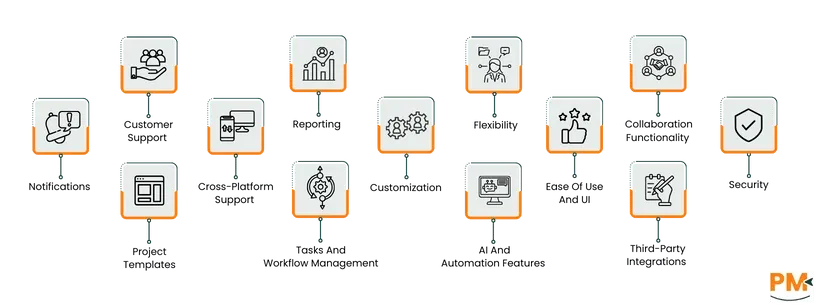
Features | Polarion | Jira |
Tasks and workflow management | Structures workflows around strict process enforcement and traceability | Focuses on flexibility and visual clarity by utilizing Scrum and Kanban Boards |
Customer support | Provides structured customer support through tiered service levels | Offers varying levels of support depending on the subscription plan |
Collaboration functionality | Offers cloud-based discussions, wikis, alerts, and co-authoring tools such as LiveDocs | Provides inline comments, user mentions, activity streams and saved/shared filters |
Cross platform support | Supports both Windows (64-bit versions) and Linux platforms | Supports Windows, macOS, iOS and Android |
Ease of use and UI | Uses role-based dashboards, interactive widgets, and in-line editing features | Utilizes Agile boards (Scrum, Kanban) |
Customization | Custom document templates, fields, form layouts, etc. | Can adjust logos, site titles, colors, date/time formats |
Security | Utilizes the Polarion Cybersecurity Solution | Offers a layered security model that includes encryption of data in transit and at rest |
Notifications | Supports configurable email notifications | Maps specific events to notifications that are then sent to the correct email recipient |
Project templates | Provides use-cases templates such as ‘Simple Tracker’ task templates | Offers all kinds of templates for different scenarios |
Reporting | Offers real-time reports and code analysis | Track project health, progress and trends via charts and agile reports |
AI and automation | Provides automated tracking and semantic matching | Utilizes AI to provide a variety of tools such as a virtual service agent and incident summarization |
Flexibility | Built to adapt to an organization’s existing methods | Supports diverse work styles |
Third party integrations | Integrates with external databases | Wide range of integrations with popular software such as Microsoft Teams, Slack, and GitHub |
TL;DR: Polarion is great for medium to large companies in industries that require traceability whereas Jira is great for teams of all sizes in most industries.

Polarion, developed by Siemens Digital Industries Software, is a unified Application Lifecycle Management (ALM) platform. It centralizes requirements, coding, testing, and release processes within a single browser-based environment. In addition, it also enables teams to collaborate effectively through shared assets, configurable workflows, and secure permissions.
With deployment options available for both on-premises and in the cloud, Polarion caters to distributed teams and large-scale enterprises alike. Its flexibility makes it particularly well-suited for industries that demand rigorous quality assurance and regulatory compliance, such as automotive, aerospace, and healthcare, where comprehensive lifecycle management and transparency are essential.
Polarion Pros and Cons
Pros | Cons |
|
|

Jira, developed by Atlassian, is an industry-leading project-and-work-management tool designed to help teams plan, track, and deliver projects of all sizes and types with confidence. The platform supports agile methodologies—such as Scrum and Kanban—offering customizable workflows, agile boards, timeline views, and powerful reporting capabilities.
Its flexibility enables teams across software development, marketing, operations, and business functions to use a single solution for organizing work and aligning activities with broader goals. With support for thousands of integrations and a wide range of templates, Jira enables teams to tailor it to their unique processes and scale as their needs evolve.
Jira Pros and Cons
Pros | Cons |
|
|
Polarion
Polarion ALM structures workflows around strict process enforcement and traceability. Each workflow defines transitions between work item states with configurable conditions, triggers, and approvals, ensuring that no change proceeds without meeting predefined criteria. The system also maintains a complete audit trail for regulatory compliance and supports electronic signatures for validated approvals.
This rule-based approach helps teams in regulated industries—like automotive or medical device development—maintaining process integrity and accountability throughout the lifecycle.
Jira
Jira focuses on flexibility and visual clarity in workflow management. Teams can design workflows using custom statuses, transitions, and swimlanes, mapping tasks across Kanban or Scrum boards. Each transition can include conditions, validators, and post-functions that automate actions such as assigning tasks or updating fields.
In short, Jira’s visual processes make it easy to track progress, adapt processes, and align workflows with agile practices. This in turn makes it ideal for teams that frequently iterate or scale across projects, such as software development.
Winner: It’s a tie as both Jira and Polarion offer adequate workflow methodologies for different purposes.
Polarion
Polarion provides structured customer support through tiered service levels—Bronze, Silver, and Gold—each offering defined response times and access to Siemens’ global support network. Customers benefit from 24/7 self-service resources, a detailed knowledge base, and technical assistance via web, phone, and portal systems, ensuring consistent and SLA-driven support for enterprise environments.
Jira
Jira offers varying levels of support depending on the subscription plan. Standard users get weekday coverage, while Premium and Enterprise customers receive 24/7 support with faster response times and phone assistance. Jira’s extensive knowledge base, community forums, and online ticket system make it easy for teams to find solutions quickly, though lower-tier plans may have slower escalation paths.
Winner: Both software are tied here since they both offer comparable support options.
Polarion
Polarion delivers collaboration functionality built around shared asset access and centralized data. To control visibility and editing, it makes use of permission controls so that only authorized personnel can make changes. Additional collaboration features include cloud-based discussions, wikis, alerts, and co-authoring tools such as LiveDocs, all of which are a great boon for teams working together across projects.
Jira
Jira also emphasizes collaboration as a core capability. It utilizes features such as inline comments, user mentions, activity streams and saved/shared filters—designed to keep all relevant participants informed and aligned regardless of role or location. Because Jira integrates easily with Atlassian’s suite of products (like Confluence) and other tools, it promotes cross-functional collaboration and real-time communication across teams.
Winner: Jira wins since it provides more in terms of collaboration features and was built with distributed teams in mind.
Polarion
Polarion supports a range of server and client environments, with installation guides provided for both Windows (64-bit versions) and Linux platforms. The installation guides for Polarion also mention that it can be used on a web browser.
Jira
Jira offers broad cross-platform compatibility, especially in its browser-based client access and server deployment. The supported platforms documentation mentions that desktop browsers such as Chrome (latest stable), Microsoft Edge (Chromium), Mozilla Firefox and Safari on macOS are supported. For mobile access, the documentation lists Chrome on mobile and Safari on iOS as supported by mobile browsers.
Winner: Since Jira offers compatibility for both desktop and mobile, it wins this round.
Polarion
Polarion presents a user interface designed for high-complexity environments, with strong customization and interactivity. It uses role-based dashboards, interactive widgets, and in-line editing features to improve user interaction. For instance, Polarion’s dashboards allow tailored views of day-to-day tasks and document status, and its tree-view tables support direct editing within cells to speed up workflows.
Jira
Jira makes use of Agile boards (Scrum, Kanban) to break large, complex projects into manageable tasks. These boards also help teams visualize their entire workflow process, helping them spot any bottlenecks and reduce work-in-progress (WIP) items. In addition, the user interface for Jira is clean and uncluttered, allowing users to navigate between various swimlanes effortlessly.
Winner: Jira’s clean user interface and Agile boards give it a leg up over Polarion when it comes to ease of use.
Polarion
Polarion supports custom document templates for consistent project documentation and open APIs for extending functionality or integrating with external systems. Further capabilities include defining custom fields for work-item types, altering form layouts (e. g. , showing or hiding fields based on enumeration values), and building extensions/widgets via open APIs.
Jira
Jira offers a broad range of customization features, especially around branding, interface, and layout, enabling administrators to adjust logos, site titles, favicons, colors, date/time formats, and more. Beyond appearance, Jira supports layout and design tweaks, and its marketplace ecosystem enables adding apps or integrations to tailor functionality.
Winner: Jira wins this round as it offers a wide berth of customization features as compared to Polarion.
Polarion
Polarion supports comprehensive cybersecurity management through its Polarion Cybersecurity Solution, designed to help organizations comply with standards such as ISO/SAE 21434 and UNECE R155.The platform enables teams to document, trace, and verify security requirements across the entire product lifecycle while performing threat and risk analysis (TARA) within the same environment.
Jira
Jira offers a layered security model that includes encryption of data in transit (TLS 1.2 + with perfect forward secrecy) and at rest (AES-256). It also supports enterprise-grade identity and access management through features like SAML SSO, SCIM and the Atlassian Guard product for user provisioning, audit logging and threat detection.
Winner: Both platforms are tied again since they both offer strong security measures and certifications.
Polarion
Polarion supports configurable email notifications where users (or administrators, depending on setup) can specify exactly which events trigger an email. Some examples of these are when a new work item is created or an existing item changes to a specific status like “feedback”.
Jira
Jira provides solid notification configuration through notification schemes, which map specific events (such as item creation, update, or comment) to email recipients. Administrators can also create custom events and then associate those with notification schemes so that tailored workflows trigger email alerts. On top of this, individual users can adjust their personal settings to manage which email notifications they receive, helping reduce inbox overload.
Winner: While both software provide notifications, Jira slightly edges it out here due to the level of customization it provides for these notifications.
Project Templates
Polarion
Polarion provides a variety of out-of-the-box templates categorized under its “Templates” section on the Extensions portal. Examples of these include the ISO 26262 hazard analysis, SAFe 5.0 project templates, “Simple Tracker” task templates and “System of Systems” project templates. All in all, these templates can be used as starting points to instantiate new projects or modules with predefined work items, structures, and configurations.
Jira
Jira offers a broad template library covering use cases such as software development (Scrum, Kanban, bug tracking), marketing, HR, finance and service management. These templates come pre-configured with workflows, issue types, boards and fields to help teams get started quickly. For example, the Scrum template includes a backlog, sprint cadence, and board layout; the Kanban template supports continuous flow.
Winner: Once again, Jira wins this round as it offers a template library that is not only larger but covers a wide range of industries as well as compared to Polarion’s specific use cases.
Reporting And Analytics Capabilities
Polarion
Polarion ALM includes reporting as a key component via its “Audits, metrics & reports” feature, enabling teams to aggregate management information in real time to enhance visibility across the lifecycle. The platform supports real-time reports, source code analysis, browser-based dashboards, ensuring that reports reflect end-to-end traceability and variant reuse.
Jira
Jira offers a broad suite of built-in reporting tools and dashboard gadgets that let teams track project health, progress and trends via charts, agile reports (e. g. , burndown, velocity), and custom dashboards. The reports are designed to serve Scrum, Kanban and hybrid methodologies and can be extended through third-party apps for deeper insights. On top of all this, Jira also supports cross project and cross instance reporting, ensuring that all bases are covered.
Winner: While Polarion offers adequate reporting features, Jira covers all possible bases, making it the winner here.
AI and Automation Features
Polarion
Polarion includes AI capabilities designed for industrial and regulated-product environments. Its “AI for Polarion” layer can analyze and automate requirement- and document-intensive tasks. With this, teams can import requirements from PDF, Word or Excel files using natural-language processing, intelligently mapping them to work items, and performing automated tracking across the lifecycle.
The solution also supports semantic matching of new requirements against a knowledge base of past items via extensions (e. g. , “semantha”), enabling reuse and reducing manual review effort. This focus on automating high-volume, document‐driven activities gives organizations in compliance-heavy industries a pathway toward improved efficiency and traceability.
Jira
Jira Service Management embeds AI under its ‘Atlassian Intelligence’ umbrella, offering features such as a virtual service agent, auto-triage of tickets, language-based routing, and incident summarization. Users can also utilize AI for more low-level tasks such as drafting replies and editing responses.
In addition, administrators can also use AI to generate automation rules by describing the desired logic in natural language. This way, they can increase efficiency while cutting down on manual tasks.
Winner: Both software are tied here as both offer comparable AI and automation features, albeit for different ends.
Flexibility
Polarion
Polarion delivers flexibility through its hybrid deployment model. Teams can choose between a SaaS cloud solution (Polarion X) or an on-premises installation, giving organizations control over infrastructure-and-data strategy. Additionally, Polarion is built to adapt to an organization’s existing methods rather than force them into a predetermined process; the company states that its platform ‘does not require customers change their internal methods or processes.’
Jira
Jira emphasizes flexibility and scalability across teams and use-cases with features like global- and project-level configuration, customizable fields and workflows, and rich APIs for integration and automation. The platform supports diverse work styles—from software development to business operations. Hence, this broad adaptability makes Jira a strong choice for many organizations
Winner: Jira offers more flexibility and broad use cases when compared to Polarion, making it the winner here.
Third-Party Integrations
Polarion
Polarion supports integration through its dedicated Extensions portal. This portal features a wide variety of connectors and plugins that link Polarion to external systems such as UML tools, PLM systems, external databases, and Microsoft Teams-based communication channels. With these integrations, organizations can enable synchronized data flows (such as requirements or work items moving between Polarion and other engineering tools).
Jira
Jira offers rich integration capabilities via its Marketplace and built-in APIs, enabling connections with thousands of third-party applications including Slack, Google Workspace, Microsoft Teams, GitHub, Bitbucket, Excel/Sheets and more. Teams can integrate their preferred tools directly into Jira workflows, reducing context switching and creating a unified platform for both planning and execution.
Winner: Jira wins again since it integrates with a wide variety of third-party software.
Polarion Vs Jira Pricing Comparison
Polarion
Polarion offers a pricing upon request model to accommodate different organizational needs. For on-premises deployments, customers can purchase lifetime perpetual licenses, with annual support and maintenance fees beginning at 20% of the license cost for the first year. Licensing is available in two main types: Named User, assigned to a specific individual, and Concurrent User, which allows multiple users to share access at different times.
Jira
Jira offers pricing plans that vary according to the size of your team. For 1-100 users, the pricing plans are:
Plan | Price | Key Features / Limits |
Free (up to 10 users) | $0 |
|
Standard | $9.05/user/month |
|
Premium | $18.30/user/month |
|
Enterprise | Customized pricing |
|
Disclaimer: The pricing is subject to change.
Who Is Polarion Best For?
Polarion is best suited for medium to large enterprises that manage complex, compliance-driven development projects across multiple teams and disciplines. It is widely adopted in industries such as automotive, aerospace, medical devices, and industrial manufacturing, where traceability, regulatory compliance, and audit readiness are essential.
Who Is Jira Best For?
Jira is designed for teams of all sizes, ranging from small startups to large enterprises, that need a flexible and scalable platform to manage projects, track issues, and support agile workflows. Its versatility makes it suitable for a wide range of industries, including software development, IT service management, marketing, finance, and operations, where collaboration, visibility, and adaptability are key.
Which One May Suit Your Needs Better?

Based on our comparison, it looks like Jira is simply a more well-rounded tool as it offers a wide range of capabilities that cater to a variety of organizations. It also supports all kinds of project methodologies, not just agile, making it a great project management tool for many.
However, this does not mean that Polarion isn’t useful. In fact, Polarion is tailored for industries requiring strict compliance and traceability. This makes it ideal for complex, regulatory-heavy projects that require a lot of oversight.
What Are The Alternatives?
Software | Alternative For | Why Consider It? |
codeBeamer | Polarion | A full ALM platform that covers requirements, risk and test management in one solution |
Jama Connect | Polarion | Focuses on requirements, traceability and risk for complex product and systems development |
Asana | Jira | A flexible work-management platform ideal for task and project tracking across teams |
Jira | An all-in-one workspace combining tasks, docs, automation and integrations for modern teams | |
Jira | Tailored for client-centric projects and small to mid-sized teams needing billing/time-tracking features |