
When it comes to choosing the right productivity tool, the comparison between Roam Research and Notion is one that many teams encounter. Both platforms are widely adopted, but they cater to different workflows and user needs.
Roam Research is built for networked thinking, using a graph-based system that connects ideas through bi-directional links. It’s ideal for research-heavy tasks, personal knowledge bases, and non-linear documentation. On the other hand, Notion offers a flexible, all-in-one workspace where teams can manage tasks, create wikis, write documents, and collaborate in real-time.
Whether you're organizing internal knowledge, planning projects, or managing team operations, finding the right tool matters. In this guide, we break down the core differences between Roam Research and Notion, covering features, collaboration, support, pricing, and more, to help you decide which platform best fits your team.
Roam Research is a networked note-taking tool built for users who value deep thinking, research, and non-linear knowledge organization. Unlike traditional productivity apps, Roam uses a graph-based structure that links pages and blocks through bi-directional references, enabling users to map connections across ideas and projects.
It is ideal for researchers, academics, consultants, and knowledge workers who manage complex information and require flexible documentation of workflows.
Users can create living knowledge bases where notes, tasks, and references evolve over time. While it has a learning curve, Roam rewards consistent use with long-term clarity and productivity. With support for block embedding, backlinks, and user-generated workflows, Roam is built for teams seeking a context-rich, and interconnected workspace.
Roam Research Pros and Cons
Pros | Cons |
|
|
Notion is an all-in-one workspace designed to unify notetaking, project management, documentation, and collaboration in a single platform. Built for flexibility, Notion combines powerful databases, customizable pages, and real-time editing to support teams of any size across industries.
Users can create structured systems using tables, boards, calendars, and timelines, with properties like due dates, tags, and assignees. Templates, rollups, and formulas enable advanced tracking and reporting, allowing for easy management of projects and knowledge in one place.
Ideal for content teams, remote workers, and cross-functional departments, Notion simplifies coordination with built-in comments, mentions, and page sharing. The platform integrates with tools like Slack, GitHub, and Google Drive. Its adaptable design and modular layout make Notion a go-to solution for teams needing a centralized, scalable digital workspace.
Notion Pros and Cons
Pros | Cons |
|
|

Roam Research
Roam Research handles task management through its Daily Notes system, where users create to-dos using the /TODO command. Tasks can be tagged with dates, which automatically surface in future logs. This creates an intuitive, context-aware task view embedded within a knowledge graph. Unlike traditional task managers, Roam updates task status globally within the graph, marking it completes in one place, which reflects across all linked references.
For more customized workflows, Roam supports user-defined systems, such as the “Magic List” or GTD-style task reviews. These rely on queries and linked references instead of fixed pipelines. While it lacks recurring task support and visual boards, its dynamic linking offers interconnected task visibility across projects, making it ideal for firms that prioritize contextual task integration over rigid structures.
Notion
Notion enables task and workflow management through customizable databases. It centralizes work within unified team spaces. Tasks are stored in tables, boards, calendars, or timelines, each with properties like due date, assignee, priority, and tags. To support tracking, Notion offers dynamic views that adjust to workflows, helping teams visualize progress and identify delays.
Built-in templates, such as To‑Do List, and Projects & Tasks, can be customized using relations, rollups, and formulas to track metrics like velocity or progress. In addition, teams automate workflows and build dashboards for stakeholders to improve project visibility and decision-making.

Roam Research
Roam Research provides customer support primarily through the Team Roam Support Chat, accessible within the desktop app for Mac, Windows, and Linux. This in-app chat is the primary channel for resolving user issues efficiently. Additionally, users can contact support via email at support@roamresearch. com for account-related queries.
For community-driven help, Roam maintains an active Slack space where users can ask questions and share tips. However, it does not provide public phone or live chat support. As a result, in-app chat, email, and Slack remain the main support options.
Notion
Notion offers customer support through a comprehensive Help Center that includes detailed articles, guides, and tutorials to help users resolve common questions independently. For direct assistance, users can contact Notion’s support team via email at team@makenotion. com. Additionally, Notion encourages engagement with its vibrant community for peer support and knowledge sharing.
Support also extends to business users through certified consultants for customized guidance and onboarding. Notion continuously updates its documentation and resources to help teams maximize productivity using the platform.

Roam Research
Roam Research supports shared graph access, allowing multiple users to contribute to the same workspace. However, it doesn't offer real-time collaboration since there are no live cursors, simultaneous editing, or instant syncing. Its core strength lies in bi-directional linking, which connects related content across the notes. While this aids in contextual navigation, it doesn't substitute for true collaborative functionality.
Notion
Notion makes team collaboration easy by centralizing tasks, documents, and communication in one shared workspace. Teams can co-edit pages in real time, leave comments, and tag colleagues to keep feedback clear and actionable.
Task management is flexible. Users can organize their work using tables, boards, calendars, or timelines, each with custom fields such as due dates, priorities, and assignments.
For planning, Notion includes ready-to-use templates such as To-Do Lists, and Projects & Tasks. These can be adapted with rollups, relations, and formulas to track progress and team performance. Real-time syncing and multiple view options help teams stay on the same page, while dashboards give decision-makers a quick snapshot of their project status.
Roam Research
Roam offers apps for all major platforms, though mobile versions have limited functionality compared to desktop.
Whether you're writing at your desk or noting ideas on the go, Roam keeps everything up to date. It's a consistent experience across platforms, meaning no loss of features or momentum, just a smooth, uninterrupted workflow wherever you are.
Notion
Notion delivers consistent cross-platform support with dedicated apps for web, desktop (Windows and macOS), and mobile (iOS and Android). Each version offers full core functionality, with real-time sync and offline access that keep workflows moving, even when there is no connection.
Mobile users can drag and drop blocks, tag teammates, and leave comments, while desktop users benefit from keyboard shortcuts and a broader workspace. Offline changes are saved locally, and sync automatically once reconnected. This unified experience ensures teams stay productive, whether they’re at a desk or working remotely.

Roam Research
Roam Research provides a clean, minimal interface ideal for networked thought. The UI emphasizes quick block creation, bi‑directional linking, and easy navigation through daily notes and graph views. Core actions respond instantly, offering a fluid editing experience once users adapt to the command-centric workflow.
Roam Research can be challenging for new users, largely due to its unique approach, which includes slash commands, block-based editing, and bi-directional linking that differ from traditional note-taking tools. However, once learned, the system offers powerful knowledge organization that improves clarity and long-term productivity.
Notion
Notion features a minimalist, block-based interface with a clean sidebar for easy navigation. Content is added using the “/” command, allowing quick insertion of text, tables, media, and more. Built-in menus and templates simplify setup for new users, while customization options enable teams to tailor layouts to their specific workflows.
Once configured, blocks can be easily moved, linked, or reformatted. Though powerful, the interface may feel overwhelming at first, and large databases can cause performance issues during use.

Roam Research
Roam Research does not offer native time tracking. Users may explore third-party community scripts, while some also use browser extensions linked to external services. These tools support manual start/stop timers and embedded time logs within Roam pages. However, all time tracking relies entirely on community-built solutions and external systems, not official platform support.
Notion
Notion lacks native time tracking features but supports workarounds through integrations and templates. Its official marketplace includes Time Tracking templates for manual or semi-automated hour entry. These templates utilize properties such as task name, start time, and duration within database views. For advanced tracking, Notion integrates with tools like Everhour.
These integrations add timers, time estimates, and budget fields to existing pages. Tracked data syncs back into Notion for reporting and analysis. However, setup requires third-party accounts and manual configuration to function correctly.

Roam Research
Roam Research offers robust documentation tools through its graph-structured interface. Content is built using interconnected pages and blocks, enabling firms to create living knowledge networks instead of static files. Bi-directional linking and automatic backlinks allow dynamic navigation across related topics.
The platform supports collapsible bullet lists for hierarchical structuring and includes visual graph views to map relationships between concepts. Each block is uniquely referenceable, allowing for single-source updates across documents. Together, these features support scalable, research-driven documentation tailored to the evolving needs of an organization's knowledge.
Notion
Notion supports documentation through a flexible, block-based editor and a clean, structured layout. Pages include rich media, code snippets, embeds, tables, and videos, with built-in toggles and tables of contents for clarity. A collapsible sidebar enables nested organization, facilitating teams' management of growing content libraries.
It also provides ready-to-use templates for policies, wikis, and process docs, ensuring consistency. Advanced users link documents to databases for tracking notes, actions, and updates. With Notion AI, teams generate summaries, extract tasks, and automate content.
Roam Research
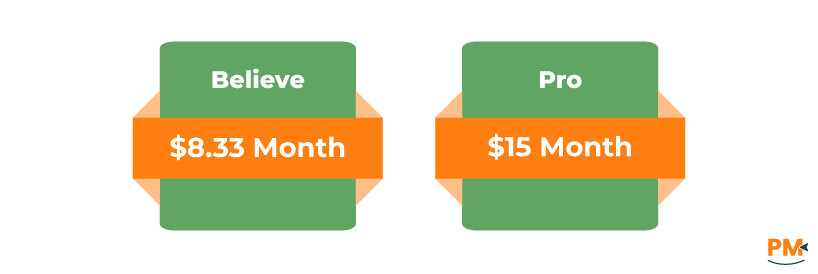
Roam Research offers two pricing plans:
- Believe - $8.33/month
- Pro - $15/month
Disclaimer: The pricing is subject to change.
Notion
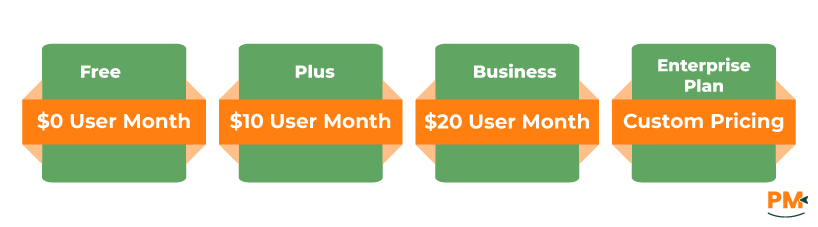
Notion includes the following pricing plans:
- Free - $0/user/month
- Plus - $10/user/month
- Business - $20/user/month
- Enterprise - Custom pricing
Disclaimer: The pricing is subject to change.
Roam Research Is Best For
Ideal Users
- Networked knowledge workers
- Research-driven organizations
- Academic and consulting teams
- Non-linear thinkers
- Custom workflow builders
Why Roam Works for Them
- Graph-based structure for interconnected Ideas
- Bi-directional linking and block references
- Dynamic knowledge maps and backlink navigation
- Support for Zettelkasten, GTD, and other systems
- Flexible page and block-level customization
Keep In Mind:
- No native time tracking - requires third-party tools
- Steep learning curve for new users
Notion Is Best For
Ideal Users
- All-in-one workspaces
- Knowledge-centric teams
- Cross-functional collaborators
- Custom workflow builders
- Remote and hybrid organizations
Why Notion Works for Them
- Unified platform for docs, tasks, wikis, and databases
- Structured knowledge management with nested pages
- Custom properties, filters, and linked databases
- Real-time editing and centralized access across devices
Keep In Mind:
- No built-in time tracking, needs integrations
- May experience performance issues with large databases or complex workspaces
Roam Research vs Notion - Which Project Management Software is Better?
The better choice between Roam Research and Notion depends on how your team organizes work and thinks about structure.
Choose Roam Research if your workflows are research-driven, context-heavy, or require non-linear thinking. Its graph-based system and bi-directional links help build deep knowledge networks, ideal for academics, consultants, or any team managing interconnected ideas.
Go for Notion if you want a flexible, all-in-one platform for documentation, project management, and task coordination. With customizable databases, real-time collaboration, and multiple views like tables and timelines, Notion adapts well to structured, cross-functional team workflows.
Both platforms support cross-platform use, documentation, and collaboration. Your ideal tool depends on whether you value flexible structure and visual management (Notion) or deep linking and thought mapping (Roam).
Still undecided? Try their free or low-tier plans. They’re feature-rich enough to explore real-world workflows before you commit.