
If you’ve ever found yourself juggling tasks, chasing updates, and wondering if there’s a smarter way to keep projects moving – welcome to the club. That’s exactly where project management software has become a staple for modern teams.
But here’s the tricky part: not all tools are built the same and choosing one can feel like picking between two different playbooks. On one side, you’ve got Workfront, tailored for large organizations running complex projects that need serious oversight. In contrast, there’s Asana, known for its clean interface and flexibility that makes it easy for any team to stay on track.
In this face-off, we’ll dig into what sets them apart and which one might earn a spot on your team.
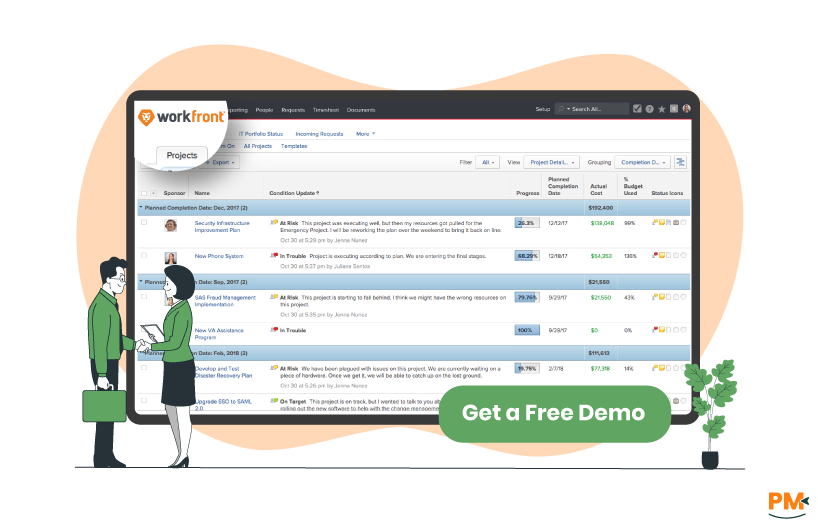
Adobe Workfront is an enterprise work management platform designed for marketing teams and creative operations at scale. Built as a comprehensive system of records, the platform centralizes project planning, resource management, and cross-team collaboration. It organizes work through structured project hierarchies, standardized processes, and governance frameworks that support complex approval workflows. The interface is functional and process-oriented, reflecting its focus on structured work management rather than simplicity. This tool is built for organizations that need enterprise-grade project governance and marketing operations management.
Workfront Pros And Cons
Pros
- Collaboration Tools: The tools stand out, offering real-time communication, file sharing, and built-in feedback features that keep everyone aligned
- Highly Customizable: Custom workflows make it adaptable to different business needs. It’s especially versatile for team collaboration and review processes
- Ticket Management: The ticket system is intuitive, making it easy to track progress. It’s also well-suited for marketing teams, with features tailored to their workflows
Cons
- Complex Setup: Difficult to fine-tune views and workflows, and the many options can feel overwhelming
- Limited Reporting Visuals: Reports lack dynamic imagery, making teams prefer PowerPoint over Workfront’s outputs
Asana is a flexible work management platform that bridges simple task management with enterprise project coordination. It connects individual tasks to company-wide strategic goals through customizable project views and AI-enhanced insights. The tool targets a broad spectrum from small teams to large enterprises seeking improved work visibility and goal alignment.
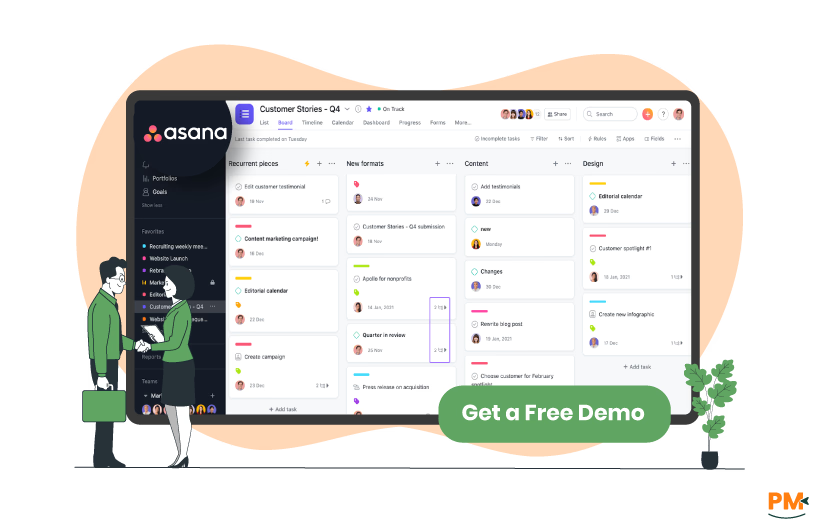
The interface is clean and intuitive, designed for ease of adoption across different user types and technical skill levels. This offers both simplicity for basic project tracking and sophistication for complex work management, rather than being locked into a single use case.
Asana Pros And Cons
Pros
- Access Control: The sharing and restriction features make it simple to grant or limit access to tasks, projects, and portfolios
- Project Management: Managing projects and tracking progress is straightforward, while team collaboration saves time and makes brainstorming effortless
- Flexible Customization: A highly adaptable system that supports customized setups across workflows and departments
Cons
- Cluttered Interface: Too many unnecessary features can clutter the interface and make navigation difficult at first
- Bookmarking Issues: Asana sometimes changes tool URLs, making saved bookmarks unreliable

Workfront
Workfront delivers a granular, enterprise-ready approach to resource management. You’ve got tools like the Resource Planner, which lets you budget project time and organize teams into resource pools. Then there’s the Scenario Planner for high-level, multi-year planning (requires an additional license).
For day-to-day management, the Workload Balancer gives you a visual way to assign tasks based on actual availability and workload. Plus, the Utilization Report helps you compare budgeted, planned, and actual resource usage to understand cost and productivity trends. It even brings in AI insights for smarter forecasting and alerts around project health.
Asana
Asana takes a simpler, more visual approach. Its Workload view shows who’s overloaded or underutilized with a quick glance—and you can rebalance work by drag-and-dropping assignments. Capacity planning stretches out the plan weeks or months ahead, and time tracking helps fill in real staffing data. Add reporting dashboards, and you’ve got insights into where time is going and whether your team is staying on target. The goal is straightforward planning and adjustment, minus the admin overhead.
In summary, Workfront emphasizes detailed planning and forecasting, while Asana focuses on simplicity and ease of balancing workloads.

Workfront
Workfront leans into automation with a toolbox designed for repeatable, complex workflows. You can build project templates and blueprints to kick off common projects—like digital asset rollouts or IT delivery plans—with just a few clicks. The platform also supports automated workflows, such as multi-stage reviews—sequential or parallel, with dependencies, permissions, and templated paths to keep things consistent and fast.
Asana
Asana takes a more lightweight, flexible route. Its Rules engine lets you automate actions based on triggers—like ‘task due soon,’ auto-assigning, moving tasks, and sending notifications. It's easy to build these using a rule builder or pick from a library of recommended automations. Moreover, Asana groups automations, custom fields, templates, and sections into Bundles for easy reuse.
In conclusion, Workfront delivers structured automation for complex enterprise needs, while Asana offers flexible, easy-to-use automation for everyday team workflows.

Workfront
Workfront offers advanced, enterprise-grade reporting and analytics. You get full control to build dashboards using customizable widgets—like timesheets, open issues, or billing—on a visual canvas. You can create your own reports or use built-in templates, apply filters and groupings, and even embed charts and matrix-style views directly into dashboards. There’s also powerful data connectivity: export your Workfront data into data lakes or integrate with business intelligence (BI) tools like Tableau, Power BI, and Looker for deeper analysis.
Asana
Asana keeps it user-friendly with reporting that’s visual and accessible. You can launch dashboards quickly using chart templates from their library—choose from line, bar, donut, number, or even lollipop charts. Pull data from tasks, projects, or goals, apply filters, and click on any data point to open underlying tasks or projects. Dashboards can be shared with team members and span multiple projects or portfolios.
In summary, Workfront excels with advanced, enterprise analytics and BI integrations, while Asana focuses on approachable, visual reporting for quick insights and team sharing.
Workfront
Workfront offers robust enterprise integrations tailored for complex organizational needs. It integrates deeply with other Adobe products like Creative Cloud, Frame. io, and Adobe Experience Manager to streamline creative and marketing workflows.
Additionally, it supports connections with key enterprise tools such as Microsoft Teams, Salesforce, Jira, and Zapier for extended interoperability. These integrations enable seamless data flow across marketing, creative, IT, and project teams, helping large enterprises maintain alignment and efficiency across diverse systems.
Asana
Asana excels in providing a wide variety of out-of-the-box integrations that cater to agile and fast-paced teams. It supports popular tools like Google Workspace, Slack, Trello, Jira, Microsoft Teams, Dropbox, and Zapier. Asana’s integrations emphasize ease of use and quick connectivity, enabling teams to automate task updates and communicate effortlessly across platforms. It is particularly favored by teams that require lightweight, flexible integrations to accelerate productivity without complex setup.
In summary, Workfront’s integrations are more enterprise-focused with deep Adobe ecosystem connections, while Asana offers broader and more accessible integrations optimized for dynamic team environments.

Workfront
Workfront has a powerful but complex interface designed for enterprise users managing multifaceted projects. It offers extensive customization and detailed project views, but can present a steeper learning curve and longer onboarding for new users. Its interface is built to accommodate advanced workflows, detailed resource planning, and compliance needs, which can feel overwhelming for smaller teams or simple projects.
Asana
Asana provides a clean, intuitive interface that is easy to navigate for users of all skill levels. Its design prioritizes simplicity and quick startup, with helpful templates, drag-and-drop task management, and straightforward project views. Asana’s ease of use makes it an excellent choice for teams seeking rapid adoption and minimal training without sacrificing essential project management features.
In summary, Workfront emphasizes depth and enterprise-grade control, while Asana focuses on simplicity and user-friendly design.

Workfront
Workfront offers advanced scheduling features that enable the precise definition of work weeks through customizable schedules assigned to users or projects. These schedules outline working hours, breaks, and time zones to accurately reflect team availability across locations. This facilitates effective workload planning, timeline calculation, and resource capacity management. Workfront supports multiple schedules per project and handles scheduling exceptions like personal time off.
Asana
Asana’s scheduling capabilities focus on task and project timeline visualization. It offers multiple views, such as list, calendar, timeline (Gantt-style), and Kanban, to help teams plan, prioritize, and monitor work progress. Users can assign due dates and milestones, visualize deadlines across calendars, and benefit from workflow automation that dynamically adjusts schedules based on dependencies and changes. Asana also integrates with external calendar tools to keep schedules synchronized.
Workfront’s scheduling capability is more comprehensive and suited for enterprise complexity, whereas Asana offers simpler, flexible task scheduling better suited for smaller or collaborative teams.

Workfront
Workfront offers a comprehensive built-in time tracking system through its timesheets feature. Users can log time spent on tasks, projects, and issues, as well as non-project activities such as meetings, training, and time away. Time entries are linked directly to specific work items, ensuring accurate tracking for project management and billing purposes. The timesheet pre-populates tasks and issues assigned to the user, making it easy to record hours either manually or through automatic updates. The timesheets include up to 45 recent tasks and issues and allow detailed tracking down to quarter-hour intervals. This functionality supports both project and non-project time tracking with a range of hour types such as vacation, sick leave, and general overhead.
Asana
Asana’s native time tracking helps set time estimates for tasks and track actual time spent either through manual entry or a built-in start/stop timer within tasks. While Asana can roll up tracked time reporting at the project and section levels, it lacks built-in comprehensive timesheets, billing capabilities, or detailed reporting for time management. Instead, Asana relies heavily on integrations with third-party time tracking apps for automatic tracking, reports, and invoicing features.
The native time tracking is minimalistic and best suited for teams needing straightforward time estimates and manual tracking embedded in their task workflow rather than extensive enterprise-grade time management.
Workfront provides a detailed time tracking system suitable for enterprise-level resource management and billing, while Asana offers simpler, manual time tracking, best for smaller teams or projects that prioritize ease of use over extensive tracking features.
Workfront Pricing
Adobe Workfront offers three pricing plans depending on your business size, along with add-ons. The plans include:
- Select
- Prime
- Ultimate
Disclaimer: The pricing is subject to change.
Asana Pricing
Asana offers various pricing plans, making it easier for businesses to pick a plan that’s suitable for their teams. These plans include:
- Personal - $0 (free forever, and best for managing small teams and individuals)
- Starter - $13.49/user/month ($ 10.99 billed annually)
- Advanced - $30.99/user/month ($24.99 billed annually)
- Enterprise – custom pricing
- Enterprise+ - custom pricing
Disclaimer: The pricing is subject to change.
Who Is Workfront Best For?
Adobe Workfront is used across a wide range of industries and sectors. It is particularly best for marketing and creative teams, agencies, and large enterprises for centralized project and campaign management. Other key industries using Workfront include technology and software development, financial services, retail and consumer goods, healthcare and life sciences, manufacturing, and professional services.
Workfront helps these industries by improving collaboration, streamlining workflows, enhancing visibility into projects, automating processes, and ensuring compliance in regulated environments. It supports breaking down silos and aligning work with strategic business goals across diverse organizational teams.
Who Is Asana Best For?
Asana is best for a wide range of teams and industries that need a flexible, user-friendly project and work management platform. It suits modern, agile teams across sectors such as technology startups, marketing agencies, healthcare, retail, financial services, education, and manufacturing. Asana is ideal for teams that want to organize complex projects into tasks and milestones, automate workflows, coordinate cross-functional collaboration, manage product launches, handle client work, or improve meeting and communication workflows.
Its versatility makes it a strong fit for companies of any size looking to boost productivity, streamline processes, and elevate team collaboration with AI-powered automation and real-time work tracking.
Which One Should You Go For?
Choosing between Workfront and Asana ultimately comes down to the scale and complexity of your work. Workfront is built for enterprises that need structured governance, advanced resource planning, and deep integrations—especially in marketing and creative operations. On the other hand, Asana shines for teams that value ease of use, flexible automation, and quick adoption without heavy setup.
If your organization runs complex, multi-department projects with compliance requirements, Workfront may be the better fit. But if your team needs an intuitive, adaptable platform to stay organized and move faster, Asana is likely the smarter choice. In the end, both tools deliver powerful ways to keep work moving—the real question is which one aligns best with how your team works today and where you want to go tomorrow.