Zoho Assist and TeamViewer are popular tools for remote access and support. Both let users connect to and control devices from any location, useful for IT teams and individuals providing technical help. Zoho Assist, part of the Zoho suite, focuses on secure and straightforward remote sessions for businesses. TeamViewer, a long-standing platform, is known for its reliability, cross-platform access, and broad device support.
This comparison looks at their main differences in features, pricing, ease of use, and security to help you decide which one fits your remote support needs better.
Zoho Assist vs. TeamViewer: At A Glance
Feature
Zoho Assist
TeamViewer
Best For
Businesses needing affordable, secure remote support
Organizations requiring advanced remote access and cross-platform control
Free Plan
Yes (limited features)
Yes (for personal use)
Starting Price
$10/month/user
$24.90/month/user
Platform Support
Windows, macOS, Linux, Android, iOS
Windows, macOS, Linux, Android, iOS, Chrome OS
File Transfer
Yes
Yes
Unattended Access
Yes
Yes
Multi-Session Handling
Available in paid plans
Available
Security
256-bit AES encryption, two-factor authentication
256-bit AES encryption, two-factor authentication
Integrations
Works with other Zoho apps, Google Workspace, and more
Integrates with major IT and enterprise tools
Customer Support
Email, chat, and phone support
Email, chat, and community support
Ease of Use
Simple and lightweight interface
Feature-rich but slightly complex interface
TL;DR: Zoho Assist is better suited for small to mid-sized teams looking for a cost-effective, secure, and easy-to-use remote support tool.
Zoho Assist Overview
Zoho Assist is a cloud-based remote desktop tool that lets users access and control computers, servers, and mobile devices from any location. It is used by IT teams and support staff to connect to systems securely and resolve issues without being on-site. The platform provides a straightforward way to reach and manage remote devices through an internet connection.
Pros And Cons
Pros
Cons
Simple to set up and easy for new users to navigate
Fast and stable connections with minimal interruptions
Unattended access works smoothly for remote systems
Mobile app sometimes lags or disconnects during sessions.
Multi-monitor control can feel slow or unresponsive.
TeamViewer Overview
TeamViewer is a remote connectivity platform that lets users access and control devices from anywhere through an internet connection. It is widely used for remote work, IT support, and system management, allowing one device to interact with another as if the user were physically present. The platform supports connections across different operating systems, making it useful for individuals and organizations that need to manage or assist remote systems securely and efficiently.
Pros And Cons
Pros
Cons
Easy to set up and use across all devices
Reliable for remote access and support
Works well for IT troubleshooting tasks
Licensing terms can feel restrictive
Connections can drop or lag occasionally
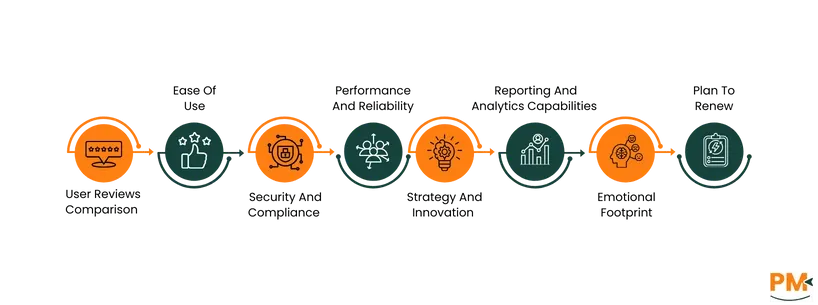
User Reviews Comparison
Zoho Assist is appreciated for its simplicity, affordability, and reliability. Users often note that it performs consistently well for small to medium-sized teams and provides smooth remote sessions with minimal setup. Some users, however, mention occasional lags during connections or difficulties with mobile access. Overall, it maintains a positive reputation for value and usability.
TeamViewer earns praise for its performance, cross-platform compatibility, and reliability at scale. Users highlight its ability to handle multiple sessions efficiently and its polished interface. The most common complaints involve its high pricing and occasional connection delays, particularly in low-bandwidth environments.
Winner: TeamViewer ; It receives higher overall satisfaction scores for stability and professional use, despite its higher cost.
Ease Of Use And UI
Zoho Assist is known for its clean and simple interface that makes it easy to start remote sessions with minimal steps. Users appreciate the straightforward setup process, especially for unattended access and browser-based connections. The tool’s lightweight design helps reduce confusion for both technicians and clients during sessions.
TeamViewer offers a polished interface with a more professional layout but can feel complex for first-time users. Its extensive options and advanced settings require some familiarity, making it better suited for experienced IT teams. Once configured, it runs smoothly, but the number of features can make onboarding slightly slower.
Winner: Zoho Assist ; It offers a faster learning curve and simpler workflow, making it more user-friendly for most users.
Security And Compliance
Zoho Assist prioritizes secure remote connections with measures like 256-bit AES encryption, two-factor authentication, and action-based permissions. It complies with industry standards such as GDPR and SOC 2, giving users confidence in data protection. The platform is designed to minimize security risks while maintaining accessibility for IT teams.
TeamViewer also offers strong security, using 256-bit AES encryption, RSA key exchange, and multi-factor authentication. It is ISO 27001 certified and adheres to major compliance frameworks like GDPR and HIPAA. TeamViewer’s enterprise-level infrastructure and frequent security updates make it a trusted option for organizations with strict compliance needs.
Winner: TeamViewer ; Its certifications and enterprise-grade security standards provide a stronger compliance framework for large-scale organizations.
Performance And Reliability
Zoho Assist delivers stable remote sessions with consistent performance across most devices. Users report smooth control and minimal lag during standard operations. However, under slower internet connections or during heavy file transfers, slight delays may occur. Overall, it performs reliably for everyday support and IT maintenance tasks.
TeamViewer is recognized for its strong performance and ability to maintain stable sessions even under low bandwidth conditions. It provides fast screen refresh rates, high responsiveness, and reliable multi-device connectivity. Occasional latency can occur during long sessions, but it rarely impacts functionality or user experience.
Winner: TeamViewer ; It consistently offers faster, more stable remote connections, especially in demanding network environments.
Strategy And Innovation
Zoho Assist continues to evolve within the broader Zoho ecosystem, focusing on improving accessibility and efficiency for remote support. Its updates often target usability, automation, and integration within Zoho’s product suite. While innovation is steady, it mainly centers around enhancing existing workflows rather than introducing disruptive features.
TeamViewer has a stronger focus on innovation, expanding its platform to include technologies like augmented reality (AR) for visual assistance and IoT device management. The company frequently introduces advanced capabilities to support enterprise and industrial use cases, keeping it ahead in terms of long-term vision and technology adoption.
Winner: TeamViewer ; Its continuous investment in emerging technologies like AR and IoT sets it apart as a forward-looking platform.
Reporting And Analytics Capabilities
Zoho Assist offers basic reporting tools that help track session history, technician activity, and connection logs. These reports are simple and functional, suitable for small teams monitoring support activity. While sufficient for operational visibility, the platform’s analytics are limited and may not meet the needs of large enterprises requiring detailed data insights.
TeamViewer provides more comprehensive reporting and analytics features, especially in its enterprise plans. Users can access detailed logs, usage statistics, and performance summaries across devices and sessions. These insights help IT managers analyze productivity, identify issues, and ensure compliance with internal policies.
Winner: TeamViewer ; It offers deeper and more customizable reporting options suited for enterprise-level monitoring.
Emotional Footprint
Zoho Assist is well-regarded by users for its reliability, simplicity, and fair pricing. Many appreciate its straightforward design and consistent support, which creates a sense of trust and satisfaction. Negative feedback is generally minor and focused on small usability issues, not overall experience. Users often describe it as dependable and stress-free to use.
TeamViewer has a strong brand presence and is trusted by professionals worldwide. Users value its performance and reliability but often express frustration with its high pricing and licensing restrictions. Despite these concerns, it maintains loyalty among enterprise users due to its proven track record and stability.
Winner: Zoho Assist ; It earns stronger emotional loyalty from users through ease, fairness, and reliability.
Plan To Renew
Most Zoho Assist users report high renewal intent due to its affordability, consistent performance, and reliable support. Its simple setup and predictable pricing make it easy for teams to continue using without switching costs or complications. Users see it as a practical long-term solution for remote support needs.
TeamViewer maintains a solid renewal rate among enterprise clients who rely on its advanced capabilities and proven reliability. However, smaller businesses are less likely to renew due to its higher subscription costs. Despite that, its strong brand trust keeps many organizations loyal to the platform.
Winner: Zoho Assist ; Its cost-effectiveness and dependable performance lead to higher renewal likelihood among a wider range of users.
Zoho Assist vs TeamViewer Pricing Comparison
Zoho Assist Pricing
Plan
Price (/technician/month)
Key Notes
Free
$0
One technician, basic remote support/unattended access
Standard (Remote Support)
US$12/month/1 technician
Adds features like multiple sessions, file transfer
Professional (Remote Support)
US$18/month/1 technician
More sessions, mobile device access
Enterprise (Remote Support)
US$28/month/1 technician
Full set of features including session recording, auditing
Standard (Unattended Access Plans)
US$12/month/25 unattended computers
Focused on unattended devices rather than ad-hoc support
Professional (Unattended Access Plans)
US$18/month/25 unattended computers
Focused on unattended devices rather than ad-hoc support
Disclaimer: The pricing is subject to change.
TeamViewer Pricing
Plan
Price (/user/month, billed annually)
Key Notes
Free for personal use
$0
Non-commercial use only
TeamViewer Remote Access
US$11. 90/month/billed yearly
Entry commercial plan; individual users
TeamViewer Business
US$25. 90/month/billed yearly
For entrepreneurs/small teams, it includes more managed devices
TeamViewer Premium
US$52. 90/month/billed yearly
For SMBs, more concurrent sessions, more devices
TeamViewer Corporate
US$102. 90/month/billed yearly
For larger teams/MSPs with higher scale needs
TeamViewer Tensor (Enterprise)
Custom Quote
Enterprise-grade solution with SSO, conditional access, and large-scale device management. Pricing varies by deployment size
Disclaimer: The pricing is subject to change.
Who Is Zoho Assist Best For?
Zoho Assist is designed for small to mid-sized businesses that need an affordable and reliable remote access and support solution. It’s simple to set up, secure, and efficient, making it a practical choice for growing teams and tech-driven operations.
Best suited for:
IT support teams handling remote troubleshooting or device management
Managed service providers (MSPs) managing multiple client systems
Help desks providing real-time customer assistance remotely
Industries like IT services, customer support, education, and small enterprises that rely on remote collaboration
Key advantages:
Lightweight and easy to deploy, no complex installation required
Ideal for small teams or individual technicians seeking a quick, reliable setup
Secure and cost-effective for up to a few dozen users
Flexible and scalable to support diverse remote work environments
Who Is TeamViewer Best For?
TeamViewer is built for larger organizations and enterprise-level operations that need robust, scalable remote connectivity. It’s designed to handle complex IT environments with multiple devices, users, and locations, offering advanced security and enterprise-grade performance.
Best suited for:
Large enterprises and global organizations managing distributed teams or clients
IT departments needing full control over remote access and support
Industries like healthcare, manufacturing, and engineering where compliance and cross-platform access are essential
Companies with global operations that rely on secure, high-capacity remote infrastructure
Key advantages:
Highly scalable, supports dozens to hundreds of users and sessions simultaneously
Enterprise-grade security and compliance for sensitive environments
Cross-platform compatibility across Windows, macOS, Linux, Android, and iOS
Comprehensive management features for networks, endpoints, and remote devices
Which One May Suit Your Needs Better?
Both tools deliver dependable remote access, but they serve different audiences. Zoho Assist stands out for its simplicity, affordability, and suitability for small to mid-sized teams that prioritize cost and ease of use. TeamViewer, on the other hand, is a stronger fit for enterprises that need advanced control, compliance, and performance across large networks.
What Are The Alternatives?
Alternatives For Zoho Assist
AnyDesk – Known for its speed and lightweight design
RemotePC – Cost-effective option for individuals and small teams
Splashtop – Offers strong performance and security for SMBs
ConnectWise ScreenConnect – Great for MSPs needing advanced customization
Chrome Remote Desktop – Free and simple tool for occasional remote access
Alternatives For TeamViewer
LogMeIn (GoTo Resolve) – Enterprise-ready with advanced IT management features
AnyDesk – Lightweight competitor with fast connections
BeyondTrust Remote Support – Strong security for regulated industries
Splashtop Enterprise – Scalable and affordable alternative for large teams
Parallels Access – Good for individuals needing mobile-to-PC connectivity
Ashar Ahmad is the Content Team Lead for the HR category at Software Finder. With over seven years of experience in content writing, he has gone through the paces to prove himself. As someone who understands the unique perspective the readers are looking for and the pain points of writers trying to craft that well-written piece, he now mentors others to enlighten the readers. Outside of work, you will probably find Ashar playing games, being tormented by his cat, tending to his fruit garden, or building keyboards just so he can write more.
Share this Article
Sign Up
Sign up to stay updated with the new content and expand your HR expertise.
Ashar Ahmad is the Content Team Lead for the HR category at Software Finder. With over seven years of experience in content writing, he has gone through the paces to prove himself. As someone who understands the unique perspective the readers are looking for and the pain points of writers trying to craft that well-written piece, he now mentors others to enlighten the readers. Outside of work, you will probably find Ashar playing games, being tormented by his cat, tending to his fruit garden, or building keyboards just so he can write more.