


Zoho Creator and Caspio are two leading low-code platforms that help businesses build custom applications without extensive coding. Zoho Creator is a low-code app development platform with an AI assistant (Zia) and drag-and-drop interface, designed to speed up creation of internal tools, workflows, and portals. It offers cross-device native apps (web, iOS, Android) and integrates with hundreds of other apps. Caspio is a no-code cloud database platform focused on data-driven business apps. It provides a visual app builder, built-in compliance (HIPAA, SOC 2, GDPR, etc.) , and powerful workflow automations. Both platforms support automation and reporting, but they target somewhat different needs: Zoho Creator is often praised for ease of use and broad integrations, while Caspio is favored in industries requiring strict data governance.
Below is a quick comparison of key aspects of each tool, followed by an executive verdict for readers in a hurry:
Feature / Aspect | Zoho Creator | Caspio |
Type of Tool | Low-code app builder (with AI assistance) | Low-code database app platform (unlimited users) |
Primary Use | Build custom business apps (portals, workflows, forms) | Build secure, data-driven applications (CRM, portals, surveys) |
Platform Support | Web-based builder; native mobile apps (iOS/Android) | Web-based (cloud); responsive apps; can embed in sites |
AI & Automation | Zia AI assistant suggests fields/workflows; visual process automation | AI-enhanced app design (GPT-based); event triggers & business rules |
Integrations | 800+ prebuilt integrations (Zoho suite, Salesforce, PayPal, etc.) | Native connectors, REST APIs, webhooks to ERPs, CRMs, analytics |
Security & Compliance | ISO 27001/27017/27018, SOC 2 compliant, encrypted data center backups | Enterprise compliance (HIPAA, SOC 2, GDPR, FERPA) built in |
Users / Teams | Scales from solo/freelance (free plan) to large orgs (30,000 organizations) | Unlimited users on all plans; used by 15,000+ organizations worldwide |
Pricing | Free plan (1 user, 1 app); paid from $12/user/month (Standard) to $35+/user | Tiered pricing (starting ~$100/month for Lite; Plus $300, Business $600; Enterprise custom) |
Collaboration | Share apps with roles/groups; real-time data access on mobile | Unlimited team collaboration; fine-grained role & SSO controls |
Reporting & Dashboards | Built-in reports and dashboards; AI-driven conversational analytics | Interactive real-time dashboards and reports (e. g. Web Dashboards) |
Support | Email and community support; extensive documentation | 24/5 chat support (higher plans); dedicated support on premium plans |
Verdict (TL;DR): Zoho Creator excels at rapidly building user-friendly apps with AI and mobile support – ideal for teams needing flexible custom tools. Caspio shines for enterprise-grade, secure data-centric applications with unlimited users and strict compliance. Your choice depends on priorities: ease and cost (Zoho) vs. scalability and governance (Caspio).

Zoho Creator is a cloud-based low-code platform that lets you create custom business applications quickly. Using its visual interface, anyone can drag-and-drop form fields, reports, and workflows to turn ideas into working apps. Zoho emphasizes automation and AI: its Zia AI assistant can suggest fields or build parts of an app from natural language descriptions. The platform supports “no-code” logic and scripting (Deluge) to automate processes and approvals. According to Zoho, businesses worldwide have built over 7 million apps on Creator, showing its scalability.

Caspio is a no-code cloud platform focused on online database applications. It enables businesses to build custom apps (forms, portals, dashboards) on top of a scalable SQL database, all without writing code. Caspio highlights unlimited users on every plan and strong security/compliance: it meets standards like HIPAA, FERPA, SOC2, GDPR out of the box. Using Caspio’s visual interface , teams can design data entry forms, interactive reports, and process workflows. Caspio is used across industries (healthcare, finance, government, nonprofits) for everything from patient portals to field data collection.
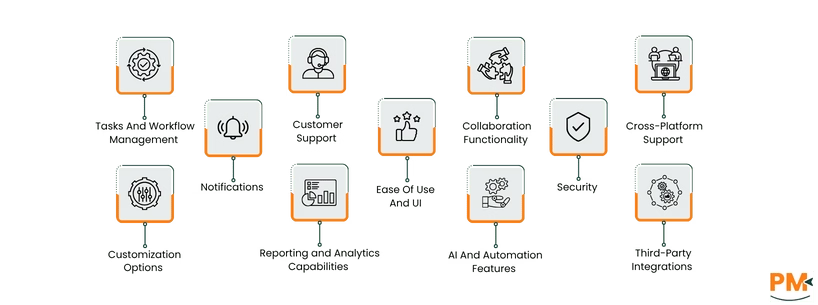
Tasks And Workflow Management
Zoho Creator
Zoho Creator excels at automating tasks and workflows. You can design business process flows visually by connecting form submissions, approvals, and actions. The platform offers drag-and-drop workflow rules, field validations, and scheduled tasks. Zoho’s AI assistant (Zia) can even help generate basic workflows based on your instructions. Teams often use Creator to build project tracking apps, issue trackers, or inventory workflows without coding. Its built-in scripting (Deluge) allows complex logic (calculations, conditionals) behind the scenes to manage tasks automatically.
Caspio
Caspio also supports robust workflow automation, especially for data-centric processes. You can set up event triggers and scheduling: when a user submits a data form, Caspio can automatically send emails, update records, or kick off other actions. Its visual builder lets you attach logic rules to forms and reports. According to Caspio, the platform helps “automate workflows, unify information and eliminate silos,” enabling greater operational flexibility. For instance, a Caspio app might automatically assign a new ticket to a team member or escalate overdue items. Caspio’s Flex framework further allows enterprises to embed custom code or third-party APIs if needed, giving IT teams full control over workflow behaviors.
Customer Support
Zoho Creator
Zoho offers standard support channels: extensive documentation, community forums, and email-based help. Zoho Creator users can access tutorials and a knowledge base. On paid plans, Zoho provides priority support as an add-on or via phone/chat (depending on regional offerings). However, compared to Caspio, Zoho’s support is generally broader (covering many products) rather than specialized. Many users rely on the Zoho community and online resources to troubleshoot. Overall, support is responsive but can vary by plan level and region.
Caspio
Caspio prides itself on strong customer support. Its pricing tiers explicitly include live support: Business and Enterprise plans get 24/7 chat access. Caspio also maintains an active online forum, knowledge base, and training resources. In short, Caspio is known for hands-on guidance, which is valuable for businesses new to no-code platforms or tackling complex customizations.
Collaboration Functionality
Zoho Creator
Zoho Creator enables collaboration by allowing multiple users to share and work on apps simultaneously. You can assign roles and permissions at the app or data level, controlling who can view, edit, or administer each application. Teams can collaborate on app development (co-design forms) and also collaborate as end-users. Importantly, every Zoho Creator application automatically includes native mobile apps: users with permission can log into the Creator mobile app to enter or view data in real-time. This means, for example, a sales team can collectively update a CRM-like app from anywhere. Furthermore, Creator integrates with Zoho Projects and other Zoho apps, so you can link tasks or data across systems for broader team collaboration.
Caspio
Caspio also supports team collaboration, especially in sharing data-driven applications. All Caspio plans allow unlimited users to access applications (even external users via public or portal apps). Within the platform, you set up team members as “app authors” with roles (e. g. developer, viewer). Caspio’s Identity & Access features let you integrate with SSO/AD (for business accounts) and apply fine-grained roles. Collaboration often happens through Caspio’s portals or dashboards: for example, multiple departments can log into a Caspio portal to enter or see the same data. In practice, companies use Caspio for collaborative needs like shared incident reporting, where everyone contributes to the same dataset.
Cross-Platform Support
Zoho Creator
Zoho Creator is inherently cross-platform. Apps built on Creator run natively on the web and on mobile. As noted on Zoho’s site, “Every application built on Zoho Creator comes with a native app for iOS and Android, allowing users to access real-time data from anywhere”. This means you design once, and Creator delivers responsive apps on all devices. Additionally, Creator’s web interface supports all major browsers. Offline support on mobile is limited, but basic form entry is possible in low-connectivity scenarios. Overall, Zoho Creator’s strength is seamless cross-device availability: a user can open the same app on a laptop, phone, or tablet with consistent UI.
Caspio
Caspio’s apps are web-based (hosted in the cloud) and therefore run on any device with a browser. Its platform does not provide separate native mobile apps; instead, it relies on responsive design. In practice, a Caspio data entry form or dashboard will adapt to screens of different sizes, but the experience is still “web form” styled. Some Caspio users embed their apps in hybrid mobile wrappers or add custom responsive styles for better phone use. However, there’s no offline mode in Caspio. The trade-off is that Caspio’s focus is on browser compatibility and web standards, rather than dedicated mobile clients. Companies using Caspio typically instruct mobile users to bookmark the app URL or integrate it into their website (Caspio can be embedded into portals or intranets).
Ease Of Use And UI
Zoho Creator
Zoho Creator is generally praised for its user-friendly interface. The drag-and-drop form/report builder is intuitive even for non-developers. The design language is modern and clean, following Zoho’s usual style. The AI assistant (Zia) adds an extra ease-of-use layer for new app creation. Onboarding is straightforward: Zoho provides templates, sample apps, and a Getting Started guide. End-users (the people who use your apps) also find Creator apps easy to navigate, since the UI elements (forms, buttons, charts) are standard and can be customized with your branding. In summary, Zoho scores high on “ease of use” for both builders and users, especially for teams familiar with other Zoho products.
Caspio
Caspio’s UI is powerful but can feel more technical. Its visual builder uses “DataPages” (forms, reports, charts) which are configured via wizards and SQL-like queries. For non-technical users, there can be a learning curve. The initial configuration (choosing columns, filters, security) exposes many options. However, Caspio provides numerous tutorials and a guided first-run for new users. The advantage is flexibility: every UI element can be finely tuned. Compared to Zoho, Caspio’s interface is more database-centric, which can intimidate absolute beginners. Advanced users appreciate that Caspio doesn’t hide complexity – you can create highly customized layouts and logic. Overall, ease of use is moderate: simple apps are quick to assemble, but complex apps require exploration of the platform.
Customization Options
Zoho Creator
Customization in Zoho Creator is robust within the platform’s ecosystem. You can customize themes, layouts, and navigation of your apps to match company branding. The built-in script language (Deluge) lets you add custom logic (calculations, loops, third-party API calls) behind forms and reports. Zoho Creator also supports custom pages (HTML/CSS) and integrations with Zoho’s AI and analytics tools. For example, you can embed custom HTML code for widgets or use Deluge to create a portal page with specific formatting. However, you are still within the low-code constraints – you cannot, for instance, export the code to host outside Zoho. The upside is that all customization options are available through the Creator interface, so no external hosting or coding is needed.
Caspio
Caspio offers extensive customization, especially through its Flex Framework (a newer feature). In traditional Caspio, you customize forms and reports via settings and SQL – limited to the platform’s editor. With Caspio Flex, you get a drag-and-drop builder that is more free-form, plus the ability to inject custom HTML, CSS and JavaScript. This means IT teams can fully customize the look and behavior of apps, or even build single-page app interfaces if desired. For example, Caspio Flex allows building apps that look and act exactly as required (with full governance). Out of the box, Caspio also provides “Dashboard” and “Application” layouts you can tailor. In short, Caspio’s customization is very deep, with enterprise extensibility (if you have developer resources).
Security
Zoho Creator
Zoho Creator takes data security seriously. According to Zoho, customer data is stored in secure data centers across multiple geographies, ensuring logical separation and backups. The platform is certified under ISO 27001/27017/27018 and is SOC 2 compliant. Standard security features include SSL encryption for data in transit, field-level security, user roles/permissions, and regular backups. Zoho also offers multi-factor authentication (MFA) and optional IP restrictions on login. In most enterprise editions, you can set password policies and audit trails on all data. Many healthcare and financial organizations use Zoho Creator because of this robust security foundation.
Caspio
Caspio’s security is enterprise-grade by design. The platform offers built-in compliance for HIPAA, FERPA, and more meaning data is encrypted, and access is tightly controlled. Caspio sits on AWS infrastructure and uses Microsoft SQL Server as its backend, benefitting from those providers’ security. Role-based access control is strong: admins can set up SAML or SSO authentication, multi-factor login, and fine-grained permissions. Caspio also offers optional features like IP filtering and session controls. In practice, Caspio applications often handle sensitive information (medical, government records) thanks to this security layer. Their compliance certifications mean users can deploy Caspio in regulated industries without needing additional security tools.
Notifications
Zoho Creator
Zoho Creator includes various notification options. You can configure email alerts on form events (e. g. “send an email when a new record is added” or “notify manager on status change”). It also supports push notifications via its mobile app: users can receive instant app activity notifications on their smartphones. In fact, Creator’s pricing features page notes “App activity notifications” as a built-in feature. Additionally, Zoho Creator can integrate with other Zoho tools (like Zoho Flow or Zapier) to send Slack messages, SMS alerts, or other communications. Overall, Zoho’s notification system is flexible: you build workflows that include “Send Email/SMS” tasks, and the platform handles delivery.
Caspio
Caspio supports notifications primarily through workflow triggers. When an event occurs (record updated, threshold reached), Caspio can automatically send email alerts or push updates to webpages. By designing a DataPage with an “Add Recipients” step, you specify who should get notifications and when. Caspio does not have a built-in SMS service (but you can use add-on integrations or API calls). Some Caspio users leverage its webhook and API capabilities to connect with services like Twilio or Slack for alerts. In essence, notification in Caspio is part of its event trigger system.
Reporting And Analytics Capabilities
Zoho Creator
Reporting is a core feature of Zoho Creator. Each form or report you build can be visualized in charts, pivot tables, or dashboards. Importantly, Creator provides real-time analytics with AI: you can literally ask questions in plain English and get instant charts or data insights. Aside from AI, Creator’s custom reports allow filtering, grouping, and exporting data. Users can also schedule report sharing or embed reports in Zoho Sheets/BI for deeper analysis. In summary, Zoho Creator offers both standard reporting views and an innovative conversational analytics feature.
Caspio
Caspio includes strong reporting and dashboard tools. Within a Caspio app, you typically create Web Dashboards (interactive charts) that update in real time as data changes. This means Caspio can present data from any part of the database in graphical form (bar charts, line graphs, gauges, etc.) , and users can drill into data. Additionally, Caspio allows exporting of data to CSV or integration with external BI tools (using the REST API). The platform also handles aggregations (sums, counts) automatically. Overall, Caspio is very capable for basic to advanced analytics, especially when combined with external tools like Power BI or Tableau for an extra layer of insight.
AI And Automation Features
Zoho Creator
Zoho Creator integrates AI at multiple levels. As mentioned, the Zia assistant uses generative AI to help build apps – for instance, it can auto-generate form fields or even simple workflows based on your description. Beyond app creation, Zoho offers Zia-powered prediction models: you can train Zia to analyze your app data and forecast trends (sales forecast, risk scoring, etc.) . Workflow automation in Creator is also AI-augmented: you might use AI to detect anomalies in records and trigger alerts.
Caspio
Caspio has recently introduced AI-enhanced tools in its Flex framework. Notably, it offers GPT Connect, an AI assistant that can generate code and insights within Caspio. Users can describe an app requirement in natural language, and Caspio’s AI will produce the underlying query or layout. For example, telling the system “build me a table to track employee hours” could auto-create a data table and form. Caspio’s own overview highlights “AI-Enhanced Development: accelerate design by describing requirements in natural language”. On the automation side, Caspio’s Visual Builder includes event triggers, scheduled tasks, and process flows (similar to Zoho’s workflows). While its AI features are newer, Caspio positions itself as combining low-code with emerging AI to speed up app creation.
Third-Party Integrations
Zoho Creator
Zoho Creator plays well with other tools. It boasts over 1000 prebuilt integrations with popular services. These include Zoho’s own ecosystem (CRM, Desk, Finance, etc.) , as well as third-party apps like Salesforce, PayPal, Twilio, Google Suite, and Slack. Integration is typically done via connectors in Zoho Flow (or third-party services like Zapier), making it easy to push or pull data. For example, a Creator form submission can automatically create a record in Salesforce, or a payment can trigger a Creator workflow. Zoho also provides REST APIs and webhooks for custom integrations. In practice, this means if your company uses other SaaS products, you can usually link them to Creator seamlessly – a big plus for extending your app’s functionality.
Caspio
Caspio offers native connectors and API integration as well. Its platform integrates out-of-the-box with common tools: you can sync Caspio data with Salesforce, QuickBooks, or Google Workspace via connectors. The platform also supports REST web services and SOAP, enabling virtually any integration if you custom-build it. Key integrations often come through Zapier or custom webhooks – for instance, pushing Caspio records into Mailchimp or Slack updates. Caspio’s own site lists the ability to connect to CRMs, ERPs, payment gateways, and analytics tools. While not as many prebuilt “one-click” integrations as Zoho’s count, Caspio’s API-first approach makes it very flexible for developers. In summary, Zoho Creator has a larger marketplace of plug-and-play integrations, whereas Caspio offers deep customizability via APIs.
Pricing for both tools is tiered and can vary by region. Here is a simplified comparison:
Zoho Creator Plans:
Plan | Price | Key Inclusions |
Free | $0 (1 user, 1 app) | 250 MB storage, 5,000 records, basic features |
Standard | $12/user/month | 1 app, 1 GB data, basic workflows |
Professional | $30/user/month | Unlimited apps, 3 GB data, advanced workflows, SSO |
Enterprise | $37/user/month | Unlimited apps, 5 GB data, premium features |
Flex | Custom | Unlimited (custom resources per needs) |
Disclaimer: The pricing is subject to change.
Caspio Plans:
Plan | Price | Key Inclusions |
Lite | $100/month | Up to 50 DataPages, 15K records, basic support |
Plus | $300/month | Up to 100 DataPages, 250K records, Standard support |
Business | $600/month | Up to 200 DataPages, 1M records, 24/5 phone support |
Enterprise | Custom (Contact Sales) | Unlimited resources, premium support, enhanced security |
Disclaimer: The pricing is subject to change.
Zoho Creator is best for organizations that need rapid app development with broad usability, often across small to medium-sized businesses. It suits teams that value ease of use and flexibility: for example, a marketing team quickly building a lead-capture app, or an HR department creating a timesheet system. Because of its per-user pricing, Creator often appeals to companies that want to start small (even a single user) and grow gradually. It is particularly strong if your company already uses other Zoho tools (CRM, Books, etc.) , as Creator fits into that ecosystem seamlessly. Industries like education, non-profits, and small tech firms often use Creator because it can handle many use cases (asset tracking, project portals, compliance checklists) without coding. Zoho Creator is also good for cross-functional apps – since it has native mobile support and AI – meaning field workers and office staff can use the same apps. In general, Creator is well-suited to businesses of virtually all sizes, especially those needing custom internal tools rather than out-of-the-box SaaS. It shines for up to thousands of users (with adequate planning), but very large enterprises might need more governance than Creator’s per-user model easily provides.
Caspio is best for large organizations and enterprises that need to build complex, data-intensive applications with strict security. It particularly fits industries like healthcare, finance, government, and education – any sector where compliance (HIPAA, FERPA, etc.) is critical. Because Caspio charges by plan (not by user), it’s cost-effective for teams with hundreds or thousands of users; for instance, a university running a student portal or a hospital deploying a patient intake app can scale without per-user fees. Caspio is also ideal when you need a centralized database backend – for example, consolidating legacy systems or spreadsheets into one cloud platform. Its flexibility suits IT departments: if you want full control over data connections, custom SQL, and advanced workflows, Caspio provides the extensibility (especially with the Flex framework) to do so. In summary, Caspio is perfect for companies that prioritize robust data management and governance over initial simplicity – think large enterprises that are ready to invest in a powerful, secure app platform. Small teams or those without dedicated technical resources might find Caspio’s capabilities more than they need, but for large-scale, mission-critical apps, Caspio is a strong choice.
Choosing between Zoho Creator and Caspio depends on your organization’s priorities:
- If you need a user-friendly, quick-start platform to build moderate-complexity apps (like internal tools, portals, task trackers) and your user count is not extremely high, Zoho Creator often wins. It’s cost-effective at smaller scales, has a gentler learning curve, and excels in multi-platform accessibility and integrations.
- If you require enterprise-level security and unlimited scalability, especially around large datasets, Caspio may be better. Caspio’s unlimited user policy and compliance certifications make it the choice for regulated industries or applications involving sensitive information. It may have a steeper learning curve, but for mission-critical apps that grow, Caspio delivers performance and governance that Zoho’s model doesn’t emphasize.
In practice, many organizations compare these platforms by piloting a simple project. Zoho Creator is typically easier to adopt without advanced training. Caspio, while more complex, might be justified if your use case is very data-centric or requires features like unrestricted user access and rigorous compliance. Ultimately, consider your project requirements, budget (per-user vs flat plans), and in-house expertise. Both platforms are leaders in low-code; your specific need for usability vs. scalability/compliance will tip the balance.
If neither Zoho Creator nor Caspio fully meets your needs, there are several notable alternatives in the low-code/no-code space:
- Quickbase – A robust low-code platform for building data-driven apps (Often cited alongside Caspio as enterprise alternative)
- OutSystems – An enterprise-grade low-code environment for complex business applications (code exportable)
- Mendix – High-end low-code that targets large enterprises needing custom mobile and web apps
- Microsoft Power Apps – Integrates well with Office 365 and Dynamics, good for rapid app building with Microsoft ecosystem
- Salesforce Lightning Platform – If you already use Salesforce, Lightning lets you create custom apps on the same platform
- Airtable – For simpler database apps or collaborative bases, with a highly intuitive interface (more limited scalability)
- AppSheet (Google) – For quick spreadsheet-driven apps with native mobile support (no-code)
Each alternative has its own strengths (e. g. better spreadsheet integration, stronger mobile app building, or tighter ecosystem). When evaluating, consider how they align with your team size, technical skill, required integrations, and security needs. Many of these options have comparison guides and reviews to help you decide which platform best matches your scenario.
