


Choosing the right customer relationship management (CRM) software can shape how effectively your business attracts, engages, and retains customers. In this comparison, we take a close look at Zoho vs Agile CRM, two powerful platforms built to streamline sales, marketing, and customer support.
Zoho CRM is a scalable, cloud-based solution trusted by businesses of all sizes to automate workflows, increase sales performance, and enhance customer experiences. Meanwhile, Agile CRM focuses on simplicity and affordability, offering small and mid-sized businesses an all-in-one platform for sales tracking, marketing automation, and customer service.
In this article, we’ll break down their core features, advantages, and limitations to help you decide which CRM aligns best with your business goals and growth strategy.
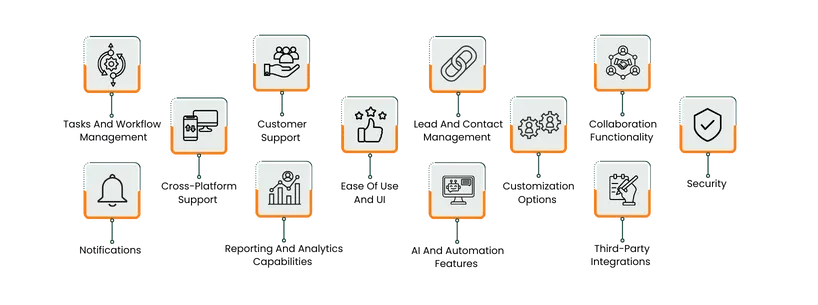
Feature | Zoho Projects | Agile CRM (Project Management) |
Primary Use | Dedicated project management software | CRM platform with built-in project management |
Best For | Small to large teams managing structured projects | Small sales or marketing teams handling client projects |
Ease of Use | Intuitive feature-rich interface with slight learning curve | Simple and minimal; easy for beginners |
Task & Workflow Management | Supports task dependencies, Gantt charts, milestones, and automation | Basic task tracking and milestones, limited workflow automation |
Collaboration Tools | Built-in chat, document sharing, forums, and comments | Integrated with CRM communications and contact management |
Customization | Extensive custom fields, layouts, templates, and workflows | Limited tags and categories |
Reporting & Analytics | Advanced dashboards and Zoho Analytics integration | Basic task and milestone tracking |
AI & Automation | Includes Zoho’s AI assistant (Zia) and workflow automation | CRM-linked automation; no AI features |
Cross-Platform Support | Full web and mobile apps for iOS and Android | Web-based with mobile CRM apps |
Integrations | Deep Zoho ecosystem + Google Drive, Slack, MS Teams | Integrates with Google Workspace, Zapier, Twilio, and others |
Security | Enterprise-grade encryption, access control, and compliance (GDPR, ISO) | SSL encryption and role-based access control |
Pricing | Free for 5 users; scalable paid tiers | Free for 10 users; pricing tied to CRM plans |
TL;DR: If your main goal is comprehensive project management, Zoho Projects is the clear winner with its advanced tools, scalability, and reporting depth.
For smaller, client-focused teams seeking CRM integration with light project tracking, Agile CRM offers simplicity and value in one platform.

Zoho Projects is a full-featured project management platform designed to help teams plan, track, and deliver projects efficiently. It supports task management, time tracking, collaboration, Gantt charts, and workflow automation.
The platform’s integrations with Zoho’s ecosystem and third-party tools make it flexible for diverse workflows, while built-in issue tracking and document sharing streamline project communication. It’s suitable for teams of all sizes looking for an affordable yet powerful project planning tool.
Zoho Pros And Cons
Pros | Cons |
|
|

Agile CRM’s Project Management module brings essential task and milestone tracking into the same system used for sales and customer engagement. It’s designed for small and mid-sized businesses that want to manage customer-facing projects without switching platforms.
Users can create projects, set milestones, assign tasks, and visualize progress through drag-and-drop Kanban boards. By linking projects to contacts or deals, teams can track deliverables alongside customer interactions for better visibility.
Agile CRM Pros and Cons
Pros | Cons |
|
|
Zoho
Zoho Projects provides structured task and workflow management to streamline project delivery. Teams can break down work into milestones, tasks, and subtasks with clear dependencies, priorities, and deadlines.
Workflow rules automate repetitive actions, such as task assignments or status updates, while custom blueprints define process stages visually. Combined with time tracking, reminders, and Gantt charts, Zoho Projects enables smooth coordination and accountability across all team members.
Agile CRM
Agile CRM’s project management focuses on simplicity and integration. Users can create tasks, assign them to team members, and organize them within milestones or projects using a Kanban-style interface. Workflows can be automated based on CRM activities—for example, when a deal closes, related project tasks can be triggered automatically. This unifies project execution with customer lifecycle management, offering an efficient solution for smaller teams balancing client work and internal projects.
Zoho
Zoho Projects supports customer collaboration and issue tracking directly within the platform. Clients can be invited to view project progress, log issues, and share feedback, fostering transparency. The integrated issue tracker allows teams to record, prioritize, and resolve bugs efficiently, while integrations with Zoho Desk extend these capabilities into full support workflows. This alignment between project execution and client feedback helps teams deliver high-quality outcomes with reduced response times.
Agile CRM
Agile CRM’s project management tool helps teams manage post-sale support and delivery tasks in one place. Support issues or client requests can be tied to project tasks, keeping customer communication aligned with ongoing work. The unified system allows service teams to monitor deadlines and ensure customer commitments are met. For small businesses, this integration simplifies client servicing without the need for separate help desk tools.
Zoho
While Zoho Projects focuses primarily on task and project execution, it integrates seamlessly with Zoho CRM to bridge the gap between leads, contacts, and project delivery. Through this connection, teams can automatically convert closed deals into projects, assign responsible members, and maintain continuity between sales and execution phases.
Within Zoho Projects itself, client contacts can be added as portal users, allowing them to view progress, share documents, and communicate directly with the team. This integration ensures smooth handoffs from lead acquisition to project completion.
Agile CRM
Agile CRM’s Project Management module is tightly interwoven with its CRM core, allowing users to link tasks and milestones directly to leads and contacts. This makes it easy to manage customer projects, track progress, and maintain all related information in one unified space.
As tasks move through different stages, updates are automatically reflected in the associated contact’s record, providing a full view of project status and client engagement. This connection between contact data and project work enables smaller teams to manage customer relationships and deliverables simultaneously.
Zoho
Zoho Projects offers a robust suite of collaboration tools designed to keep teams and clients aligned throughout the project lifecycle. Users can communicate through built-in chat, project forums, and task-level comments, ensuring context stays connected to work. File sharing, document versioning, and real-time activity feeds make collaboration seamless and transparent.
Team members can also use the project calendar and interactive Gantt charts to stay informed about deadlines and dependencies. With client portals, Zoho Projects enables external stakeholders to participate directly, improving visibility and communication across all project stages.
Agile CRM
The Project Management module in Agile CRM supports lightweight collaboration through its shared workspace and Kanban-style boards. Teams can assign, update, and track tasks together in real time, with automatic progress updates visible to all members. Each project or milestone can include notes and attachments, centralizing communication and documentation in one place.
Since Agile CRM’s project management is integrated with its contact and sales modules, communication with clients can also be tied directly to project activities—helping small teams maintain continuity between conversations and deliverables.
Zoho
Zoho Projects delivers strong cross-platform accessibility, allowing teams to stay connected and productive from virtually any device. The platform is web-based and compatible with all major browsers, while its dedicated mobile apps for iOS and Android enable users to create tasks, log time, track progress, and collaborate on the go.
Integration with Zoho’s ecosystem and tools like Google Drive, Microsoft Teams, and Slack further extends accessibility. Cloud-based synchronization ensures updates are reflected instantly across all platforms, providing flexibility for distributed or hybrid teams.
Agile CRM
The Project Management feature within Agile CRM is accessible through the main Agile CRM web interface, ensuring teams can manage projects and tasks from any browser. Its responsive design adapts to various devices, enabling task tracking and milestone updates on desktops, tablets, and smartphones.
Agile CRM also offers mobile apps for iOS and Android, giving users access to contact details, deals, and project tasks while away from their desks. This cross-platform functionality allows small teams to stay coordinated whether in-office or remote.
Zoho
Zoho Projects offers a clean and structured interface designed for clarity, though its feature-rich environment may require a short learning period for new users. The dashboard provides quick access to key areas such as tasks, milestones, timesheets, and reports, with visual elements like Gantt charts and progress bars simplifying complex project tracking.
Navigation is intuitive once configured, and customization options let teams tailor layouts and views to their workflow preferences.
Agile CRM
The Project Management interface in Agile CRM is minimalistic and built for ease of navigation. Its Kanban-style task boards and drag-and-drop functionality make it straightforward for users to update progress or reassign work. Each task card provides essential details briefly, helping small teams stay organized without overcomplicating workflows.
While the interface lacks the advanced visualization options found in dedicated project management tools, its simplicity benefits users who prioritize quick adoption and seamless integration with customer data.
Zoho
Zoho Projects offers extensive customization capabilities that allow teams to adapt the platform to their workflows. Users can create custom fields, layouts, and views to track project-specific data, while task automation and custom blueprints help standardize unique processes.
Custom statuses, business rules, and templates make it easy to align the workspace with different project methodologies—whether agile, waterfall, or hybrid. The platform’s flexible settings and API access also enable deeper configuration and integrations with other Zoho or third-party tools.
Agile CRM
Agile CRM’s Project Management module provides limited but practical customization for small teams. Users can rename projects, define milestones, and categorize tasks based on project type or department. Custom tags and task types help organize work visually on Kanban boards, while simple automation rules can trigger updates or notifications.
However, compared to full-featured project management tools, customization is more constrained—ideal for teams that prefer an uncomplicated setup without extensive configuration.
Zoho
Zoho Projects places strong emphasis on data security and user privacy. It is hosted on Zoho’s secure cloud infrastructure, which includes encryption at rest and in transit (SSL/TLS), multi-factor authentication, and granular role-based permissions. Admins can define detailed access controls to ensure users only see relevant information.
Zoho complies with major global data protection standards like GDPR, ISO/IEC 27001, and SOC 2 Type II, ensuring enterprise-level protection for all project data, communications, and files stored within the platform.
Agile CRM
Agile CRM protects user and project data through SSL encryption, secure API communication, and regular data backups within its hosted infrastructure. Access permissions can be managed by role to restrict visibility of projects and customer information.
While not as security-detailed as dedicated enterprise project management tools, Agile CRM maintains solid protection suitable for small and medium-sized teams managing internal or client projects. It ensures data remains private and synchronized securely across web and mobile access points.
Notifications
Zoho
Zoho Projects provides a comprehensive notification system that keeps teams informed of every project update. Users can receive real-time alerts for task assignments, status changes, comments, document uploads, and approaching deadlines.
Notifications can be customized at both the project and user level, allowing individuals to choose how and when they’re alerted—via email, in-app updates, or mobile push notifications. Managers can also configure automated reminders and escalation alerts to ensure accountability and on-time task completion across teams.
Agile CRM
The Project Management module in Agile CRM offers straightforward notification features that alert users to important project and task updates. Team members receive notifications for task creation, assignment, and completion, helping everyone stay aligned on project progress.
These notifications are available within the Agile CRM dashboard and through email alerts. While not as advanced as dedicated project tools, its integration with CRM activities ensures users remain informed about both client interactions and project milestones in one system.
Reporting And Analytics Capabilities
Zoho
Zoho Projects includes powerful reporting and analytics tools that provide deep visibility into project performance. Teams can track progress using built-in charts for tasks, milestones, timesheets, and budgets. Custom reports and dashboards help monitor productivity, resource utilization, and time tracking across multiple projects.
Integration with Zoho Analytics adds advanced data visualization, enabling teams to create cross-project reports and share insights in real time. These tools make Zoho Projects well-suited for data-driven project planning and performance evaluation.
Agile CRM
Agile CRM’s Project Management module offers basic reporting tools that give small teams visibility into project and task progress. Users can track task status, completion rates, and milestones directly within the dashboard. Activity tracking provides an overview of project timelines and workloads, ensuring managers can quickly assess progress.
Although reporting capabilities are limited compared to advanced project management software, Agile CRM’s integration with customer data offers useful context for teams managing client-focused projects.
AI And Automation Features
Zoho
Zoho Projects uses automation to simplify repetitive work and improve efficiency across teams. Through workflow rules and custom blueprints, managers can automate task assignments, status updates, and approval processes. The platform supports automatic time tracking triggers and recurring task creation, ensuring consistent progress without manual input.
When connected with Zoho’s AI assistant, Zia, users can access intelligent suggestions, anomaly detection, and predictive insights for project trends—helping teams make faster, data-driven decisions.
Agile CRM
The Project Management module in Agile CRM incorporates basic automation tied to CRM activities. Teams can trigger task creation, milestone updates, or email alerts based on customer interactions or deal progress. This integration ensures that project tasks automatically follow sales or service events, reducing manual coordination.
While it lacks advanced AI capabilities, its rule-based automation helps small teams maintain consistent workflows across both client management and project execution.
Third-Party Integrations
Zoho
Zoho Projects offers a broad ecosystem of third-party integrations that extend its functionality beyond core project management. Native integrations include Google Drive, Microsoft Teams, Slack, GitHub, Bitbucket, and Dropbox, enabling smoother file sharing and communication.
It also connects seamlessly with other Zoho tools like Zoho Books, Zoho CRM, and Zoho Analytics, creating a unified environment for managing work, finance, and reporting. An open API further allows teams to build custom integrations with external platforms.
Agile CRM
Agile CRM’s project management tool integrates naturally with the broader Agile ecosystem, linking project tasks with contacts, deals, and marketing activities. Beyond its internal modules, Agile CRM supports connections with external services such as Google Workspace, Twilio, Zapier, and RingCentral.
These integrations allow small teams to connect their communication, scheduling, and automation tools for a more cohesive workflow, though integration depth is limited compared to dedicated project management platforms.
Zoho vs Agile CRM Pricing Comparison
Zoho Pricing
Zoho offers a free trial period of 15 days with no requirements of credit card. Its multi-tiered plans are as follows:
Standard $20/user/month | Professional $35/user/month | Enterprise $50/user/month | Ultimate $65/user/month |
What’s Included:
| Everything in Standard, plus:
| Everything in Professional, plus:
| Everything in Enterprise, plus:
|
Disclaimer: The pricing is subject to change
Agile CRM
Agile CRM offers affordable plans with straightforward pricing. These include:
Free For 10 users | Starter $14.99/user/month | Regular $49.99/user/month | Enterprise $79.99/user/month |
| Everything in Free, plus:
| Everything in Starter, plus:
| Everything in Regular, plus:
|
Disclaimer: The pricing is subject to change.
Who Is Zoho Best For?
Zoho Projects is best suited for small to medium-sized teams that need a scalable, structured platform to manage projects, tasks, and collaboration efficiently. It’s an ideal fit for teams in industries such as IT services, marketing, construction, consulting, and product development, where visibility, time tracking, and cross-department coordination are crucial. The tool supports anywhere from a few users to hundreds, making it versatile enough for startups that expect to grow into larger operations.
Because Zoho Projects integrates seamlessly with the broader Zoho ecosystem—including Zoho CRM, Zoho Books, and Zoho Desk—it’s particularly valuable for organizations that want an all-in-one suite rather than juggling multiple disconnected tools. Its cloud-based nature and rich customization options allow remote or hybrid teams to collaborate effectively while maintaining full project oversight.
That said, its feature depth can be more than smaller teams need if they only want basic task tracking. But for teams ready to establish a repeatable, data-driven project management process, Zoho Projects delivers enterprise-level functionality without the enterprise price tag.
Who Is Agile CRM Best For?
Agile CRM’s Project Management feature is best suited for small to medium-sized teams that want to manage both customer relationships and project tasks in a single, unified system. It’s particularly ideal for sales, marketing, and service-oriented businesses—such as digital agencies, consulting firms, and customer support teams—where client projects are tightly linked to CRM activities. By combining deal tracking, automation, and task management, Agile CRM helps teams maintain visibility across the entire customer journey without switching between multiple tools.
The platform works well for teams of under 50 users who need basic project organization—such as task boards, milestones, and deadlines—without the complexity of enterprise-grade project management suites. Because Agile CRM’s project functionality is built into the CRM itself, it’s a strong fit for businesses focused on client-based workflows rather than large-scale internal operations.
While larger enterprises or teams managing intricate multi-department projects may find its capabilities limited, Agile CRM delivers excellent value for smaller teams seeking to blend CRM efficiency with lightweight project management in a cost-effective package.
Which One May Suit Your Needs Better?
If you’re deciding between Zoho Projects and Agile CRM’s Project Management, your choice will depend on the depth of project management functionality you need and whether CRM integration is a core requirement.
Choose Zoho Projects if your primary focus is on structured project management, team collaboration, and workflow automation. It’s designed for growing teams that need detailed task dependencies, Gantt charts, reporting, and customization options. With scalable plans and strong integration within the Zoho ecosystem, it’s ideal for small to large teams looking to streamline operations, manage resources, and track project performance with precision.
Choose Agile CRM’s Project Management if you want lightweight project tracking built into a CRM system. It’s best for small sales or marketing teams that need to manage client projects alongside deals, campaigns, and support tasks. Agile CRM simplifies work management without overwhelming users, making it suitable for startups or service-based teams that value simplicity and unified customer data over complex project structures.
In summary, Zoho Projects is the better choice for teams seeking a dedicated, scalable project management platform, while Agile CRM is ideal for smaller, client-focused teams wanting a unified solution that combines CRM and basic project oversight.
What Are The Alternatives?
Alternatives To Zoho
If Zoho Projects feels too feature-rich or doesn’t align with your workflow preferences, there are several capable alternatives that cater to varying team sizes and management needs:
- Asana: A versatile work management tool offering task dependencies, timelines, automation, and portfolio tracking — ideal for cross-functional teams
- Monday. com: A flexible work operating system (Work OS) with drag-and-drop customization, workflow automation, and vibrant visual boards
- ClickUp: Combines task management, docs, goals, and dashboards in a single, customizable platform that scales with teams of any size
- Wrike: Known for its advanced reporting, Gantt charts, and enterprise-grade security — excellent for complex, multi-team projects
- Smartsheet: Provides a spreadsheet-style interface with automation, reporting, and integration options, suitable for teams familiar with Excel-based workflows
Alternatives To Agile CRM
If Agile CRM’s Project Management tool feels too limited for your project needs or you prefer more advanced task management, consider these alternatives:
- HubSpot CRM + Projects Integration: A robust CRM platform with integrations that allow simple project and task tracking tied to customer pipelines
- ClickUp: Provides more powerful project management functionality while still supporting CRM-style task organization and automation
- Trello: A user-friendly, Kanban-style project board ideal for small teams managing simple client projects or marketing campaigns
- Notion: Combines notes, databases, and lightweight project management — great for agencies and startups seeking flexibility
- Monday. com: Offers CRM and project management in one unified interface with automation, dashboards, and scalable template
