
Choosing a business management platform is like picking the perfect recipe for your team’s success—too many ingredients, and you’re overwhelmed; too few, and it falls flat. Zoho and Odoo are two flavorful contenders in the B2B space, each cooking up distinct solutions. Zoho serves a rich, all-in-one buffet with its tightly integrated app suite, while Odoo offers a modular, open-source feast, letting you customize your plate.
This comparison slices through the noise, dissecting features, usability, pricing, and more to help you find the platform that best fuels your team’s workflow. Let’s dig in.
Zoho is a cloud-centric suite of business applications (often under “Zoho One”) that covers nearly every function – CRM, email, finance (Books), help desk (Desk), HR, and project management (Zoho Projects and Zoho Sprints for Agile). All Zoho apps are web-based (with mobile clients) and designed to work together. Zoho Projects, in particular, is a full-featured project planning tool: it lets you break work into milestones, task lists, tasks and subtasks, track bugs/issues, and view everything in lists, Kanban boards or Gantt charts. You can link task dependencies, set recurring tasks, and even do Agile sprints (via a built-in Zoho Sprints integration). Zoho emphasizes usability and automation: for example, it provides templates and automated workflows (Blueprints) so teams can quickly set up projects. In practice, Zoho’s strength is offering an all-in-one cloud platform – each app (Projects, CRM, Books, etc.) is mature on its own, but they sync together. Zoho also includes AI tools (Zia) and analytics across apps.
Zoho Pros And Cons
Pros
Cons
Odoo is an open-source ERP platform that includes a built-in Project app as one part of its suite. Odoo’s strength is integration and flexibility. The Project app itself is straightforward: it offers Kanban and Gantt views by default. You create projects and tasks, categorize them by stage (To Do, Doing, Done, etc.) , and track progress visually. Odoo supports multi-project views and calendar scheduling as well. Tasks can include subtasks, dependencies and milestones. Odoo’s modules cover CRM, Sales, Inventory, Manufacturing, Accounting, etc. , so project tasks can tie directly to sales orders, invoices, or timesheets. In short, Odoo’s Projects app is one part of a larger ERP – it may not have all bells and whistles of a standalone PM tool, but it connects to the rest of the business processes.
Odoo Pros And Cons
Pros
Cons

Zoho: In Zoho Projects, every project is broken into milestones, tasklists, tasks and sub-tasks. By default, tasks flow through simple statuses (Open, In Progress, Completed) on Kanban boards, lists, or timelines. You can visualize projects with Gantt charts – these clearly show dependencies and critical paths (so you see if a delayed task will derail the schedule. Zoho lets you set tasks to recur (daily/weekly) and to depend on others. There are built-in “workflow rules” (Zoho calls them Blueprints in CRM) to automate status changes, notifications or approvals when tasks reach certain stages. In practice, Zoho’s approach is to give sensible defaults: teams can start with standard task flow and only tweak custom fields or statuses if needed.
Odoo: Odoo’s Projects app is centered on Kanban boards by default, but you can also view tasks in a calendar or Gantt timeline. You can create subtasks and milestones for structure. Odoo supports dependencies (so delaying one task shifts dependent ones). Repetitive actions are automated with built-in “Automated Actions”. Overall, Odoo handles workflows more manually than Zoho (it has no visual blueprint builder), but it integrates deeply: timesheets, sales orders or helpdesk tickets can all become tasks.

Zoho: Collaboration is built into Zoho Projects. Team members can comment on tasks and mention colleagues to notify them. Each project has an activity feed and discussion forum where people can chat about the project. You can attach files or even start wiki-style documents (via Zoho WorkDrive or Zoho Wiki) linked to projects. Project files can be stored internally or synced from Google Drive/Dropbox, and Zoho’s email integration lets you turn emails into tasks.
Odoo: Odoo’s collaboration centers on its Chatter. Every project and task has a Chatter feed that logs all activity: notes, emails, calls, meetings, etc. , in one thread. Team members can @mention colleagues in comments, and followers get notified of updates. You can attach documents or images directly on tasks. Unlike Zoho, Odoo has no native real-time group chat built into Projects (it has a separate “Discuss” app, but that’s outside projects). In practice, Odoo teams often integrate with external tools (Slack or Microsoft Teams) for chat.
Odoo’s advantage is that all history is kept on the task record (the single source of truth), whereas Zoho spreads collaboration across forums and chat channels.
Both Zoho and Odoo are primarily web-based and support modern browsers, but they also offer mobile solutions.
Zoho: Zoho Projects is fully functional in any browser, and Zoho provides dedicated mobile apps for iOS and Android for most of its suite, including Projects. The mobile apps let you view tasks, update status, log time, and get push notifications on the go. Zoho’s data syncs in real time, so anything you change on mobile or web appears everywhere. Many Zoho apps also have offline capabilities (e. g. Zoho CRM, Mail).
Odoo: Odoo is also mobile-friendly. It offers a Progressive Web App (PWA) that works on phones/tablets. There are also official mobile apps (iOS/Android) for Odoo that cover common tasks. For example, Odoo’s mobile project app lets you “track projects and tasks easily on the move” odoo. com . In practice, whether on desktop or phone, the look and feel is consistent (a responsive web interface or app).
In short, both platforms allow project work to continue away from the desk, though Zoho’s native mobile apps are more uniform across its suite.
Zoho: Zoho’s interface is designed for business users. It uses clear menus, dashboards with charts, and clickable Kanban boards. Many users find Zoho Projects intuitive, especially if they have used modern SaaS apps. In user reviews, Zoho Projects is praised as “super easy to use and very user friendly” with a strong mobile app. That said, the sheer number of features (especially in higher-tier plans) can clutter the UI. Zoho mitigates this with customizable layouts and templates, but teams still often need a Zoho admin to streamline the interface. Overall, Zoho’s learning curve is relatively shallow: a new user can start creating tasks and projects within hours.
Odoo: Odoo’s UI is functional but more complex. It uses a consistent header and sidebar across modules, with lots of menus and settings. Out of the box, everything is accessible but this can be overwhelming to beginners. For example, configuring a project might involve setting user roles, access rights, accounting links, etc. Once configured, day-to-day use of tasks (drag-and-drop on Kanban, filling form fields) is straightforward for a user. However, customizing anything beyond the basics (adding new fields, reports or logic) usually requires technical effort.
In short, Odoo’s interface is less glossy than Zoho’s, and new users often need training – the trade-off is that you can bend the system to almost any process.

Neither Zoho nor Odoo is primarily a timesheet tool, but both support time logging in their own way.
Zoho: Zoho Projects has built-in time tracking. Team members can log work hours on tasks and submit timesheets for approval (this is available in Premium/Enterprise plans. Zoho then reports on actual vs. planned hours, and you can even invoice clients based on logged time by integrating with Zoho Books or Zoho Invoice. You do not need a separate app for basic time logs – it’s part of Projects. (Zoho also has a dedicated Zoho People app for detailed timesheets and attendance, which can be synced with Projects if needed.)
Odoo: Odoo delegates time tracking to its Timesheets app, which tightly integrates with projects. In practice, each user can “Start” a timer or log hours on a project task via the Timesheet module. Managers can then approve timesheets and automatically bill projects. Because Odoo ties timesheets into Accounting and Sales, you can run profitability reports on projects easily. Odoo does not have a built-in stopwatch on tasks (like some PM tools), but its timesheet app covers all basics.
In summary, Zoho provides simple time logging out of the box (and uses it for scheduling/analytics), whereas Odoo uses its separate Timesheet app to achieve the same, which may require a bit more setup.

Zoho: Zoho itself includes several dedicated documentation tools. While Zoho Projects allows attaching files to tasks or a project’s document repository, larger documents are typically managed in Zoho’s other apps. For example, Zoho WorkDrive is a cloud file system (like Google Drive) where you can store project documents. Zoho also offers Zoho Writer (word processing), Zoho Sheet (spreadsheets), and even Zoho Wiki for knowledge bases. These can be linked or attached from Projects. In practice, teams often use Zoho’s collaborative editors for spec writing or knowledge sharing, then reference those docs in task descriptions. Zoho Projects itself does not have a built-in “wiki page” feature, but its tight integration means you never leave the Zoho ecosystem to handle project docs.
Odoo: Odoo’s built‑in documentation capabilities are more limited. The Projects module lets you attach files and images to tasks, and Odoo includes a simple text editor for task descriptions. For richer content, Odoo has a “Notes” app (for personal notes) and a “Knowledge” app, but no dedicated team wiki. Real-time co-editing exists in Odoo’s Notes (you can “chat” and edit tasks jointly), but it’s not a full document collaboration feature. Most Odoo customers link to external tools (Google Docs, Confluence, etc.) or use the general Odoo Documents app (introduced in recent versions) to manage files.
In short, Zoho provides in‑ecosystem docs and editors (WorkDrive/Writer), whereas Odoo’s approach is to attach or link external docs; Odoo’s “collaboration” mostly revolves around its Chatter feed, not rich document editing.
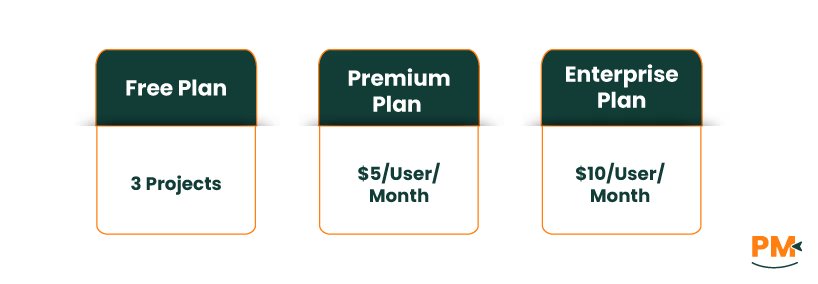
Zoho Pricing: Zoho’s pricing varies by product. Zoho Projects has the following plans:
- Free Plan: 3 projects, 5GB storage — free forever
- Premium Plan: $5/user/month — unlimited projects, 100GB storage
- Enterprise Plan: $10/user/month — includes advanced analytics and governance features
A popular option is Zoho One, which bundles nearly all Zoho apps; pricing is available in two models:
- Flexible-User Pricing: $105/user/month or $90 with annual billing—pay only for the users you need
- All Employee Pricing: $45/employee/month or $37 annually—requires licenses for all company employees
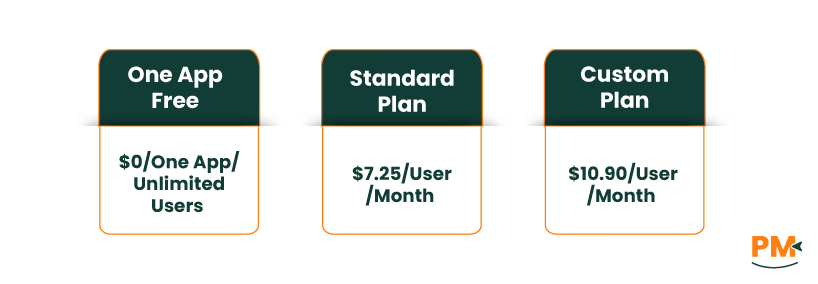
- Odoo Pricing: Odoo offers a free edition and paid plans
- One App Free: $0 – One app, unlimited users (Odoo Online)
- Standard: $7.25/user/month annually or $8.95 monthly – All apps included (Odoo Online)
- Custom: $10.90/user/month annually or $13.60 monthly – All apps, Odoo Studio, Multi-Company support (Odoo Online / Odoo. sh / On-premise)
Keep in mind that self-hosted Community is free but you handle your own hosting and upgrades. The cost for Odoo. sh hosting is not included in the Custom plan and is billed separately.
Disclaimer: The pricing is subject to change.
Zoho is ideal for small to midsize businesses and teams who want a unified cloud solution with minimal admin overhead. If you already use Zoho CRM or Books (or want an integrated all-in-one suite), Zoho Projects fits naturally. It’s especially suited for service firms, agencies, startups and companies that value ease of setup. Organizations without dedicated IT teams – those that prefer point‑and‑click setup and ready‑made workflows – adapt well to Zoho. In short, choose Zoho if you want a polished set of apps that “just work” together, if you value a fast learning curve, and if you don’t require heavy customization or complex manufacturing modules.
Who Is Odoo Best For?
Odoo shines for mid‑to‑large businesses and for any team that needs an ERP‑level solution. If your organization needs to link projects to sales orders, inventory, manufacturing or accounting in one system, Odoo’s all‑in‑one platform is a great fit. It’s also a strong choice for businesses with non-standard processes – since Odoo can be customized or extended, it adapts to unique workflows. Industries like manufacturing, distribution, and retail often pick Odoo, because it supports production bills-of-materials, stock management, POS, etc. Also, if your company already has developers or IT staff, you can leverage Odoo’s open‑source nature and integrate it deeply.
Which One Should You Go For?
If your primary need is easy onboarding and an all-in-one cloud experience, Zoho is likely the better choice. Zoho lets teams start quickly with sensible defaults and a friendly interface, and it includes most tools (CRM, finance, help desk, etc.) under one roof at a predictable price. On the other hand, if you require deep flexibility, complex automation, and enterprise‑level features, Odoo is the safer bet – especially for larger organizations. Odoo can handle the most complex scenarios (advanced manufacturing, custom data models, multi‑phase approvals), albeit with more setup effort.
Each can manage projects and teams, but Zoho does so with speed and ease, whereas Odoo does so with power and scale.