
When it comes to choosing the right productivity or project management platform, Jama vs Jira is a comparison many product teams, engineers, and project managers are actively weighing. Both tools are widely adopted, but for very different reasons.
Jama Connect is purpose-built for complex product development, offering deep requirements management, traceability, and risk analysis—especially valuable in regulated industries like aerospace, automotive, and healthcare. Jira, developed by Atlassian, is a flexible and highly customizable project tracking tool that excels in agile software development and team collaboration.
This comparison will break down the key features, strengths, and limitations of each tool, so you can make the right choice for your team’s needs.
Jama Software is a purpose-built platform for requirements, risk, and test management, designed to support the development of complex, safety-critical products. With a strong focus on traceability, compliance, and real-time collaboration, Jama Connect enables teams to align around a single source of truth across the product development lifecycle. It’s especially valued in industries like aerospace, medical devices, automotive, and industrial manufacturing, where regulatory standards and quality assurance are mission critical.
What sets Jama apart is its live traceability and impact analysis, allowing teams to identify downstream effects of changes before they cause delays or compliance issues. The platform also helps teams demonstrate regulatory compliance with frameworks such as ISO 26262, DO-178C, and FDA 21 CFR Part 11, thanks to robust audit trails and built-in review workflows.
Jama Connect integrates with key ALM and PLM tools—including Jira, GitHub, and Azure DevOps—supporting cross-functional collaboration between product managers, systems engineers, QA, and software developers. While the platform delivers exceptional value in high-stakes environments, it may be less suitable for teams seeking lightweight or fast-start PM tools.
Jama Pros And Cons
Pros | Cons |
|
|
Jira is a highly flexible project management and issue-tracking platform developed by Atlassian, widely adopted by software development and IT teams across industries. Initially designed as a bug tracker, Jira has evolved into a powerful solution for managing agile workflows, product roadmaps, and cross-functional collaboration at scale.

What makes Jira stand out is its deep support for agile methodologies, including Scrum, Kanban, and SAFe. Teams can plan sprints, track epics and user stories, manage backlogs, and visualize progress through interactive boards and real-time reports. Its rich automation engine and customizable workflows allow organizations to tailor Jira to fit virtually any software or product development process.
Jira integrates natively with other Atlassian tools, such as Confluence software , Bitbucket, and Trello, as well as hundreds of third-party apps via the Atlassian Marketplace. Its cloud-based and self-managed deployment options make it versatile for both startups and enterprises. However, teams unfamiliar with agile concepts—or those outside of tech domains—may find Jira’s feature set more complex than necessary for basic project tracking.
Jira Pros And Cons
Pros | Cons |
|
|

Jama
Jama Connect offers structured, item-based workflow management tailored for complex product development rather than traditional task tracking. Teams work with actionable items like requirements, test cases, and risks—each assigned to users and tracked through custom, rules-based workflows that support reviews, approvals, and traceability.
Workflows are fully configurable, supporting role-based responsibilities, status transitions, and audit trails aligned with industry regulations. While Jama lacks Kanban or sprint-style boards, its Live Traceability and activity streams provide real-time visibility into task ownership and progress within safety-critical projects, making it ideal for teams operating in compliance-heavy environments.
Jira
Jira is purpose-built for flexible task and workflow management, with native support for Scrum, Kanban, and custom workflows. Teams can create tasks, bugs, and epics, assign them to team members, and track progress through visual boards and backlogs.
Customizable workflows define how issues progress through various states, while built-in automation rules automate repetitive actions, such as triggering alerts or updating statuses. With features like drag-and-drop boards, sprint planning, and WIP limits, Jira enables high visibility and control across agile teams. It’s especially effective for software development, DevOps, and IT teams seeking scalable, iterative project execution.

Jama
Jama software provides tiered support plans, including Standard, Premium, and Enterprise options. All users get access to the Jama support community, knowledge base, and ticketing system. Premium plans include priority ticket routing, 24/5 technical support, and a named technical account manager (TAM) for strategic guidance.
Enterprise customers gain access to dedicated onboarding assistance, proactive health checks, and customized escalation workflows. Jama also offers live instructor-led training, certifications, and a learning portal to support onboarding and advanced usage. While support is highly responsive for regulated industries, some users report slower initial response times on base-tier plans.
Jira
Jira’s support ecosystem varies depending on the deployment model. Jira Cloud customers on paid plans receive access to Atlassian Support, including 24/5 help for Standard users and 24/7 priority support for Premium and Enterprise plans. Self-managed (Data Center) users access support via the Atlassian support portal and extensive documentation. Premium users also benefit from dedicated support SLAs, cloud-specific incident management, and release tracking assistance.

Jama
Jama Connect emphasizes structured collaboration within highly regulated product development environments. Its Review Center enables formal peer reviews, where stakeholders can comment, approve, or reject items like requirements or test cases within a controlled, traceable process. Real-time @mentions, threaded discussions, and notifications ensure feedback is centralized and auditable.
The platform also supports live traceability views, allowing cross-functional teams to see upstream and downstream dependencies in real time. This helps ensure alignment across engineering, QA, and compliance teams without relying on fragmented communication tools.
Jira
Jira facilitates agile collaboration with real-time updates, comment threads, @mentions, and change history on every task or issue. Team members can collaborate directly within tickets, attach files, tag stakeholders, and track conversations contextually. All updates are reflected immediately across shared Kanban or Scrum boards.
Integration with Confluence, Slack, and Microsoft Teams enhances cross-functional communication, while smart links and embedded issue previews streamline reference sharing. Jira also supports shared filters, dashboards, and project-level reports, helping teams stay aligned on progress and blockers. Its collaboration tools are optimized for fast-moving, iterative work environments.
Jama
Jama Connect is a cloud-based platform accessible via all major web browsers (Chrome, Firefox, Edge, Safari) with no need for local installation. While Jama doesn’t offer a dedicated mobile app, its responsive browser interface ensures usability on tablets and smaller screens for review tasks and light collaboration.
The platform integrates across ecosystems through RESTful APIs, Jama Connect Interchange (JCI), and third-party connectors for Jira, Azure DevOps, and other ALM tools. However, offline functionality is limited, and performance is best on desktop. For teams operating in secure or air-gapped environments, on-premise deployments are available via the Jama Connect Self-Hosted solution.
Jira
Jira offers robust cross-platform access, supporting web, desktop, and mobile experiences. The Jira Cloud mobile apps for iOS and Android provide full task management, board views, notifications, and comment functionality—ideal for remote teams or field users.
Users can access Jira via modern browsers, with full support for both Jira Software Cloud and Jira Data Center (self-managed). Whether in-office or on the go, Jira ensures a consistent, device-agnostic experience for agile teams.

Jama
Jama Connect features a clean, form-driven interface focused on traceability and requirements-centric workflows. The UI is organized around modules like Requirements, Test Management, Reviews, and Trace View—each designed to guide users through structured processes. While powerful, the interface assumes familiarity with systems engineering principles, which can make the learning curve steeper for non-technical users.
Recent UX enhancements include a modernized dashboard, improved filtering, and more intuitive navigation within Review Center. However, the platform prioritizes depth over simplicity, which means onboarding often requires training or guided setup, especially for teams unfamiliar with compliance-heavy product development tools.
Jira
Jira’s UI is optimized for agile execution, featuring drag-and-drop boards, in-line editing, and real-time updates across workflows. Users can customize dashboards with charts, filters, and widgets, while the navigation sidebar allows quick access to projects, backlogs, and reports.
The interface is intuitive for software and DevOps teams, but can become complex with excessive customizations or plugins. Atlassian has addressed this with the Jira Cloud experience, which introduces a more streamlined layout and simplified admin controls. Still, new users may need time to grasp Jira’s layered configurations, especially when managing large-scale, multi-project environments.

Jama
Jama Connect does not offer built-in time tracking as a core feature. The platform is purpose-built for managing requirements, test plans, risks, and traceability, making it ideal for engineering-driven workflows, but less focused on granular time-based task management.
However, organizations can track effort indirectly by using custom fields, workflow statuses, or external integrations. For teams requiring formal time tracking, Jama can be connected to external tools like Jira, TimeCamp, or Harvest through APIs or third-party middleware, enabling broader project reporting without disrupting Jama’s primary compliance and systems engineering use cases.
Jira
Jira includes native time tracking features, allowing users to log work, set original estimates, and track remaining time on individual tasks. These fields are fully customizable per issue type and can be aggregated into burn-down charts, velocity reports, and sprint overviews for visibility into team performance.
Advanced time tracking is available through Timesheets by Tempo (a popular Jira Marketplace app), which adds features like approval workflows, billable hours tracking, and detailed reporting. Jira’s built-in time tracking works out of the box, but teams can extend it based on their billing, compliance, or project accounting needs.

Jama
Jama Connect offers robust documentation capabilities purpose-built for requirements and systems engineering. Users can create, version, and manage structured documents such as requirements specs, risk assessments, and test protocols—all tied to live traceability. Each item can include rich text, attachments, stakeholder comments, and status tracking, providing a clear audit trail throughout the lifecycle.
The Review Center supports formal document reviews with approval workflows, tracked feedback, and decision logging. Jama also enables real-time document exports in Word, PDF, and Excel formats using customizable templates. It's built for teams needing precise, traceable documentation—not just internal notes.
Jira
Jira does not provide native documentation authoring tools, but it integrates seamlessly with Confluence, Atlassian’s collaborative documentation platform. Teams can link Jira issues directly to Confluence pages, enabling real-time context sharing for product requirements, meeting notes, and technical specs.
Within Jira itself, users can attach documents, leave detailed descriptions using rich-text editors, and reference linked issues. For structured documentation workflows, Confluence is the recommended pairing, offering templates, version history, inline comments, and access controls.
When evaluating Jama and Jira, it’s essential to understand how their pricing models align with your team’s size, requirements, and long-term growth plans. Both solutions offer different tiers to fit various business needs and budgets.
Jama Pricing
Jama offers subscription-based pricing plans tailored to your organization's specific needs. Pricing varies depending on team size, project complexity, and required features. In addition, Jama offers a free trial so you can evaluate the platform before committing.
Jira Pricing
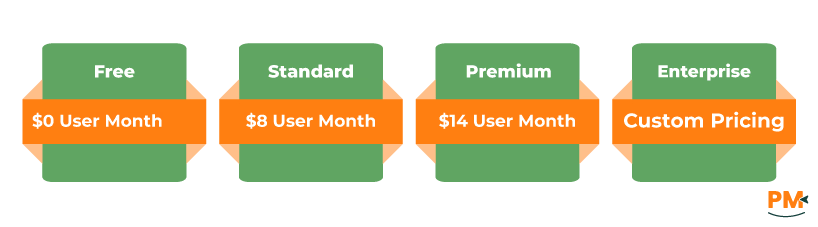
Jira offers the following pricing plans for teams and enterprises:
- Free - $0/user/month (up to 10 users)
- Standard - $8/user/month
- Premium - $14/user/month
- Enterprise - Custom pricing
Disclaimer: The pricing is subject to change.
Who Is Jama Best For?
Ideal For:
- Compliance-driven engineering teams
- Medical device manufacturers (FDA, ISO 13485)
- Aerospace, automotive, and industrial systems developers (e. g. , DO-178C, ISO 26262)
- Cross-disciplinary teams building complex hardware/software products
Why Choose Jama?
- Purpose-built for traceability, risk management & requirements verification
- Enables live collaboration with full review audit trails
- Supports rigorous standards & safety-critical workflows
Perfect For Systems Engineering:
- Requirements → Test → Risk traceability in one platform
- Supports V-model, waterfall, and hybrid lifecycles
- Integration-ready with Jira, Azure DevOps, and test tools
- Tailored for industries where compliance = product viability
Ideal For:
- Agile software development teams
- DevOps organizations and IT service desks
- Product-led SaaS companies managing iterative releases
Why Choose Jira?
- Highly customizable agile boards (Scrum, Kanban, hybrid)
- Out-of-the-box reporting: burn-downs, epics, sprints
- Integrates deeply with Bitbucket, Confluence, and CI/CD tools
Built For High-Velocity Teams:
- Real-time visibility into sprint and backlog status
- Scales from startups to enterprise agile frameworks (SAFe, LeSS)
- Powerful automation rules and marketplace apps
- Great for teams shipping features weekly or daily
Choose Jama if you're building complex systems in regulated industries where requirements traceability, standards compliance, and structured reviews are essential. It’s purpose-built for teams managing high-risk, multi-stakeholder projects where every change must be documented, verified, and auditable.
Choose Jira if your team thrives on agile workflows, rapid iteration, and cross-functional collaboration. Whether you’re in software development, DevOps, or digital product management, Jira offers the flexibility, automation, and scalability needed to support fast-paced, high-growth environments.
Both tools are powerful, but your team's development lifecycle, compliance obligations, and collaboration style should guide the final decision.