
When managing tasks, teams, and timelines, the right project management software can help you stay organized and keep work moving forward. Whether you're building software, launching campaigns, or managing daily workflows, two tools often come up in conversation: Linear and Asana.
Linear is a fast, clean, and developer-focused project management tool, ideal for engineering teams managing sprints, bugs, and product roadmaps with minimal distractions. In contrast, Asana is a flexible platform suited for teams across industries, offering robust features for task tracking, timelines, automation, and collaboration, making it easy to handle everything from marketing plans to human resource (HR) onboarding.
In this blog, we’ll compare Linear vs Asana to help you decide which tool best fits your project needs and team workflow.

Linear is a fast and modern project management tool built specifically for software teams. Designed with speed and simplicity in mind, it helps engineering and product teams stay focused by combining tasks, sprints (called cycles), and roadmaps in one seamless experience. With a clean interface and powerful keyboard shortcuts, Linear makes it easy to create, track, and resolve issues without distractions.
It integrates smoothly with development tools like GitHub, GitLab, Slack , and Figma, allowing teams to keep their workflow connected and efficient. Linear is ideal for teams that want to ship quickly, stay organized, and maintain clear visibility into what is being worked on. It also supports collaborative features like shared roadmaps, cycle tracking, and progress updates, helping everyone stay aligned with company goals.
Linear Project Management Pros and Cons
Pros
Cons
Asana is a simple and flexible tool that helps teams plan, track, and finish their projects more easily. Whether you're working on a product launch, a marketing campaign, or an internal project, Asana provides users with a single place to manage tasks, files, messages, and timelines. It allows users to view their work in different ways, such as a list, a board (like Kanban), a calendar, or a timeline, depending on what works best for you.
It also makes teamwork smoother with features like shared tasks, comments, file attachments, and mentions to keep everyone in the loop. Additionally, users can save time by setting up automation through templates, forms, and rules, eliminating repetitive manual work.
Asana Pros And Cons
Pros
Cons
Linear Project Management
Linear provides a developer-first issue and workflow experience designed for speed and simplicity. Users can quickly create issues, assign them to cycles (sprints), and track progress through a clean, keyboard-centric UI.
Built-in templates, SLA rules, and automatic triage ensure backlog hygiene and efficient task flow. It supports rich issue relationships, such as blockers, sub-issues, and automated status changes tied to Git branches. Reports show that teams using Linear file twice as many issues and resolve them 1.6x faster.
Asana
Asana offers a flexible and highly visual task workflow system ideal for teams that want more than just issue tracking. At its core, Asana organizes work into tasks, subtasks, sections, and projects. Users can view and manage tasks in a list, board, calendar, or timeline format. Advanced automation enables workflow standardization through reusable templates, forms for inbound requests, and rules that trigger actions such as status changes or task assignments.

Linear Project Management
Linear offers a seamless support experience through an in-app form and responsive email support. Users can also join the active Slack community for peer tips and expert advice. Linear’s support team utilizes tools like Intercom and Slack to manage issues efficiently, with clear response times: 24 hours for critical bugs, 7 days for high-priority issues, and 14 days for medium-priority issues.
Asana
Asana offers 24/7 English-language support with a guaranteed initial response time of two business hours for ‘Enterprise’ users, accessible via its ‘Help Center’ chatbot. While there's no public phone support, users can rely on a robust self-service library of tutorials, video guides, and community forums. Enterprise and Enterprise+ customers also benefit from dedicated support.

Linear Project Management
Linear offers collaboration tools tailored to development teams. Users can leave comments on issues, mention teammates, and track discussions within each ticket. Integrations with Slack make conversations async and connected to workflows.
Additionally, team members can collaborate on monitoring roadmaps and sprints, ensuring clarity on priorities and dependencies. While Linear lacks elaborate chat or shared document features, it maintains conversation context and keeps conversations tightly connected to actionable items.
Asana
Asana offers robust collaboration features across departments, including task comments, mentions, team messaging, file sharing, and project updates, all within a single platform. Users can co-edit project briefs, assign tasks to multiple teammates, and receive real-time notifications.
Additionally, it integrates with tools like Slack, Zoom, and Microsoft Teams to enhance communication beyond the app. Asana’s flexibility makes it ideal for cross-functional teamwork.

Linear Project Management
Linear offers fast, native apps for macOS, Windows, Linux, and mobile (iOS and Android). All apps sync in real time, and they maintain smooth performance even with large issue loads. The desktop apps support keyboard shortcuts, offline draft queueing, and light theming, making it reliable in diverse work environments. With full GitHub/GitLab/Slack integrations, developers can seamlessly transition between platforms without losing context.
Asana
Asana works smoothly across web, desktop (Mac and Windows), and mobile (iOS and Android). The desktop app provides a clean, focused workspace with system tray access, focus timers, and native alerts, features not available in the browser version.
On mobile, users can use voice-to-text, attach photos, comment in threads, and work offline, with updates syncing automatically once back online. The web version supports multi-tab browsing and browser extensions. Some users report that the desktop app feels slower, but overall, Asana provides a reliable experience on all platforms.

Linear Project Management
Linear is known for its clean, minimalist interface and fast performance, built with developers in mind. It offers keyboard shortcuts, intuitive navigation, and a distraction-free environment that makes issue tracking and task management smooth and efficient. Its simple layout reduces learning time and keeps teams focused.
Asana
Asana provides a visually rich, user-friendly interface with multiple project views like list, board, and timeline. It’s easy to navigate, with drag-and-drop functionality and colour-coded tasks for better clarity. While packed with features, some users feel the UI can get cluttered in complex projects.

Linear Project Management
Linear does not offer built-in time tracking features. Instead, it integrates with external tools like Harvest and TrackingTime, allowing teams to track time directly from issues or tasks using their preferred platform. These integrations help development teams maintain visibility into how time is allocated without cluttering Linear’s clean interface. However, the absence of native time tracking means users need to rely on third-party apps for detailed timesheet analysis or billable hour logging.
Asana
Asana also does not include native time tracking within its core platform; however, it offers extensive integration capabilities with popular time tracking solutions, such as Harvest, Everhour, Tmetric, and Toggl Track. These integrations allow users to start timers, log hours, and generate reports directly from their Asana tasks.
Additionally, Asana’s API supports custom time tracking solutions for teams with more specific needs. While some users request a built-in tracker, the platform’s flexibility with third-party tools ensures that time tracking can still be seamlessly incorporated into workflows.

Linear Project Management
Linear does not offer a dedicated document management or internal documentation system, such as wikis or knowledge bases. Its documentation functionality is limited to rich-text descriptions within issues, custom views, and project pages. These allow teams to add context, summaries, or notes, but they are not a replacement for a full-fledged document collaboration tool.
However, Linear’s minimal and structured interface encourages teams to keep documentation focused and directly tied to actionable items. For broader documentation needs, many teams integrate Linear with tools like Notion or Google Docs using Zapier or API-based custom workflows.
Asana
Asana makes it easy for users to add and manage task-related content. Users can write detailed descriptions for tasks, subtasks, and project briefs using a rich-text editor with headers, checklists, links, and file uploads (up to 100 MB each).
It also allows embedding or linking files from Google Drive, Dropbox, OneDrive, and Box, keeping everything in one place. Project overviews help teams share briefs and updates. While not a full document management tool, Asana helps users keep all key information and content organized throughout a project.
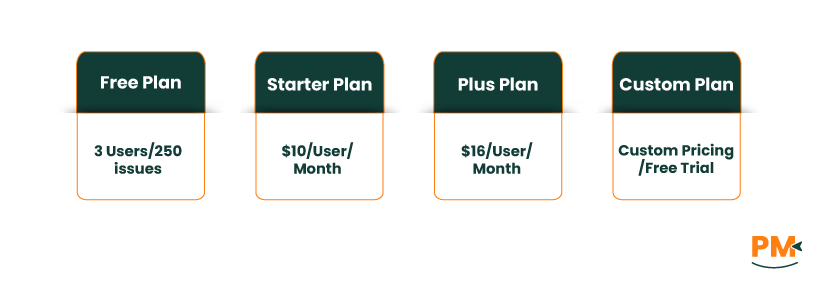
Linear offers four pricing plans, including Free plan for up to 3 users and 250 issues, Starter plan at $10/user/month, Plus plan at $16/user/month, and Enterprise plan at custom pricing with a free trial available.
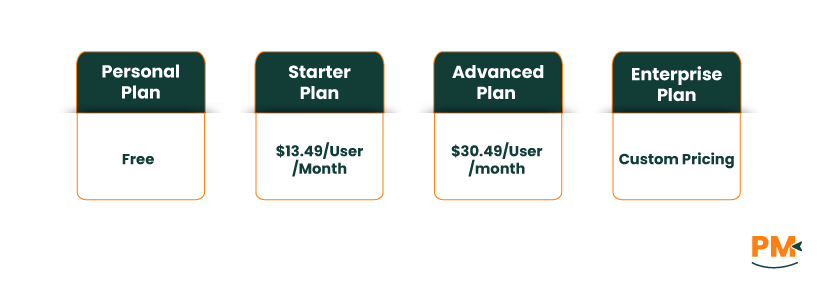
Asana also offers four pricing plans, including Personal plan, which is free forever, Starter plan at $13.49/user/month, Advanced plan at $30.49/user/month, and Enterprise plan at custom pricing.
Disclaimer: The pricing is subject to change.
Linear is ideal for fast-paced product and engineering teams that value speed, simplicity, and clean workflows. With its keyboard-driven interface and developer-friendly integrations, it suits startups and agile teams focused on issue tracking, sprints, and streamlined project planning. It’s less suited for non-technical or cross-functional teams needing extensive documentation or built-in time tracking.
Asana is ideal for cross-functional teams, including marketing, operations, HR, and product management, that require a flexible and feature-rich platform for managing complex projects. Its multiple views, robust collaboration tools, and wide integration support make it ideal for businesses of all sizes looking to centralize work, align goals, and manage tasks across departments.
Final Verdict – Which Project Management Software Is Better?
Linear and Asana cater to different needs. Linear is built for engineering and product teams that value speed, simplicity, and deep integration with developer tools. Asana, on the other hand, is ideal for cross-functional teams needing a flexible, all-in-one solution for managing complex projects and collaboration.
For fast, focused development work, go with Linear. For managing complex, multi-team projects, Asana is the better choice. However, choosing the right platform comes down to what your team needs most. Consider your industry, budget, key features, and how complex your projects are before deciding which tool fits best.