Choosing between Microsoft Planner vs Trello can be the tipping point in how effectively your team organizes, tracks, and delivers work. Both tools are popular project management platforms, but they cater to different workflows, integration needs, and team dynamics.
In this comparison guide, we’ll break down Microsoft Planner—a task management tool tightly integrated with Microsoft 365—and Trello, a flexible, card-based platform known for its simplicity and visual workflows.
This isn’t just a side-by-side feature list. We’ll dive into usability, collaboration features, pricing, pros, cons, and ideal use cases—so you can find the best fit for your productivity stack.
Ready to discover which tool aligns with your goals? Let’s get into it.
Microsoft Planner Overview
Microsoft Planner is a task and project management tool that’s part of the Microsoft 365 ecosystem. Designed with simplicity and team collaboration in mind, Planner allows users to create visual task boards using buckets, cards, and checklists—ideal for tracking progress in a structured yet flexible format.
A standout feature of Microsoft Planner is its native integration with Microsoft 365 apps such as Teams, Outlook, and SharePoint. This makes it easy to assign tasks, set deadlines, and collaborate without leaving the Microsoft environment. Users can also access Planner through Microsoft Teams tabs, enabling seamless task management within team conversations.
Planner is best suited for business users, enterprise teams, and organizations already using Microsoft 365.It’s particularly effective for coordinating internal projects, departmental planning, and recurring workflows that benefit from centralization and access control.
While it doesn’t offer advanced project management features like Gantt charts or time tracking, Planner excels at streamlining task coordination across departments that rely on Microsoft tools for day-to-day operations.
Microsoft Planner Pros and Cons
Pros
Cons
Easy-to-use, board-style interface for organizing tasks
Easy-to-use, board-style interface for organizing tasks
Built-in support for notifications, due dates, and attachments
Limited customization options compared to competitors
No dedicated mobile-first interface for power users
Trello Overview
Trello is a visual, Kanban-based project management tool known for its flexibility, intuitive design, and ease of use. Developed by Atlassian, Trello helps individuals and teams organize tasks using boards, lists, and cards that can be customized with checklists, labels, due dates, attachments, and more.
One of Trello’s biggest strengths is its extensive ecosystem of Power-Ups (add-ons) and automation via Butler, which allows users to streamline repetitive tasks. Trello integrates with popular apps like Slack, Google Drive, and Jira, making it highly adaptable to a wide range of workflows.
Trello is especially well-suited for freelancers, small teams, startups, and creatives who need a lightweight, visual tool to manage everything from content calendars to client work. It shines in scenarios where flexibility, simplicity, and collaboration are more important than rigid project structures or enterprise-level controls.
Trello Pros and Cons
Pros
Cons
Intuitive, drag-and-drop interface with low learning curve
Highly customizable with labels, checklists, and card features
Useful automation via Butler to reduce manual effort
Limited native reporting and analytics features
Can become cluttered and hard to scale for large teams
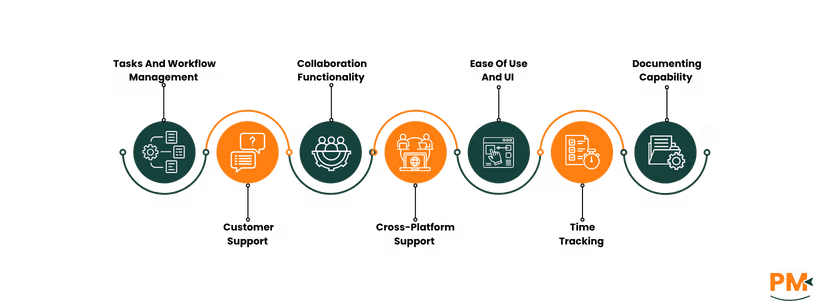
Tasks And Workflow Management
Microsoft Planner
Microsoft Planner uses a task board system built around buckets, which function as workflow stages or task categories. Each task is represented by a card that includes due dates, assignees, checklists, attachments, labels, and progress tracking. For teams using Microsoft 365, Planner integrates tightly with Outlook (for calendar sync) and Microsoft Teams, allowing users to view and update tasks within their existing collaboration tools.
While Planner’s interface is clean and easy to navigate, its workflow customization is relatively basic—better suited for straightforward task tracking than complex process automation. However, for organizations already invested in Microsoft’s ecosystem, the seamless integration and centralized access make it a compelling solution.
Trello
Trello is built around cards (tasks) organized in lists (stages) on boards (projects)—a pure Kanban experience. Tasks can include checklists, attachments, labels, and due dates, with custom fields and templates available on higher-tier plans. Trello shines in flexibility: workflows are fully customizable, from editorial calendars to development sprints.
With Butler automation, users can automate repetitive actions (e. g. , move cards, assign users, set reminders). Trello is also highly scalable thanks to its Power-Up ecosystem, making it suitable for both simple to moderately complex workflows. The user experience is visual, intuitive, and ideal for agile environments.
Customer Support
Microsoft Planner
Support for Microsoft Planner is part of the broader Microsoft 365 support infrastructure. Users on business and enterprise plans can access Microsoft’s Admin Center, submit tickets, or use live chat for technical issues.
There’s also a robust Microsoft Learn portal, detailed documentation, and active community forums where users can troubleshoot and share tips.
However, Planner-specific support can sometimes feel generalized due to its integration with Microsoft 365.Response times vary by subscription tier, with enterprise users receiving faster, prioritized assistance.
Trello
Trello offers layered support options depending on your plan. All users have access to the Trello Help Center, which includes detailed guides, tutorials, and troubleshooting resources. Paid users benefit from Atlassian’s prioritized support tiers, with faster ticket response times and extended support hours.
Additionally, Trello has a vibrant community forum, where users can ask questions, suggest features, and share templates. While phone support isn’t offered, the platform’s documentation and ticket-based help system are comprehensive and easy to navigate.
Collaboration Functionality
Microsoft Planner
Microsoft Planner enables team collaboration through task assignments, shared task boards, and Microsoft 365 Groups. Team members can comment on tasks, upload files via OneDrive, and track progress visually. Because Planner integrates natively with Microsoft Teams, users can manage tasks inside channels, improving contextual collaboration.
Planner also syncs with Outlook calendars, making it easy to align deadlines with meetings and schedules. For Microsoft-centric teams, the real-time updates and group-based structure offer strong visibility and cohesion across departments.
Trello
Trello supports real-time collaboration with features like card comments, mentions, due date notifications, and file attachments. Multiple users can work on a board simultaneously, with updates reflected instantly. Trello’s activity feed and card history help teams track progress and stay aligned.
With Power-Ups like Slack, Google Drive, and Confluence integrations, Trello extends collaboration beyond its native features. It’s ideal for distributed teams that need responsive tools for fast-paced coordination. The user interface promotes transparency, and card-level discussions reduce the need for external communication channels.
Cross-Platform Support
Microsoft Planner
Microsoft Planner is accessible via web browser, with dedicated apps for Windows, Android, and iOS. As part of the Microsoft 365 suite, Planner is designed to work seamlessly across devices where Office apps are supported. Users can view and update plans across desktops, tablets, and mobile devices, with data synced through the cloud in real time.
However, offline functionality is limited—Planner requires an internet connection to access most features. While the integration across Microsoft’s ecosystem enhances continuity, performance can vary depending on device type and network reliability, especially in mobile environments.
Trello
Trello is a web-based tool with full-featured native apps for macOS, Windows, Android, and iOS, providing a consistent experience across platforms. Its offline mode is robust—users can view and make changes offline, which sync automatically when back online.
Trello’s cross-platform performance is highly rated for speed, responsiveness, and seamless syncing. Whether on desktop or mobile, Trello retains its intuitive layout, making it ideal for remote teams, freelancers, or anyone working across multiple devices.
Ease Of Use And UI
Microsoft Planner
Microsoft Planner offers a clean, minimalist interface that feels familiar to Office 365 users. Tasks are organized into boards and buckets, with easy drag-and-drop functionality.
While this simplicity supports quick adoption in business settings, the UI can feel rigid—there’s little room for visual customization or workflow innovation beyond what’s pre-defined.
The learning curve is low for existing Microsoft users, but non-Microsoft users may face friction navigating Planner’s reliance on the broader Microsoft ecosystem for full functionality.
Trello
Trello is widely praised for its visual, drag-and-drop interface that makes onboarding fast and intuitive—even for non-technical users. Boards are easy to set up, cards are highly customizable, and workflow templates offer a head start for new users.
The UI is vibrant and adaptable, providing a user-friendly experience for teams of all types. Its low learning curve and interactive design make Trello a top choice for individuals and small teams looking to get organized without needing training or tutorials.
Time Tracking
Microsoft Planner
Microsoft Planner does not offer native time tracking capabilities. Users looking to track time spent on tasks must rely on external solutions such as Power Automate workflows, Excel time logs, or integrations through third-party apps available within the Microsoft ecosystem (e. g. , Project for the web or third-party connectors).
For organizations with more advanced needs, combining Planner with Microsoft Project or tools like Time Doctor via API can provide a workaround—but it often requires additional setup and licensing. As a result, Planner isn’t ideal for teams that need built-in time accountability.
Trello
Trello also lacks native time tracking, but it offers a wide range of Power-Ups and integrations that add this functionality. Tools like Harvest, Time Doctor, Clockify, and Everhour integrate smoothly with Trello cards, allowing users to start timers, log hours, and generate reports directly from within the board.
This modular approach gives teams flexibility, though it typically comes at an added cost. For users willing to invest in the right Power-Up, Trello can become a highly functional time-tracking platform without compromising its core simplicity.
Documenting Capability
Microsoft Planner
Microsoft Planner includes basic fields for task descriptions and file attachments, but it lacks robust documentation features. It’s not designed to serve as a knowledge base or documentation tool on its own.
However, since it’s part of the Microsoft 365 suite, users can link tasks to OneNote notebooks or Word documents, enabling a more comprehensive approach to internal documentation—though this requires managing multiple apps in parallel.
This setup works well for teams already accustomed to Microsoft’s workflow but adds some friction for those who want documentation and tasks housed together.
Trello
Trello offers more built-in flexibility for lightweight documentation. Users can add rich descriptions, comments, attachments, and markdown formatting to cards. Cards can also be linked together, allowing teams to create wiki-style structures within boards. For more advanced use cases, Power-Ups like Confluence or Notion integrations extend Trello’s documentation capabilities.
While not a full replacement for a dedicated knowledge management system, Trello’s in-card documentation is often sufficient for small to mid-sized teams managing ongoing projects, SOPs, or creative workflows.
Microsoft Planner Vs Trello: Pricing Comparison
Microsoft Planner Pricing
Microsoft Planner offers following subscription plans:
Microsoft Planner – included in Microsoft 365
Planner Plan 1 - $10.00 user/month, paid yearly
Planner and Project Plan 3 - $30.00 user/month, paid yearly
Planner and Project Plan 5 - $55.00 user/month, paid yearly
Trello Pricing
Trello includes multiple plans for different teams:
Free - $0/user/month
Standard - $5/user/month
Premium - $10/user/month
Enterprise - $17.5/user/month
Microsoft Planner Vs Trello: Who Are They Best For?
Microsoft Planner – Best For:
Microsoft 365 Users & Enterprise Teams
Ideal for organizations already using Outlook, Teams, SharePoint, and OneDrive
Seamless integration makes it great for internal project management
Simple interface for task assignment, tracking, and collaboration
Best Fit:
Internal operations
Departmental workflows
Outlook-centric teams
Teams valuing structure & visibility
Why Choose Planner?
Native integration = zero learning curve for Microsoft users
Built-in collaboration across the Microsoft ecosystem
No need for external platforms or logins
Trello – Best For:
Creative Teams, Freelancers & Startups
Highly visual and drag-and-drop board interface
Great for remote teams, marketing, content planning, and agile boards
Best Fit:
Creative workflows
Client project tracking
Editorial calendars
Solo or small agile teams
Why Choose Trello?
Customizable with Power-Ups & Butler automation
Easy to set up and adapt — no complex onboarding
Build your own structure with total flexibility
Which One May Suit Your Needs Better?
When it comes to Microsoft Planner vs Trello, the best tool depends on your team’s size, goals, and preferred software environment.
Choose Microsoft Planner if your team is deeply integrated with Microsoft 365, values structured collaboration, and doesn’t require advanced project customization. It’s a practical solution for internal business operations and cross-departmental task tracking.
On the other hand, Trello is ideal for those who prioritize visual workflows, flexible setups, and third-party integrations. Creative teams, agile startups, and remote workers will appreciate its ease of use and adaptability.
Each platform has its strengthsPlanner fits best in enterprise ecosystems, while Trello thrives in agile, fast-moving teams. The right choice hinges on your workflow needs and digital ecosystem alignment.
Usman Bashir is a Technical Content Writer specializing in the medical category at SF. With a degree in PharmD, Usman brings deep understanding and passion for medical content. His expertise and dedication to clarity and accuracy make his work stand out. Outside of work, Usman enjoys hiking and capturing the beauty of nature through photography, finding balance and inspiration in nature.
Share this Article
Sign Up
Sign up to stay updated with the new content and expand your HR expertise.
Usman Bashir is a Technical Content Writer specializing in the medical category at SF. With a degree in PharmD, Usman brings deep understanding and passion for medical content. His expertise and dedication to clarity and accuracy make his work stand out. Outside of work, Usman enjoys hiking and capturing the beauty of nature through photography, finding balance and inspiration in nature.