
Choosing the right collaboration software isn’t just about checking boxes — it’s about finding a tool that matches your team’s workflow. Trello and Confluence are both Atlassian products, but they serve very different purposes. Trello is a visual Kanban-style task manager where you organize work on boards, lists, and cards.
In one glance, Trello shows what’s being worked on, who’s working on it, and where each task is in the process. Confluence, on the other hand, is a full-featured team workspace for documentation and knowledge sharing. It’s designed as a “source of truth” for project plans, meeting notes, and rich content – organized content and knowledge that’s easily findable and always up-to-date.
In this comparison, we’ll break down how Trello and Confluence stack up in features, ease of use, pricing, and support, so you can decide based on facts (not buzzwords) and pick the right tool for your B2B SaaS team.
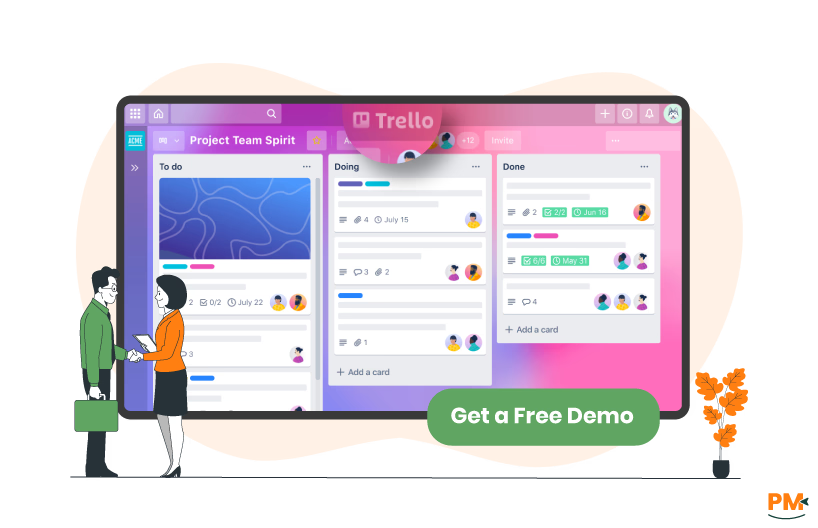
Trello is a web-based project and task management tool built around Kanban boards. Each project or workflow is represented as a Board, containing Lists (columns) and Cards (tasks or items). You move cards between lists (e. g. “To Do” → “Doing” → “Done”) to reflect progress, add members, due dates, attachments, checklists, and comments. As Atlassian describes, Trello lets teams “stay organized and efficient with Inbox, Boards, and Planner,” giving a shared visual overview of tasks.
Key features include drag-and-drop board editing, customizable workflows, and a huge ecosystem of “Power-Ups” connecting Trello to Slack, Google Drive, GitHub, and many other tools. Trello is offered as a cloud (SaaS) service (with Atlassian hosting uptime and maintenance) and also has an enterprise-tier self-managed option. It has apps for web browsers, a desktop client, and iOS/Android apps for mobile use.
Trello Pros And Cons
Pros
- Intuitive, Visual Interface: Trello’s drag-and-drop Kanban boards and cards are easy for new users
- Flexible And Customizable: You can model many workflows in Trello by renaming lists and using labels or custom fields
- Generous Free Plan: Trello’s free tier allows unlimited cards and users, making it great for small teams or trialing the product. This low barrier-to-entry is ideal for startups or teams on a budget
- Cloud And Mobile: Being cloud-hosted, Trello requires no setup. It automatically updates and has a robust performance for most teams. Mobile apps let you manage cards on the go
Cons
- Limited Native Reporting: Trello’s focus on simplicity means minimal built-in reporting or analytics. There is no Gantt chart, burnup chart, or advanced metrics out of the box
- No Built-In Time Tracking: Trello does not include native time logging or budgeting. This makes it less suitable if you require integrated time sheets or invoiceable hours

Confluence software is a web-based collaboration wiki and knowledge management tool, also from Atlassian. It’s intended as a team workspace trusted for documentation, project collaboration, Jira integrations, and more. The core of Confluence is an online wiki: you create Pages (and Blogs) that can contain rich text, images, tables, videos, and even embedded spreadsheets or diagrams. Real-time collaborative editing lets multiple teammates co-author a page at once.
Confluence offers templates (marketing plan, product requirements, meeting notes, etc.) to get started. It functions as a central repository for company information – meeting agendas, HR policies, technical design docs, project requirements, etc. Atlassian calls Confluence “your team’s knowledge, all in one place” and encourages teams to “Build a source of truth” with organized, searchable content.
Confluence provides hierarchical organization (Spaces → Pages → Subpages), powerful search (labels, full-text), and permissions. It integrates natively with the rest of Atlassian: you can link Confluence pages to Jira issues, embed Jira reports, or use Confluence for customer-facing or internal knowledge bases.
In summary, Confluence is for when your team needs more than just tasks – when knowledge capture, documentation, and cross-team transparency are top priorities.
Confluence Pros And Cons
Pros
- Content Collaboration: Confluence supports rich media (images, tables, whiteboards, databases) and real-time collaborative editing. You get countess templates and even AI tools to speed writing
- Central Knowledge Base: Confluence is built to be a single source of truth. You can store everything from product specs to marketing strategy in one place
- Integration with Atlassian Suite: If you use Jira, Bitbucket, or other Atlassian products, Confluence provides seamless linking. Confluence itself integrates with Slack, Teams, Drive, etc. , so files and updates can be shared across apps.
- Mobile Support: Confluence has official mobile apps so distributed teams can review docs anytime, anywhere
Cons
- Not a Task Manager: Confluence is primarily for documentation, not project tracking. It has lightweight task lists (inline to-do checkboxes) but no boards or native Agile tools
- Search And Organization Quirks: While Confluence search is powerful, some users report it can return irrelevant results if pages aren’t well tagged. Keeping a large Confluence instance organized requires discipline (consistent naming, archiving old pages, etc.)

Trello is built around visual task workflows. Each card represents a task or item of work, and moving cards between lists advances the workflow. You can define lists as stages (To Do, In Progress, Done, etc.) , tag cards with labels or custom fields, and assign members. Trello’s Butler automation can auto-move or update cards based on triggers (like a due date arriving). Importantly, Trello provides Sprint/Kanban boards natively, with features like Calendar/Timeline/Timeline/Map views in Premium. You can export data and sync with calendars. In short, Trello is fully task-centric: its strength is in letting you design and see workflows clearly on boards.
Confluence’s approach is different. It has no boards or Kanban view at all. Instead, it lets you create task lists on pages. For example, in meeting notes or project docs you can insert checkboxes (using “//” or the task-list tool) to assign action items.
In practice, Confluence tasks are simple and live right next to content (e. g. meeting agenda next to action item). But Confluence has no built-in way to manage those tasks visually or in bulk. You can pull a “Task report” or use an add-on, but by itself Confluence won’t show a Kanban board of tasks. So while Confluence enriches task management by tying tasks to knowledge documents.
In summary: Trello provides a full agile management layer (boards, custom workflows, and automation). Confluence provides lightweight action items embedded in docs.

Trello and Confluence both fall under Atlassian’s support umbrella, but their specifics differ. Trello’s support model reflects its freemium approach. All users get access to Atlassian’s online documentation and community forums. Paid Trello plans (Premium, Enterprise) unlock faster support: Enterprise users even get 24/7 admin support. In practice, free Trello customers rely on self-service help and forums, while Standard/Premium teams can submit tickets during business hours. Atlassian also offers a searchable knowledge base and webinars for learning Trello.
Confluence support follows the standard Atlassian structure for cloud products. All tiers have access to documentation and community Q&A. Confluence Standard customers receive business-hours support, while Premium plan customers get “24/7 support for critical issues”. Enterprise customers have dedicated support and advanced SLAs.
Bottom line: If official vendor support SLAs are critical, Confluence (at Premium/Enterprise levels) has stronger guarantees. Trello’s paid Enterprise tier also offers robust support, but smaller Trello teams largely depend on Atlassian docs and forums.

Collaboration in Trello happens on the Kanban board itself. Team members can comment on cards and use @mentions to loop in colleagues. All actions on a board (card moves, comments, attachments) generate notifications for watchers. You can also add a Card to multiple boards (card mirroring) and share board links via Slack or email. However, Trello lacks features like inline page editing or document linking – its collaboration is task-centric. There’s no wiki or long-form content on Trello, so discussions stay fragmented on individual cards.
Confluence, conversely, is designed for teamwork around content. Anyone can edit or comment on pages; the editor even tracks changes and shows version history. Users can @mention individuals or Teams (e. g. “@marketing team”) in page comments or tasks to notify the right people. You can like pages or comments to signal approval. Confluence also supports inline comments (you can comment on a specific paragraph) to discuss content. For broader visibility, Confluence has shared team calendars and status macros to summarize progress.
Importantly, Confluence works closely with collaboration apps: for example, there are built-in integrations to share pages to Slack or Microsoft Teams. Confluence pairs with Jira: you might discuss a feature in Confluence and push a requirement into Jira with one click. In short, Confluence fosters cross-functional collaboration via rich pages and connections (e. g. linking Confluence docs to Jira tickets, Bitbucket commits, or Confluence whiteboards).
In essence: Trello provides modern collaboration around tasks (comments, mentions, Slack bots). Confluence provides modern collaboration around knowledge (real-time editing, inline commenting, page sharing). Confluence has a richer toolkit for group writing and content review, whereas Trello’s discussion tools are confined to card comments and notifications.
Both Trello and Confluence are cloud-based and run in a web browser. Trello also offers dedicated apps: there’s a desktop app (Windows/Mac) and mobile apps for iOS and Android. All plans (even free) include these apps. Trello’s mobile and tablet apps mirror the web interface, letting you create boards, cards, check off lists, and comment on the go.
Confluence is similarly browser-based with official native apps. Atlassian provides Confluence Cloud for mobile on iOS and Android, which “gives you instant access to your team, projects, and customers” atlassian. com . The mobile app lets you view, edit, and share pages; it even syncs your work across devices. Confluence has no standalone desktop application (you use it via browser on a PC), but Atlassian offers the Desktop Companion app for uploading large files to pages.
So both platforms support cross-device use. However, in practice, Confluence’s mobile experience is more limited to reading and basic editing of pages, whereas Trello’s mobile is fully functional for task updates.

Trello is known for its simplicity. Its UI is deliberately minimal: boards of lists populated by cards with basic controls. New users typically pick up Trello immediately – the learning curve is flat. This low friction is a strength: team members spend time managing work, not learning software.
However, this simplicity means there is also not much hand-holding: advanced settings (like setting up card automations or custom fields) are buried in menus and may take a bit to find. Overall, Trello’s UI is clean and friendly, and long-term users appreciate how little clutter and how few features they have to navigate.
Confluence’s interface is more complex, reflecting its depth. The main navigation has spaces (high-level categories), and within each space you have pages arranged in trees. Atlassian has tried to streamline it with keyboard shortcuts and templates, but it’s still a feature-rich environment.
Once accustomed, users find it clean – pages are rendered like simple documents, and you can customize layouts. In practice, teams report that Confluence feels modern and professional, but it requires more initial training than Trello.
Comparison: Trello’s UI is like sticky notes on a wall – extremely straightforward but limited. Confluence’s UI is like a full-fledged document editor/wiki – more powerful but also more intricate.

Neither Trello nor Confluence is built for detailed time tracking out of the box. Trello has no native time log fields; you would need to add a Power-Up (like Harvest, Toggl, or Chronos) to each board to track hours spent on cards. Similarly, Confluence has no time tracking at all – its pages can have task checkboxes, but no built-in fields for logging hours.
If your team needs to record time (estimates vs actuals), you’ll likely integrate either tool with a dedicated time-tracking app or use Jira (which has time fields). In short, time tracking is not a core feature of either platform. Trello is meant for status tracking, and Confluence is meant for content – so they both defer to other tools for time logs.

Trello has almost no documentation functionality. The only “content” on Trello cards is the card description, comments, and attachments. You can attach files or screenshots to a card and write a bit of a description or checklist, but there’s no search across card text and no way to host pages.
Trello boards themselves are project-specific and not meant as knowledge repositories. If your team wants a FAQ, knowledge base, or wiki, Trello won’t suffice. At best, teams link Trello cards to external docs (Google Docs, Confluence pages, etc.) or attach key files.
Confluence, by contrast, is all about documentation. It is essentially a wiki platform. Every Confluence page is a document that can be collaboratively written, tagged, and searched. You can embed images, code snippets, videos, and even whiteboards right in a page. If your team needs to maintain process docs, client-facing knowledge base, or centralize all meeting notes and tech docs in one place, Confluence is built for that.
Indeed, Confluence is often paired with Jira precisely to fill Jira’s lack of documentation: Atlassian even suggests linking Confluence to Jira for just this reason.
In summary: Trello is strictly about tasks – no wiki, no structured docs. Confluence is a full-fledged content platform – it is essentially a documentation and wiki tool that complements any task manager (including Trello).

Confluence’s pricing is structured to support teams of all sizes, from small groups just getting started to enterprises with complex needs. The plans (for 300 users) are as follows:
- Free: $0 (up to 10 users)
- Standard: $5.16 /user/month
- Premium: $9.73/ user/month
- Enterprise: Custom pricing (custom pricing, billed annually)
Disclaimer: The pricing is subject to change.
Trello’s pricing scales with team size and complexity—from lightweight personal use to enterprise-grade collaboration and security. The plans are as follows:
- Free: $0 (up to 10 collaborators per Workspace)
- Standard: $6 /user/month
- Premium: $12.50 /user/month
- Enterprise: $210 per user/year
Disclaimer: The pricing is subject to change.
Choose Trello if your top priorities are ease of use, low cost, and flexibility. It’s perfect if you want a free or cheap tool that scales up gradually as your team grows. It fits teams who prefer visual boards over spreadsheets or forms. Organizations that already use other Atlassian tools can integrate Trello into their stack, but you don’t need any other software to use Trello. In short, Trello suits teams that focus on getting things done with a simple, fun interface, and who don’t require built-in knowledge management or advanced project metrics.
Who Is Confluence Best For?
Confluence is tailored for teams that need robust documentation, collaboration, and knowledge sharing in addition to (or instead of) task management. It’s well-suited to mid-to-large organizations with processes and content to centralize.
For example, software development teams often use Confluence alongside Jira: developers post technical specs and sprint retrospectives in Confluence, while using Jira/Trello for issues. Product teams use Confluence for roadmaps, PRDs, and meeting notes, linking out to tasks as needed. Any team that needs a company-wide intranet or wiki will find Confluence valuable.
Which One Should You Go For?
Choose Trello if your focus is a cost-effective, easy-to-adopt task tracker. It’s the right pick when you need to manage work visually with minimal setup. Ideal situations include agile or hybrid teams that want boards, lists, checklists, and basic automation. It’s also great for non-technical groups or those on a shoestring budget. And essential features are user-friendly. If you don’t need fancy reports or built-in documentation, and you want a tool that “just lets me move cards around,” go with Trello.
Choose Confluence if you need an all-in-one team workspace with documentation at its core. It’s the better choice for larger or growing teams that will pay per user for added capabilities. Pick Confluence when you follow structured workflows (Agile, ITIL, etc.) that benefit from written requirements, meeting notes, and defined spaces for each department. If your team demands things like role-based access control, enterprise security, and formal change history on documents, Confluence’s extras are worth the investment.
Final thought: Trello suits teams prioritizing simplicity, transparency, and zero-cost entry. Confluence suits teams prioritizing depth, documentation, and integration within a paid enterprise stack. Both can coexist (many organizations even use Trello for day-to-day task boards and Confluence for their project docs), but if you have to pick one: pick Trello for agile task management, and Confluence for collaborative content creation and knowledge management.
What Are The Alternatives?

If neither Trello nor Confluence feels like the perfect fit, there are plenty of other collaboration and project management tools on the market. Here are some of the most notable options you might consider:
Alternatives To Trello
- Asana – Great for task and project management with timeline and workload features
- ClickUp – Combines docs, tasks, goals, and chat in one platform for all-in-one productivity
- Monday. com – Visual project tracking with customizable boards and strong integrations
- Notion – Flexible workspace that blends notes, docs, databases, and kanban boards
- Microsoft Planner – A simple task management tool built into the Microsoft 365 ecosystem
Alternatives To Confluence
- Notion – Popular wiki/documentation platform with collaboration and project tracking
- Slab – Knowledge management platform designed for internal documentation
- Guru – Focused on knowledge sharing and enabling internal teams with quick access to answers
- Document360 – Specialized documentation software, especially for SaaS knowledge bases
- Google Workspace (Docs + Sites) – A cloud-based alternative for teams already invested in Google’s ecosystem