


When it comes to managing team communication and project coordination, Voxer and Slack offer distinct approaches to collaboration. Voxer functions as a push-to-talk (PTT) voice messaging app that blends live audio, text, photo, and video communication. Slack, in contrast, is a powerful collaboration hub that organizes communication into channels, integrates thousands of apps, and supports workflow automation and AI-powered insights.
This comparison examines both tools in depth, evaluating their usability, integrations, automation, and scalability, to help teams determine which one aligns best with their communication style and project structure.
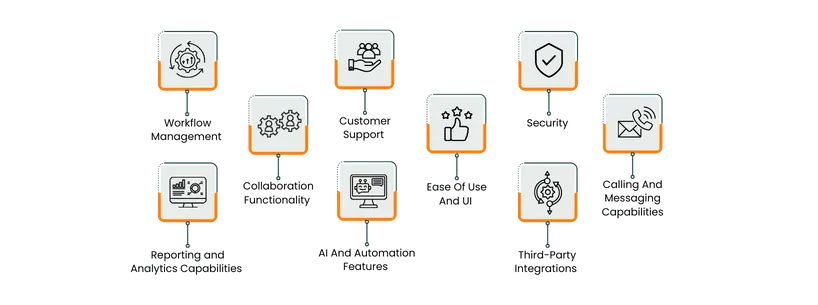
Features | Voxer | Slack |
Tasks And Workflow Management | Relies on Zapier for task triggers | Built-in task lists, automations, and deep integrations |
Collaboration Functionality | Voice-first, real-time chat; best for mobile teams | Channel-based collaboration with file sharing and external access |
Customer Support | Basic email and help center | Tiered support with self-service, priority access for paid users |
Ease Of Use And UI | Simple, mobile-friendly interface | Intuitive, structured workspace with customizable layout |
Security | End-to-end encryption for private chats | Enterprise-grade encryption, SSO, and compliance certifications |
Reporting And Analytics | Minimal analytics | Comprehensive workspace analytics dashboard |
AI And Automation | AI message summaries and transcription | AI-powered summaries, smart search, and workflow automations |
Third-Party Integrations | Via Zapier (1,000+ apps) | 2,000+ native integrations and custom app development |
Calling And Messaging | Push-to-talk, live/recorded voice, and multimedia | Text, voice, video, huddles, and screen sharing |

Voxer is a messaging and PTT application that offers live voice communication, along with features for recording voice messages, sending text, sharing photos, videos, and locations. It works over cellular data or Wi-Fi and allows individual or group chats with voice messages streamed live and stored in the cloud.
A project manager leading a field service, logistics, or field operations team will find Voxer helpful for rapid voice coordination. For example, a mobile technician can “push to talk” to the project manager, send a photo of a site condition, and the manager can immediately respond without typing lengthy messages.
Voxer Pros And Con
Pros | Cons |
|
|

Slack is positioned as the operating system for work, a platform that brings together people, processes, data, applications, and AI into one conversational interface. It helps reduce reliance on email and scattered file storage. With mobile and desktop access, managers and teams can stay connected from anywhere.
A project manager at a medium or large organization can use Slack to centralize project communication: set up a channel per project, integrate task-tracking tools, automate reminders for due dates, and invite external collaborators when needed.
Slack Pros And Cons
Pros | Cons |
|
|
Voxer
Voxer is primarily a voice-messaging and push-to-talk platform designed for live communication among teams. Its core features include live or recorded voice messages, text, photo/video sharing, and location sharing. Voxer does provide integrations via Zapier, allowing connections to over 1,000 other apps to trigger workflows or automate actions.
However, Voxer does not appear to include built-in, dedicated task-list or assignment features (e. g. , due dates, assignees, progress tracking) within its core products.
Slack
Slack is a collaboration hub built to integrate communication, apps, and workflows in one workspace. It offers channels, messaging, file sharing, and a large app ecosystem. For task and workflow management, it supports internal features, ‘Lists’, which allow users to create task lists with fields like due dates and assignees.
Slack channels and messages can act as task-assignment spaces, and when combined with integrated tools like Asana, Trello, or Wrike, the tool becomes part of full task-tracking workflows.
Winner: Slack wins this category. The reason is that it supports both internal task-list features and workflow automation, giving project managers a more complete solution for managing tasks and workflows within one environment.
Voxer
Voxer offers a communication-centric collaboration platform designed to support real-time and asynchronous messaging. It enables the creation of team chats with up to 500 participants and comprehensive team management, allowing managers to add and remove multiple admins and manage teams centrally.
Slack
Slack is a collaboration hub built for teams to organize conversations, share files, integrate apps, and streamline work processes. Its key collaboration capabilities include channels that group conversations by topic, project, team, or department, file sharing, screen sharing, and asynchronous voice/video clip features.
Winner: Slack wins this category as it offers a broader, more versatile collaboration framework, making it more suitable for end-to-end project collaboration and stakeholder coordination.
Voxer
Voxer provides support through ticket submissions within the app. The platform also offers a support center, which includes FAQs, getting-started guides, and troubleshooting articles for self-service assistance.
Slack
Slack offers a comprehensive help center that includes guides, featured articles, and useful tips, along with videos and tutorials that provide detailed explanations of its features. Users can access these resources anytime for instant answers.
Winner: This section ends with a draw , as both software customer support capabilities.
Voxer
Voxer is designed specifically for live voice messaging and mobile-focused communication. Its walkie-talkie-style interface allows for quick, push-to-talk interactions, making it ideal for both personal and professional use, including team communication and coaching sessions.
Slack
Slack’s web portal and desktop app share an identical user interface that is simple, modern, and visually appealing. Its interface feels cleaner and more organized. The purple color scheme, clear typography, and ample white space create a pleasant and easy-on-the-eyes experience.
Winner: Slack leads this section as it combines a polished, familiar-messaging style interface with structural features that support project teams.
Voxer
Voxer provides a baseline of security features oriented toward mobile and voice messaging contexts. It’s ‘Private Chats’ feature supports end-to-end encryption for one-to-one conversations through the open-source signal protocol. From a project management standpoint, Voxer provides adequate security for teams handling moderately sensitive information—particularly those working in mobile or field environments.
Slack
Slack provides a range of features designed to maintain data privacy and strengthen security. It uses end-to-end data encryption to protect information in transit from being intercepted or decoded.
Single sign-on (SSO) allows users to access Slack with a single set of credentials, while two-factor authentication adds an additional layer of protection by requiring secondary verification. Role-based permissions enable administrators to control access and set up customized user permissions, preventing unauthorized data exposure.
Winner: Slack wins this category. The reason is that Slack offers a much richer set of enterprise-grade security control features.
Voxer
Voxer is primarily a communication tool focused on live voice, text, photo/video sharing, and (in business versions) team management controls. However, for project managers, this means that while Voxer can support communication tracking and team control, it lacks the robust built-in reporting and analytics tools that would support metrics-driven management of team behavior, usage trends, or communication health.
Slack
Slack’s admin dashboard provides detailed data reports and analytics for your workspace, with options to view insights from the last 30 days, the previous month, or all time. The Channel analytics section offers a line-by-line breakdown of each Slack channel, showing creation dates, message counts, active members, and message viewers. The Member analytics section provides detailed information on all workspace members, including their names, email addresses, days active, and total messages posted.
Winner: Slack wins this category as it provides clear, accessible analytics capabilities via its dashboard.
Voxer
Voxer includes AI-powered enhancements targeted at improving communication speed and accessibility. For instance, Voxer offers message summaries where users can tap a ‘Voxer AI’ icon in the chat to generate a condensed version of a long conversation. The automation is, however, lightweight: the AI features focus on summarizing and transcribing rather than full workflow automation or agent-based processes.
Slack
Slack has a robust suite of AI and automation capabilities suited for modern project-centric teams. Its built-in AI functions include conversation summaries, thread recaps, file summarization, smart search, built-in workflow automation via the Workflow Builder, and support for AI agents.
The ‘Workflow Builder’ allows users to automate routine tasks and processes without any coding required. It can be used to create workflows for actions such as sending welcome messages to new members, setting up approval processes, completing forms, and more.
Winner: Slack takes the lead again as its AI and automation capabilities are both broader and go beyond message summarization to include workflow automation, AI-driven search, agent support, and integration into operational tasks.
Voxer
Voxer supports integration primarily via its partnership with Zapier. Users can connect with 1,000+ apps through Zapier, enabling automation workflows where triggers in one tool can send or receive messages in Voxer.
Slack
Slack offers a solid ecosystem with over 2,000+ apps and integrations, covering a wide range of tools, from project management platforms like Asana to file storage solutions like Google Drive and developer tools such as GitHub. This extensive integration capability makes it easy to streamline and manage all your work from one centralized platform.
Winner: Slack excels in this section again as it offers deeper, broader, and more native integration capabilities suited for full-scale project environments.
9.Calling And Messaging Capabilities
Voxer
Voxer is designed around live voice messaging combined with text, photos, videos, and location sharing. The core calling/messaging capabilities include PTT live voice, recorded voice messages, text, photo, video, and location messages.
For project managers, Voxer’s calling/messaging strengths lie in fast voice-led updates, especially for mobile or field-based teams where typing may slow things down. It allows quick broadcast-style communication, instant feedback, and asynchronous voice playback so remote workers can catch up when convenient.
Slack
Slack enables communication with individuals or groups through direct messages or dedicated channels organized by topic, project, team, or location. Channels can be public, open to everyone in the organization, or private, accessible only by invitation.
With Slack Connect, users can also create shared channels and exchange direct messages with external partners or clients. Both direct messages and channels support the same features, allowing users to format text, share emojis, audio, or video clips, and files. The @ mention feature helps draw specific users’ attention by sending instant notifications.
Winner: This section ends with a tie as both platforms provide advanced calling and messaging capabilities.
Voxer Vs Slack Pricing Comparison
Voxer Pricing
Personal | Pro + AI | Business |
$0 | $7.99/user/month | $6/user/month |
What’s Included | What’s Included | What’s Included |
| Everything in Personal, plus
| Everything in Pro, plus
|
Disclaimer: Pricing is subject to change.
Slack Pricing
Free | Pro | Business+ | Enterprise+ |
$0 | $8.75/user/month | $18/user/month | Custom pricing |
What’s Included | What’s Included | What’s Included | What’s Included |
|
| Everything in Pro, plus
| Everything in Business+, plus
|
Disclaimer: Pricing is subject to change.
Who Is Voxer Best For?
Voxer is best suited for small to medium-sized teams that rely heavily on real-time communication rather than complex project management structures. Its push-to-talk functionality and mobile-first design make it particularly valuable for field-based industries such as construction, logistics, security, hospitality, retail, and education—where team members need to communicate quickly without typing long messages.
Project managers overseeing dispersed or mobile crews will find Voxer ideal for keeping everyone updated with live voice or multimedia messages. However, for organizations that need centralized task tracking, workflow automation, or detailed analytics, Voxer may serve best as a supplementary communication tool rather than the primary collaboration hub.
Who Is Slack Best For?
Slack is built for organizations of all sizes—from startups to global enterprises—that require structured collaboration across departments, projects, and time zones. Its scalability, integrations, and enterprise-grade controls make it especially useful for knowledge-based industries such as technology, finance, consulting, healthcare, and education.
For project managers, Slack serves as both a communication hub and a coordination layer, connecting project boards, documentation systems, and reporting dashboards into a unified interface.
Which One May Suit Your Needs Better?
When comparing Voxer and Slack, the decision ultimately depends on how your team communicates and the type of projects you manage. Voxer excels in fast-paced, field-oriented environments where voice-first communication takes priority over structured documentation. It’s simple, mobile-friendly, and effective for smaller or on-the-go teams that need to exchange quick updates rather than manage extensive workflows.
Slack, on the other hand, is the stronger all-around collaboration platform. It combines robust messaging, file sharing, automation, analytics, and integration into one workspace that scales from startups to global enterprises. Its channel-based communication, built-in AI tools, and wide range of integrations make it better suited for project-driven teams that require structured workflows, visibility, and cross-functional collaboration.
In summary, Voxer is ideal for small, mobile, or operational teams seeking instant communication, while Slack stands out as the better performer for project-oriented teams needing scalability, automation, and integration across diverse business systems. For project managers managing complex projects or large teams, Slack is the more capable and future-ready choice.
What Are The Alternatives?
Here are some alternative tools to consider if you’re not fully convinced by either platform.
Voxer
- Zello: A walkie-talkie style push-to-talk app built for frontline teams, offering real-time voice streaming, channel support, and mobile-first communication
- Microsoft Teams: A heavyweight alternative that integrates deeply with the Microsoft 365 ecosystem; very suitable for organizations already using Office tools
- Basecamp : A project-workspace tool combining chat, message boards, and to-dos, which may appeal if you decide to move beyond simple voice
Slack
- Google Chat: Ideal for teams embedded in Google Workspace; offers chat, rooms, and integrates with Gmail, Drive, and Calendar
- Twist: A communication platform designed for more calm, thread-based discussion (less real-time noise), which might suit teams overwhelmed by Slack’s pace
- Chanty: A simpler, more cost-friendly messaging-collaboration platform with built-in task management and fewer distractions than Slack
