

Collaboration among teams has become the most integral part of any kind of business, and the right Project Management (PM) software can often mean the difference between success and failure. As such, teams frequently choose between two popular platforms: Trello and Teamwork.
Trello, an Atlassian product, has become the industry standard for simplicity and visual Kanban task management, utilizing an effortlessly intuitive system of boards, lists, and cards, making it ideal for small teams, personal use, and straightforward workflows. Teamwork, on the flip side, is a sophisticated platform purpose-built for enterprise agility, empowering organizations to align strategy with execution by unifying deep Backlogs (for planning) with execution boards (for tracking) under high-level collections.
This article provides a comprehensive, feature-by-feature comparison covering everything from their user interfaces and automation capabilities to pricing and suitability, with the goal of guiding you to the tool that will best accelerate your team's success.
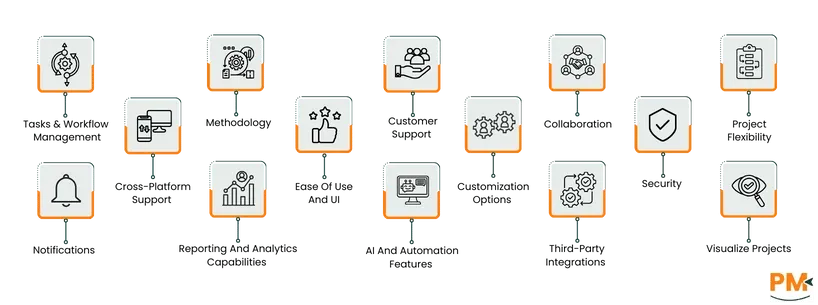
Feature | Teamwork | Trello | Winner |
Tasks and Workflow Management | Dual workflow structure with Backlogs and Boards | Purely visual, drag-and-drop Kanban boards | Teamwork |
Collaboration | Designed for highly detailed, client-focused collaboration | Excels at project-specific collaboration and communication | Teamwork |
Third-Party Integrations | High-quality, focused list of powerful integrations | Massive integration ecosystem via the Power-Ups gallery | Trello |
Customer Support | Tiered support with email for all, and enterprise support options | Tiered support with Help Center/Community forums | Tie |
Project Flexibility | Highly organized project alignment | Effective and task-centric product management | Teamwork |
Methodology | Hybrid methodology for waterfall and Kanban-based projects | Ideal for granular, board, or Kanban type workflows only | Teamwork |
Visualize Projects | Offers comprehensive project visualization options | Limited to kanban visualization and needs power-ups for further options | Teamwork |
Cross-platform Support | Full experience across web and dedicated desktop apps | Accessible via web, native desktop apps | Trello |
Ease of Use and UI | Clean, professional, functionally rich UI | Signature feature is extreme simplicity and fast onboarding | Trello |
Customization Options | Deep structural customization across Board, Item, and Organization levels | Modular, add-on-based via Power-Ups. core structure is rigid; customization focuses on card data, not overall organization | Teamwork |
Security | Standard encryption, GDPR compliance | Leverages Atlassian security features | Tie |
Notifications | Alerts for activity on followed or assigned cards/backlogs | Instant, effective notifications via central inbox, email, and push. Butler automation can generate custom, timely alerts | Trello |
Reporting and Analytics | Strong native reporting with custom, high-level dashboards | Native reporting is basic, with dashboard View or third-party Power-Ups for complexity | Teamwork |
AI and Automation Features | Powerful integrated automation engine for rule-based actions | Butler automation is a no-code strength for routine task automation | Trello |
TL;DR: Teamwork is the winner, securing wins in the critical areas of Project Complexity, Workflow Management, and Reporting, making a good choice for teams moving beyond basic task tracking into better project management

Teamwork is a powerful, cloud-based collaborative planning platform specifically engineered for agility and scale, catering particularly to the technology and game development sectors. It is designed to be the single source of truth that connects high-level organizational strategy with day-to-day team execution. The platform’s core strength lies in its ability to unify distinct project views, including prioritized backlogs for product management and flexible boards for team execution, into customizable, aggregated workspaces called collections.
This unique structure allows teams to maintain process autonomy, using features like Scrum, Kanban, or a hybrid, while executives gain a bird's-eye, rolled-up view of progress.
Teamwork Pros And Cons
PROS | CONS |
Offers custom views and boards that can be customized to different workflows Offers powerful collaborative planning Makes tasks manageable with automations and tagging | The platform has limited customization The platform can have programming and startup errors |

Trello is a globally recognized project management tool, leveraging the visual appeal and simplicity of the Kanban methodology. It is characterized by its straightforward, drag-and-drop interface, which organizes all work into boards for projects, Lists for workflow stages, and cards for individual tasks.
As an Atlassian product, Trello's modular nature, enabled by an extensive gallery of integrations and a powerful, built-in butler automation tool, allows teams to add necessary functionality without cluttering the core experience.
Trello Pros And Cons
PROS | CONS |
Allows for automations to review and renew monthly and weekly tasks Allows users to add additional information, like due dates and labels, to tasks Promotes collaboration and keeps people on the same page | Lack of admin privileges and user restrictions Limitations in card view can cause visibility issues with important data |

Teamwork Pricing
The platform offers the following pricing plans.
Pricing Plan | Starting At | Features |
Free | $0 | For small teams and startups |
Deliver | $13.99/month | For smaller teams needing robust project management |
Grow | $25.99/month | For more complex client-driven projects |
Scale | Customized pricing | For large organizations, offering more productivity and flexibility |
Enterprise | Customized pricing | For enterprise-grade businesses seeking advanced features |
The platform also offers a 14-day free trial.
Disclaimer: The pricing is subject to change.
Trello Pricing
The platform offers the following plans for pricing, each billed annually.
Pricing Plan | Pricing | Features |
Free | $0/user/month | Unlimited cards, quick task capture, and unlimited power-ups per board |
Standard | $5/user/month | Custom fields, advanced reports, and collapsible lists |
Premium | $10/user/month | Atlassian Intelligence (AI) with Views covering Calendar, Timeline, Table, Dashboard, and Map
|
Enterprise | $17.50/user/month | Unlimited Workspaces, organization-wide permissions with visible boards, and public board management |
Disclaimer: The pricing is subject to change.
Teamwork is purpose-built for medium-to-large organizations and scaling tech companies that operate within a complex, multi-team Agile framework. It is an excellent fit for industries like software development, game studios, and corporate IT that require a high degree of organizational alignment and process flexibility.
The platform's unique structure, unifying Backlogs with Boards in Collections, makes it ideal for program and product managers who need executive visibility across multiple workstreams and a single place to manage a deep product roadmap. Teamwork's feature set and pricing structure position it as a professional-grade solution, making it best suited for organizations coordinating 10 or more users on a continuous, strategic basis.
Trello is the optimal choice for individuals, small startups, and functional teams who prioritize an intuitive, low-friction, and highly visual workspace. The tool's incredibly generous free plan makes it perfect for personal productivity, non-profit groups, and small teams that need a simple tool to manage basic tasks without financial investment.
The platform excels for teams like marketing, HR, content creators, and general operations who primarily use a straightforward Kanban workflow and do not require deep strategic planning or resource management features. Its ease of adoption and visual appeal make it the most accessible and easiest tool to roll out across a small business unit or department.
The better performer between Teamwork and Trello is determined by your organization's scale and the complexity of your workflow.
Teamwork is superior for Scale and Complexity. If your need is to coordinate dozens of developers, product owners, and marketing teams on a single large-scale product release, Teamwork’s native Backlogs, Relations, and Collections provide the essential framework for organizational alignment that Trello lacks.
Trello is superior for Simplicity and Accessibility. If your requirement is an effortless, low-cost solution for a small, singular team managing a linear workflow (like a content calendar or hiring pipeline), Trello's visual purity and easy-to-use automation make it the clear winner for immediate productivity and user adoption.
Choose Teamwork for strategy and enterprise agility; choose Trello for tasks and visual simplicity.
Teamwork Alternatives
Alternative | Description |
Offers a very deep feature set (tasks + docs + goals + chat + multiple views) that goes beyond what Teamwork offers, making it ideal for teams wanting an all-in-one workspace. | |
Asana | Has a more polished user interface and easier onboarding than Teamwork, which is helpful when workflows aren’t extremely complex and you prefer simplicity. |
Provides more advanced reporting, resource management, and integrations than Teamwork, so it’s suitable when you have larger-scale projects or need stronger analytics. |
Trello Alternatives
Alternative | Description |
Great for teams already in the Zoho ecosystem; offers Kanban plus Gantt, time tracking, and detailed project analytics | |
Kanbanchi | Built inside Google Workspace (Drive, Calendar, Gmail) — ideal if your team is already using Google apps and wants seamless integration. |
Microsoft Planner | A good choice if you’re invested in Microsoft 365: it integrates deeply into that ecosystem, making things smoother for MS users. |
