Choosing between Trello vs Todoist isn’t just about picking a productivity app—it’s about finding the right tool to streamline how you plan, collaborate, and execute work. Whether you're managing solo tasks or coordinating team projects, the right platform can significantly impact your focus and efficiency.
In this comparison guide, we’ll dive deep into how Trello and Todoist stack up across core features like task management, collaboration, user experience, integrations, and more. If you’re weighing which platform is better for organizing your personal workflow or leading a team, this article is designed to help you make a confident, well-informed decision.
By the end, you’ll have a clear view of each tool’s strengths, limitations, and ideal use cases—so you can choose the best solution for your productivity goals.
Trello Overview
Trello is a visual project management tool that organizes tasks using the Kanban board model—a system where work is displayed as cards moving across columns representing different stages (e. g. , “To Do,” “In Progress,” “Done”). Owned by Atlassian, Trello is widely used for both personal task tracking and collaborative team projects.
Each board in Trello represents a project, and within it, users can add cards for individual tasks, assign team members, attach files, set due dates, and more. Power-Ups (integrations and add-ons) extend functionality, allowing teams to connect tools like Slack, Google Drive, and Jira.
Trello is especially useful for small to mid-sized teams, marketing departments, agile squads, or anyone who prefers a visual, flexible way to manage workflows. It's ideal for users who want to see the big picture without diving into overly complex structures.
Trello has improved its automation features via Butler, expanded its views (including Calendar and Timeline) for paid tiers, and added better admin controls for enterprise users.
Trello Pros And Cons
Pros
Cons
Visual, Kanban-style project organization
Easy onboarding and user-friendly UI
Cross-platform support (web, desktop, mobile)
Not ideal for managing large or complex projects
Minimal built-in reporting and analytics
Todoist Overview
Todoist is a streamlined, list-based task manager designed to help individuals and small teams organize their daily responsibilities with speed and simplicity. Unlike visual tools like Trello, Todoist centers on checklists, nested tasks, and due dates, making it ideal for straightforward task management.
Users can create projects, add tasks, set priorities, apply labels, and filter views using a flexible tagging system. One of Todoist’s standout features is natural language input—allowing you to type something like “Submit report tomorrow at 2pm” and have it automatically scheduled.
Todoist is best suited for individuals, freelancers, and lightweight project management needs, especially for those who prioritize speed, structure, and personal productivity. Teams can also collaborate on shared projects, though Todoist’s strengths lean more toward task organization than visual planning.
Todoist introduced enhanced AI task suggestions, smarter recurring reminders, and priority-based sorting improvements. It remains a strong option for users seeking a focused, minimalistic productivity tool with broad device compatibility.
Todoist Pros And Cons
Pros
Cons
Fast task entry with natural language recognition
Offers nested tasks and sections for organization
Great for daily planning and habit tracking
Collaboration features are basic compared to team PM tools
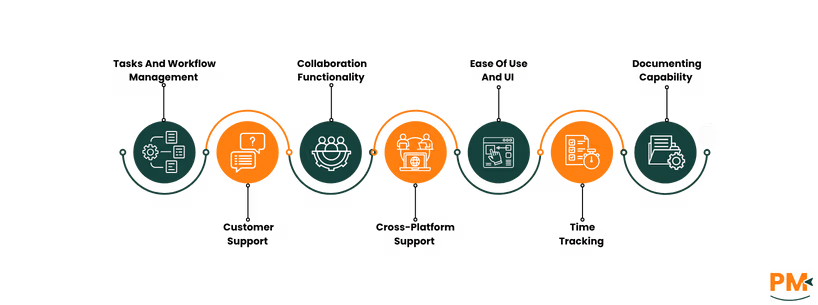
Trello uses Kanban-style boards to visualize tasks as cards that move through customizable columns—ideal for tracking progress in a linear or status-based workflow. Each card can hold checklists, attachments, comments, due dates, and assigned members, offering a centralized space for task details.
Butler automation allows users to trigger actions based on rules (e. g. , moving a card when a due date changes), helping streamline repetitive workflows. For more advanced needs, Power-Ups can add calendars, time tracking, or integration with tools like GitHub or Jira.
Trello excels in visual project tracking and is well-suited for teams that need a shared, flexible workspace. However, its lack of task nesting and limited views (unless upgraded) can hinder users managing highly structured or hierarchical work.
Todoist centers around list-based task organization, with tasks arranged by project and optionally grouped into sections. Each task can have due dates, priority levels, comments, labels, and be filtered using custom views.
One of its standout features is Quick Add, which uses natural language input to set task parameters quickly (e. g. , “Call client tomorrow at 9am #Work @high”). Filters allow users to create saved, dynamic views like “overdue tasks with high priority.”
Todoist’s workflow is ideal for personal productivity, daily planning, and lightweight project management. However, it lacks visual layouts like Kanban or Gantt charts, which may limit appeal for visual thinkers or teams managing complex dependencies.
Customer Support
Trello: Self-Service Support, Atlassian Community, Support Tickets
Trello provides several support channels, primarily centered around its self-service Help Center, which includes tutorials, documentation, and troubleshooting guides. Users can also tap into the broader Atlassian Community for peer-to-peer support.
Direct support ticket submissions are available, though response times can vary depending on your plan. Priority support is reserved for Business Class and Enterprise customers. Free-tier users are mostly reliant on self-help resources.
Overall, Trello’s support model is robust but favors self-sufficiency unless you're on a paid plan.
Todoist: Email Support, Help Center, Speed/Quality Of Response
Todoist offers email-based support for all users, with generally fast and helpful responses. Their Help Center includes clear, well-organized guides covering everything from getting started to using advanced features like filters and labels.
Premium and Business plan users receive priority support, which usually translates to faster turnaround times and more personalized assistance.
Compared to Trello, Todoist’s support is more direct and accessible, even on lower tiers, though it lacks live chat or phone support.
Collaboration Functionality
Trello: Real-Time Editing, Team Boards, @Mentions, Integrations With Slack, Google Drive
Trello is designed with team collaboration in mind. Users can co-edit boards in real time, use @mentions for notifications, and assign tasks to multiple users. Team boards create shared visibility, and the comment threads on cards serve as the central place for discussion.
Trello’s integrations with Slack, Google Drive, Microsoft Teams, and others further enhance collaboration, making it a strong option for distributed teams or marketing and product squads.
Its visual nature makes it especially effective for group planning, status updates, and agile workflows.
Todoist allows users to share projects, assign tasks, and add comments, supporting basic team coordination. However, collaboration is limited to five active collaborators per project on the free plan, which may not scale well for larger teams.
Comments are task-specific and don’t offer threaded replies, which can limit deeper discussions. There’s no real-time editing view, but changes sync quickly across devices.
Todoist is best suited for small teams or partners collaborating on simple task lists, while larger teams may find its collaboration capabilities limiting without upgrading.
Cross-Platform Support
Trello: Available On Web, iOS, Android, Desktop Apps
Trello offers strong cross-platform support, with apps available on web, iOS, Android, macOS, and Windows. All versions provide access to core features, and changes sync in real time across devices. The web app remains the most fully featured, while the mobile apps focus on quick task updates and notifications.
Offline support is limited; you can view and edit some content offline, but functionality is reduced compared to full connectivity. Trello also integrates well within the Atlassian ecosystem, which benefits teams using tools like Jira or Confluence.
Performance is generally reliable, though large boards with many cards and attachments can feel sluggish on older mobile devices.
Todoist: Available on Same Platforms, Browser Extensions, Gmail Add-On
Todoist is also available on web, iOS, Android, macOS, Windows, and goes a step further with browser extensions (Chrome, Firefox, Edge) and a Gmail add-on that allows users to create tasks directly from emails.
Sync is fast and seamless, with updates reflecting in real time across platforms. Offline access is supported across all major devices, letting users manage tasks even without an internet connection.
Todoist’s tight ecosystem integration—especially with Google Calendar, Gmail, and third-party automation tools—makes it an excellent choice for users who work across multiple tools daily.
Ease Of Use And UI
Trello: Visual, Intuitive, Might Get Cluttered In Large Projects
Trello’s drag-and-drop interface is intuitive, especially for users new to project management tools. The visual layout helps users quickly understand task progress and status. Onboarding is simple, with built-in templates and tutorials that make it easy to get started.
However, as boards grow in size or complexity, they can become visually overwhelming, especially when managing dozens of cards, labels, and team members. The flexible structure can also lead to inconsistency in how teams set up boards unless clear guidelines are in place.
Todoist: Minimalist, Clean, Great For Task-First Workflows
Todoist focuses on a clean, minimalist interface designed for distraction-free productivity. Its list-based layout feels familiar to anyone used to traditional task apps. The learning curve is shallow, and features like Quick Add make it easy to start using immediately.
The UI scales well even with long task lists, thanks to sorting options, filters, and labels. However, its simplicity may feel limiting to users who prefer more visual or structured layouts for managing multiple workflows.
Overall, Todoist is ideal for users who value speed, clarity, and task focus over visual project mapping.
Time Tracking
Trello: Native Time Tracking Not Available, Integrations
Trello does not offer built-in time tracking, but supports this via Power-Ups and integrations. Popular options include Toggl, Harvest, and Clockify—each adding timers directly onto cards. Once enabled, users can start, stop, and log hours, view reports, and sync tracked time with external tools.
These integrations make Trello viable for simple time logging, though they rely entirely on third-party add-ons and often require separate paid subscriptions for full functionality.
Todoist: No Native Tracking, Integrates With Time Tracking Tools
Todoist also lacks native time-tracking capabilities, but offers robust compatibility with tools like Toggl, Clockify, and Time Doctor, typically through browser extensions or third-party services such as Zapier and IFTTT. Once linked, users can associate task timers directly with Todoist items, and track time alongside task completion.
Although this workflow is seamless for users already using those tools, it’s not as streamlined as having an integrated timer built into the platform.
Documenting Capability
Trello: Notes Via Card Descriptions/Comments, Attached Files
Trello cards support rich text descriptions, checklists, and comment threads, making them a solid option for light documentation. Users can attach files, images, and links (including embedding Google Drive docs).
However, these serve as task-level notes rather than standalone documents. The structure lacks hierarchical document organization, advanced formatting, or robust version history—limiting its ability to serve as a full-fledged knowledge base compared to dedicated tools.
Todoist tasks include descriptions and comment threads, and users on paid plans can attach files. The platform supports basic formatting, such as simple links and plain-text. While effective for adding context to tasks or sharing minimal notes, Todoist does not support advanced documentation features like rich text formatting, internal linking, or document version control.
As a result, both Trello and Todoist pale in comparison to tools like Notion, Obsidian, or Evernote for organized and scalable knowledge management.
Trello Vs Todoist: Pricing Comparison
Trello Pricing
Trello offers various pricing plans for all teams:
Free - $0/user/month
Standard - $5/user/month
Premium - $10/user/month
Enterprise – $17.5/user/month
Todoist Pricing
Todoist includes the following pricing options:
Beginner - $0/user/month
Pro - $5/user/month
Business - $8/user/month
Who Is Trello Best For?
Trello is a great choice for:
Visual learners who prefer drag-and-drop interfaces
Agile teams managing sprints, backlogs, or roadmaps
Marketing/content teams planning calendars collaboratively
Startups and cross-functional squads that need flexibility
Workflows that benefit from visual cues and fast iteration
Strengths:
Intuitive Kanban boards
Easy collaboration with team visibility
Lightweight and scalable with Power-Ups & integrations
Not ideal if you need deep task hierarchies or complex reporting
Who Is Todoist Best For?
Todoist is a powerful tool for:
Solo professionals and freelancers
Users who love checklists and structured productivity
People needing cross-platform access (mobile, web, desktop)
Fans of the GTD method and habit tracking
Users managing recurring tasks or multi-project workflows
Strengths:
Clean interface with fast task input
Smart natural language recognition (e. g. , “every Monday”)
Advanced labels, filters, and priority levels
Perfect for personal productivity without the bloat of full PM tools.
Which One May Suit Your Needs Better?
When comparing Trello vs Todoist, the best choice depends entirely on your workflow and preferred organization style. Choose Trello if you’re managing team projects, need visual task tracking, or want to build dynamic workflows with Power-Ups and automation. It’s built for collaboration and project visibility.
Opt for Todoist if your priorities are speed, simplicity, and solo task management. It’s ideal for capturing to-dos on the fly, organizing priorities, and staying focused without distractions.
Ultimately, Trello vs Todoist is less about which tool is better and more about which one aligns with how you think and work. Both are excellent—but designed for different use cases.
Usman Bashir is a Technical Content Writer specializing in the medical category at SF. With a degree in PharmD, Usman brings deep understanding and passion for medical content. His expertise and dedication to clarity and accuracy make his work stand out. Outside of work, Usman enjoys hiking and capturing the beauty of nature through photography, finding balance and inspiration in nature.
Share this Article
Sign Up
Sign up to stay updated with the new content and expand your HR expertise.
Usman Bashir is a Technical Content Writer specializing in the medical category at SF. With a degree in PharmD, Usman brings deep understanding and passion for medical content. His expertise and dedication to clarity and accuracy make his work stand out. Outside of work, Usman enjoys hiking and capturing the beauty of nature through photography, finding balance and inspiration in nature.