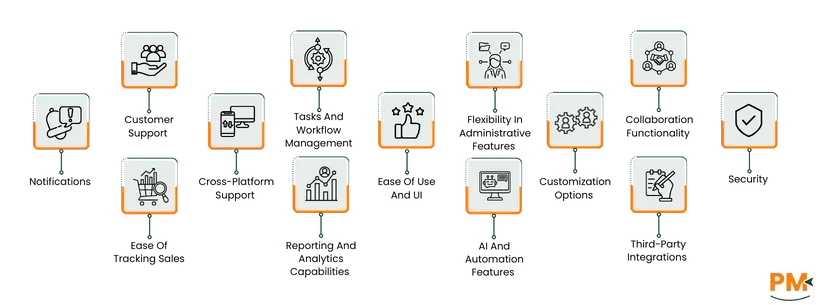
Tasks And Workflow Management
Monday. com provides a visual and flexible platform to manage workflows and daily tasks. Users can create custom boards, set task priorities, assign team members, and track progress through timelines or Kanban views. Its drag-and-drop setup makes it easy to organize work and automate repetitive actions, ensuring teams stay aligned and meet deadlines efficiently. The platform supports workflow automation and real-time updates, helping teams maintain smooth coordination across projects.
Zoho Projects automates routine processes and keeps team tasks organized. Its visual blueprint editor lets users define task stages, assign responsibilities, and track progress. Workflow rules can trigger automatic actions such as sending alerts, updating fields, assigning tasks, or invoking webhooks. Time-based rules allow scheduling actions based on due dates or timelines, ensuring consistency, and reducing manual work.
Winner: Zoho Projects. It offers deeper automation through customizable workflow rules and time-based triggers, making task management more dynamic and efficient.
Customer Support
Monday. com offers 24/7 customer support to ensure users get help whenever needed. It provides a detailed help center with guides, tutorials, and community forums for self-service assistance. Users can reach support through live chat or email, while enterprise customers get premium support that includes faster response times, dedicated technical experts, and priority handling. Monday’s approach focuses on quick resolutions and a human-centered support experience to keep workflows running smoothly.
Zoho provides multiple channels for customer support, including email, tickets, and phone assistance through its global offices. It also offers detailed documentation, help articles, and a community forum for users to resolve issues independently. For new customers, Zoho’s sales team and product concierge assist in selecting suitable tools, while existing users can raise support requests directly from the portal. Response times and available support options may vary depending on the plan and region.
Winner: Monday. com. It delivers faster, round-the-clock support with dedicated experts and priority handling, ensuring quicker issue resolution than Zoho.
Collaboration Functionality
Monday. com enables teams to collaborate in real time through a shared workspace. Team members can comment on tasks, mention others, share files, and attach updates directly to items or projects. The platform also supports status updates, notifications, and visual boards that keep everyone aligned. With its centralized communication and file sharing, Monday helps teams reduce scattered conversations and maintain transparency across all projects.
Zoho Projects offers multiple tools for team collaboration, including task comments, chat, forums, and project feeds. Team members can discuss updates, share files, and track progress within the same platform. The built-in chat enables instant communication, while forums allow structured discussions on specific topics. With document sharing and activity streams, Zoho ensures that every team member stays informed and connected throughout the project lifecycle.
Winner: Zoho Projects. It provides a broader range of collaboration tools, like built-in chat and forums, enabling richer team communication than Monday. com.
Cross-Platform Support
Monday. com is fully cloud-based and accessible through web browsers, desktop apps (Windows and macOS), and mobile apps for iOS and Android. The platform ensures real-time syncing across all devices, allowing users to update tasks or check project progress anytime. Its mobile app mirrors most desktop features, offering smooth navigation and quick updates, making it reliable for teams working remotely or on the go.
Zoho Projects is also cloud-based and supports access through web browsers and mobile apps for both Android and iOS. The mobile version enables users to create tasks, track time, and communicate with team members conveniently. However, some users note that the mobile app can feel slower or less responsive compared to the desktop experience. Still, Zoho provides strong accessibility overall, keeping teams connected across multiple devices.
Winner: Monday. com
Ease Of Use And UI
Monday. com is known for its clean, colorful, and highly visual interface. It uses simple layouts and drag-and-drop elements that make managing projects intuitive, even for beginners. Tasks, timelines, and progress are displayed in easy-to-read formats, allowing teams to grasp project status at a glance. The learning curve is minimal, and users can quickly adapt to its layout without extensive training. Its design focuses on clarity and engagement, making daily use smooth and enjoyable.
Zoho Projects provides a structured and professional interface that prioritizes functionality. While it offers a wide range of tools and customization options, this can make the interface feel more complex initially. New users may need some time to get comfortable navigating its menus and features. However, once familiar, it provides powerful control and depth for managing detailed projects. The layout is practical and efficient, but less visually appealing compared to Monday. com.
Winner: Monday. com wins for its modern, intuitive, and easy-to-navigate interface that suits all experience levels, while Zoho favors users who prefer functionality and depth over visual simplicity.
Customization Options
Monday. com offers a high level of flexibility that allows teams to shape their workspace according to their specific workflows. Users can customize boards, columns, dashboards, and automation rules to match how their teams operate. It also supports custom views, colors, and field types for easier organization. The setup process is simple and visual, making it easy for anyone to adjust workflows without coding knowledge. Monday. com focuses on quick, user-friendly customization that enhances team productivity.
Zoho Projects provides deeper customization capabilities designed for more structured business needs. Users can tailor layouts, task fields, workflows, and templates to suit different departments or processes. It also supports detailed automation rules and permission settings for advanced control. While these options make Zoho highly adaptable, they can require more setup time and technical understanding to fully optimize. Zoho’s customization is extensive but leans toward enterprise-level complexity.
Winner: Zoho wins for its comprehensive customization options that allow advanced process control, while Monday. com stands out for offering a faster and more user-friendly customization experience.
Security
Monday. com ensures strong data protection through enterprise-grade security measures. It uses encryption both at rest and in transit, supports multi-factor authentication, and complies with GDPR and ISO/IEC 27001 standards. Role-based permissions help restrict access to sensitive data, while frequent audits and automated backups maintain system reliability. These practices make Monday. com a secure choice for organizations that prioritize data safety without complexity.
Zoho Projects follows strict global security standards, including SSL encryption, GDPR, and ISO 27001 compliance. It offers additional security features like IP restrictions, audit trails, and role-based access controls to manage user permissions effectively. Zoho also benefits from its larger ecosystem’s privacy-first infrastructure, which ensures consistent protection across all Zoho services.
Winner: Both platforms maintain strong enterprise-level security, but Zoho slightly leads due to its broader administrative control and extensive data protection options.
Notifications
Monday. com provides real-time notifications across desktop, email, and mobile devices. Users receive instant updates for mentions, task changes, and project progress. Notification of preferences can be customized to avoid overload and focus only on relevant alerts. The system’s clear visuals and centralized inbox make it easy to stay on top of team updates and deadlines.
Zoho Projects offers multiple notification channels, including in-app, email, and mobile alerts. Users can manage preferences for task changes, comments, and milestones based on their role in a project. While notifications are timely, they can sometimes feel less streamlined compared to Monday. com’s more visual and interactive format.
Winner: Monday. com wins for its faster, cleaner, and more customizable notification system that keeps teams connected without overwhelming them.
Reporting And Analytics Capabilities
Monday. com provides customizable dashboards that give teams a clear view of project progress, workloads, and performance metrics. Users can pull data from multiple boards to create visual reports using widgets such as charts, timelines, and number tracking. These dashboards update in real time, helping teams identify bottlenecks and make quick, data-driven decisions. With flexible visualization and sharing options, Monday enables better tracking of project health and team productivity.
Zoho Projects includes robust reporting and charting tools that help track key project metrics like task progress, time logs, and team performance. Users can generate detailed reports and visualize data through charts such as Gantt, resource utilization, and burn-down reports. The reporting module allows customization to focus on specific KPIs and offers export options for further analysis. With these analytics, teams can monitor progress, spot delays early, and optimize project efficiency.
Winner: Zoho Projects. It delivers more in-depth analytics with specialized reports like Gantt and burn-down charts, offering stronger project performance insights than Monday. com.
AI And Automation Features
Monday. com offers powerful automation tools that help teams eliminate repetitive work and save time. Users can create automation recipes to trigger actions such as task assignments, status updates, or notifications based on specific conditions. These automations help maintain smooth workflows without manual intervention. The platform also includes AI-assisted features that summarize updates, suggest actions, and enhance productivity by streamlining task management and communication.
Zoho Projects automates task management through customizable workflow rules and triggers. Users can define conditions to automatically assign tasks, update fields, send notifications, or set task dependencies. Time-based automation allows actions to occur on scheduled dates or after defined intervals. These automation tools minimize manual effort and ensure projects progress according to plan.
Winner: Monday. com. It combines advanced automation with AI-powered insights and suggestions, offering smarter and more proactive workflow management than Zoho Projects.
Third-Party Integrations
Monday. com offers an extensive range of third-party integrations that connect seamlessly with popular tools used across different industries. It integrates with platforms like Slack , Google Workspace, Microsoft Teams, Zoom, Trello , and Salesforce, among others. These integrations allow teams to automate workflows, sync data, and reduce the need to switch between apps. The setup process is quick, with most integrations requiring only a few clicks through its integration center. This makes Monday. com ideal for teams relying on multiple software tools for daily operations.
Zoho Projects integrates not only with the extensive Zoho ecosystem, such as Zoho CRM, Zoho Books, and Zoho Desk, but also with third-party tools like Google Drive, Microsoft Teams, and Slack. Its integrations are designed to create a unified workspace for managing all business functions from one platform. While setup can be slightly more technical, the depth of integration across the Zoho suite makes it a strong choice for organizations already using other Zoho products.
Winner: Monday. com wins for broader and easier third-party integration options, while Zoho is better suited for businesses already invested in the Zoho ecosystem.
Flexibility in Administrative Features
Monday. com provides a straightforward administrative setup that allows admins to manage users, permissions, and security settings with ease. It supports role-based access control, enabling managers to assign viewing or editing rights per board or project. Admins can also track activity logs, manage automations, and monitor usage statistics through a clean dashboard. This flexibility ensures control without adding unnecessary complexity, making it suitable for teams of all sizes.
Zoho Projects offers robust administrative controls designed for detailed management of users, roles, and project access. It allows granular permission settings, advanced audit trails, and IP restrictions to ensure secure access. Admins can also configure workflows, define approval hierarchies, and manage team structures efficiently. Though the interface may take time to master, Zoho’s administrative flexibility caters well to large organizations with complex management needs.
Winner: Zoho wins for its deeper and more granular administrative control, making it ideal for enterprises, while Monday. com excels in simplicity and ease of management for smaller teams.
Ease of Tracking Sales
Monday. com includes dedicated sales and CRM boards that help teams track leads, deals, and customer interactions in one place. Its customizable pipelines and real-time dashboards make monitoring sales progress easy and transparent. The visual layout allows sales teams to see where each deal stands and automate follow-ups or reminders. It’s simple yet powerful for small to mid-sized sales teams that want clarity and quick insights without complex setup.
Zoho’s strength in sales tracking comes from its seamless connection with Zoho CRM, offering a comprehensive view of customer journeys and sales pipelines. Users can track leads, manage deals, forecast revenue, and analyze performance within a unified system. Advanced analytics and reporting tools further enhance visibility into sales progress. This integration makes Zoho ideal for organizations that prioritize detailed, data-driven sales management.
Winner: Zoho wins for its advanced sales tracking and analytics through Zoho CRM, while Monday. com is better suited for teams seeking a simple, visual sales tracking experience.